mirror of
https://github.com/LogicLabs-OU/OpenArchiver.git
synced 2026-04-06 08:41:57 +02:00
Compare commits
37 Commits
| Author | SHA1 | Date | |
|---|---|---|---|

|
47324f76ea | ||
|
|
5f8d201726 | ||

|
ec1cf3cf0b | ||

|
9c9152a2ee | ||

|
c05b3b92d9 | ||
|
|
aed0c964c8 | ||

|
86dda6c6d3 | ||
|
|
6e1dd17267 | ||
|
|
b4d2125020 | ||
|
|
a2ca79d3eb | ||
|
|
8f519dc995 | ||
|
|
b2ca3ef0e1 | ||
|
|
9873228d01 | ||
|
|
94190f8b7c | ||
|
|
832e29bd92 | ||
|
|
cba6dfcae1 | ||
|
|
24f5b341a8 | ||
|
|
cba7e05d98 | ||
|
|
cfdfe42fb8 | ||
|
|
9138c1c753 | ||
|
|
c4afa471cb | ||
|
|
187282c68d | ||
|
|
82a83a71e4 | ||
|
|
ff676ecb86 | ||
|
|
9ff6801afc | ||
|
|
d2b4337be9 | ||
|
|
b03791d9a6 | ||
|
|
4cbbb6cec3 | ||
|
|
f10bf93d1b | ||
|
|
512f0312ba | ||
|
|
29db34c5d8 | ||
|
|
a87000f9dc | ||
|
|
4872ed597f | ||
|
|
e02ad0355e | ||
|
|
23ebe942b2 | ||
|
|
842f8092d6 | ||
|
|
3201fbfe0b |
11
.env.example
11
.env.example
@@ -4,6 +4,8 @@
|
||||
NODE_ENV=development
|
||||
PORT_BACKEND=4000
|
||||
PORT_FRONTEND=3000
|
||||
# The frequency of continuous email syncing. Default is every minutes, but you can change it to another value based on your needs.
|
||||
SYNC_FREQUENCY='* * * * *'
|
||||
|
||||
# --- Docker Compose Service Configuration ---
|
||||
# These variables are used by docker-compose.yml to configure the services. Leave them unchanged if you use Docker services for Postgresql, Valkey (Redis) and Meilisearch. If you decide to use your own instances of these services, you can substitute them with your own connection credentials.
|
||||
@@ -20,7 +22,7 @@ MEILI_HOST=http://meilisearch:7700
|
||||
|
||||
|
||||
|
||||
# Valkey (Redis compatible)
|
||||
# Redis (We use Valkey, which is Redis-compatible and open source)
|
||||
REDIS_HOST=valkey
|
||||
REDIS_PORT=6379
|
||||
REDIS_PASSWORD=defaultredispassword
|
||||
@@ -31,6 +33,8 @@ REDIS_TLS_ENABLED=false
|
||||
# --- Storage Settings ---
|
||||
# Choose your storage backend. Valid options are 'local' or 's3'.
|
||||
STORAGE_TYPE=local
|
||||
# The maximum request body size to accept in bytes including while streaming. The body size can also be specified with a unit suffix for kilobytes (K), megabytes (M), or gigabytes (G). For example, 512K or 1M. Defaults to 512kb. Or the value of Infinity if you don't want any upload limit.
|
||||
BODY_SIZE_LIMIT=100M
|
||||
|
||||
# --- Local Storage Settings ---
|
||||
# The path inside the container where files will be stored.
|
||||
@@ -55,13 +59,12 @@ STORAGE_S3_FORCE_PATH_STYLE=false
|
||||
JWT_SECRET=a-very-secret-key-that-you-should-change
|
||||
JWT_EXPIRES_IN="7d"
|
||||
|
||||
# Admin User
|
||||
# Set the credentials for the initial admin user.
|
||||
ADMIN_EMAIL=admin@local.com
|
||||
ADMIN_PASSWORD=a_strong_password_that_you_should_change
|
||||
SUPER_API_KEY=
|
||||
|
||||
# Master Encryption Key for sensitive data (Such as Ingestion source credentials and passwords)
|
||||
# IMPORTANT: Generate a secure, random 32-byte hex string for this
|
||||
# You can use `openssl rand -hex 32` to generate a key.
|
||||
ENCRYPTION_KEY=
|
||||
|
||||
|
||||
|
||||
13
.prettierignore
Normal file
13
.prettierignore
Normal file
@@ -0,0 +1,13 @@
|
||||
# Ignore artifacts
|
||||
dist
|
||||
.svelte-kit
|
||||
build
|
||||
node_modules
|
||||
pnpm-lock.yaml
|
||||
meili_data/
|
||||
|
||||
## shadcn installs
|
||||
packages/frontend/src/lib/components/ui/
|
||||
|
||||
# Ignore logs
|
||||
*.log
|
||||
@@ -1,12 +1,11 @@
|
||||
{
|
||||
"useTabs": true,
|
||||
"singleQuote": true,
|
||||
"trailingComma": "none",
|
||||
"trailingComma": "es5",
|
||||
"semi": true,
|
||||
"tabWidth": 4,
|
||||
"printWidth": 100,
|
||||
"plugins": [
|
||||
"prettier-plugin-svelte",
|
||||
"prettier-plugin-tailwindcss"
|
||||
],
|
||||
"plugins": ["prettier-plugin-svelte", "prettier-plugin-tailwindcss"],
|
||||
"overrides": [
|
||||
{
|
||||
"files": "*.svelte",
|
||||
@@ -16,24 +16,24 @@ We pledge to act and interact in ways that are welcoming, open, and respectful.
|
||||
Examples of behavior that contributes to a positive environment for our
|
||||
community include:
|
||||
|
||||
- Demonstrating empathy and kindness toward other people
|
||||
- Being respectful of differing opinions, viewpoints, and experiences
|
||||
- Giving and gracefully accepting constructive feedback
|
||||
- Accepting responsibility and apologizing to those affected by our mistakes,
|
||||
and learning from the experience
|
||||
- Focusing on what is best not just for us as individuals, but for the
|
||||
overall community
|
||||
- Demonstrating empathy and kindness toward other people
|
||||
- Being respectful of differing opinions, viewpoints, and experiences
|
||||
- Giving and gracefully accepting constructive feedback
|
||||
- Accepting responsibility and apologizing to those affected by our mistakes,
|
||||
and learning from the experience
|
||||
- Focusing on what is best not just for us as individuals, but for the
|
||||
overall community
|
||||
|
||||
Examples of unacceptable behavior include:
|
||||
|
||||
- The use of sexualized language or imagery, and sexual attention or
|
||||
advances of any kind
|
||||
- Trolling, insulting or derogatory comments, and personal or political attacks
|
||||
- Public or private harassment
|
||||
- Publishing others' private information, such as a physical or email
|
||||
address, without their explicit permission
|
||||
- Other conduct which could reasonably be considered inappropriate in a
|
||||
professional setting
|
||||
- The use of sexualized language or imagery, and sexual attention or
|
||||
advances of any kind
|
||||
- Trolling, insulting or derogatory comments, and personal or political attacks
|
||||
- Public or private harassment
|
||||
- Publishing others' private information, such as a physical or email
|
||||
address, without their explicit permission
|
||||
- Other conduct which could reasonably be considered inappropriate in a
|
||||
professional setting
|
||||
|
||||
## Enforcement Responsibilities
|
||||
|
||||
|
||||
@@ -6,8 +6,8 @@ First off, thank you for considering contributing to Open Archiver! It's people
|
||||
|
||||
Not sure where to start? You can:
|
||||
|
||||
- Look through the [open issues](https://github.com/LogicLabs-OU/OpenArchiver/issues) for bugs or feature requests.
|
||||
- Check the issues labeled `good first issue` for tasks that are a good entry point into the codebase.
|
||||
- Look through the [open issues](https://github.com/LogicLabs-OU/OpenArchiver/issues) for bugs or feature requests.
|
||||
- Check the issues labeled `good first issue` for tasks that are a good entry point into the codebase.
|
||||
|
||||
## How to Contribute
|
||||
|
||||
@@ -41,13 +41,23 @@ This project and everyone participating in it is governed by the [Open Archiver
|
||||
|
||||
### Git Commit Messages
|
||||
|
||||
- Use the present tense ("Add feature" not "Added feature").
|
||||
- Use the imperative mood ("Move cursor to..." not "Moves cursor to...").
|
||||
- Limit the first line to 72 characters or less.
|
||||
- Reference issues and pull requests liberally after the first line.
|
||||
- Use the present tense ("Add feature" not "Added feature").
|
||||
- Use the imperative mood ("Move cursor to..." not "Moves cursor to...").
|
||||
- Limit the first line to 72 characters or less.
|
||||
- Reference issues and pull requests liberally after the first line.
|
||||
|
||||
### TypeScript Styleguide
|
||||
|
||||
- Follow the existing code style.
|
||||
- Use TypeScript's strict mode.
|
||||
- Avoid using `any` as a type. Define clear interfaces and types in the `packages/types` directory.
|
||||
- Follow the existing code style.
|
||||
- Use TypeScript's strict mode.
|
||||
- Avoid using `any` as a type. Define clear interfaces and types in the `packages/types` directory.
|
||||
|
||||
### Formatting
|
||||
|
||||
We use Prettier for code formatting. Before you commit new code, it is necessary to check code format by running this command from the root folder:
|
||||
|
||||
`pnpm run lint`
|
||||
|
||||
If there are any format issues, you can use the following command to fix them
|
||||
|
||||
`pnpm run format`
|
||||
|
||||
80
README.md
80
README.md
@@ -1,14 +1,17 @@
|
||||
# Open Archiver
|
||||
|
||||

|
||||

|
||||

|
||||
[](https://www.docker.com)
|
||||
[](https://www.postgresql.org/)
|
||||
[](https://www.meilisearch.com/)
|
||||
[](https://www.typescriptlang.org/)
|
||||
[](https://redis.io)
|
||||
[](https://svelte.dev/)
|
||||
|
||||
**A secure, sovereign, and affordable open-source platform for email archiving and eDiscovery.**
|
||||
**A secure, sovereign, and open-source platform for email archiving and eDiscovery.**
|
||||
|
||||
Open Archiver provides a robust, self-hosted solution for archiving, storing, indexing, and searching emails from major platforms, including Google Workspace (Gmail), Microsoft 365, as well as generic IMAP-enabled email inboxes. Use Open Archiver to keep a permanent, tamper-proof record of your communication history, free from vendor lock-in.
|
||||
Open Archiver provides a robust, self-hosted solution for archiving, storing, indexing, and searching emails from major platforms, including Google Workspace (Gmail), Microsoft 365, PST files, as well as generic IMAP-enabled email inboxes. Use Open Archiver to keep a permanent, tamper-proof record of your communication history, free from vendor lock-in.
|
||||
|
||||
## Screenshots
|
||||
## 📸 Screenshots
|
||||
|
||||

|
||||
_Dashboard_
|
||||
@@ -19,7 +22,7 @@ _Archived emails_
|
||||

|
||||
_Full-text search across all your emails and attachments_
|
||||
|
||||
## Community
|
||||
## 👨👩👧👦 Join our community!
|
||||
|
||||
We are committed to build an engaging community around Open Archiver, and we are inviting all of you to join our community on Discord to get real-time support and connect with the team.
|
||||
|
||||
@@ -27,7 +30,7 @@ We are committed to build an engaging community around Open Archiver, and we are
|
||||
|
||||
[](https://bsky.app/profile/openarchiver.bsky.social)
|
||||
|
||||
## Live demo
|
||||
## 🚀 Live demo
|
||||
|
||||
Check out the live demo here: https://demo.openarchiver.com
|
||||
|
||||
@@ -35,32 +38,39 @@ Username: admin@local.com
|
||||
|
||||
Password: openarchiver_demo
|
||||
|
||||
## Key Features
|
||||
## ✨ Key Features
|
||||
|
||||
- **Universal Ingestion**: Connect to Google Workspace, Microsoft 365, and standard IMAP servers to perform initial bulk imports and maintain continuous, real-time synchronization.
|
||||
- **Secure & Efficient Storage**: Emails are stored in the standard `.eml` format. The system uses deduplication and compression to minimize storage costs. All data is encrypted at rest.
|
||||
- **Pluggable Storage Backends**: Support both local filesystem storage and S3-compatible object storage (like AWS S3 or MinIO).
|
||||
- **Powerful Search & eDiscovery**: A high-performance search engine indexes the full text of emails and attachments (PDF, DOCX, etc.).
|
||||
- **Compliance & Retention**: Define granular retention policies to automatically manage the lifecycle of your data. Place legal holds on communications to prevent deletion during litigation (TBD).
|
||||
- **Comprehensive Auditing**: An immutable audit trail logs all system activities, ensuring you have a clear record of who accessed what and when (TBD).
|
||||
- **Universal Ingestion**: Connect to any email provider to perform initial bulk imports and maintain continuous, real-time synchronization. Ingestion sources include:
|
||||
- IMAP connection
|
||||
- Google Workspace
|
||||
- Microsoft 365
|
||||
- PST files
|
||||
- Zipped .eml files
|
||||
|
||||
## Tech Stack
|
||||
- **Secure & Efficient Storage**: Emails are stored in the standard `.eml` format. The system uses deduplication and compression to minimize storage costs. All data is encrypted at rest.
|
||||
- **Pluggable Storage Backends**: Support both local filesystem storage and S3-compatible object storage (like AWS S3 or MinIO).
|
||||
- **Powerful Search & eDiscovery**: A high-performance search engine indexes the full text of emails and attachments (PDF, DOCX, etc.).
|
||||
- **Thread discovery**: The ability to discover if an email belongs to a thread/conversation and present the context.
|
||||
- **Compliance & Retention**: Define granular retention policies to automatically manage the lifecycle of your data. Place legal holds on communications to prevent deletion during litigation (TBD).
|
||||
- **Comprehensive Auditing**: An immutable audit trail logs all system activities, ensuring you have a clear record of who accessed what and when (TBD).
|
||||
|
||||
## 🛠️ Tech Stack
|
||||
|
||||
Open Archiver is built on a modern, scalable, and maintainable technology stack:
|
||||
|
||||
- **Frontend**: SvelteKit with Svelte 5
|
||||
- **Backend**: Node.js with Express.js & TypeScript
|
||||
- **Job Queue**: BullMQ on Redis for robust, asynchronous processing. (We use Valkey as the Redis service in the Docker Compose deployment mode, but you can use Redis as well.)
|
||||
- **Search Engine**: Meilisearch for blazingly fast and resource-efficient search
|
||||
- **Database**: PostgreSQL for metadata, user management, and audit logs
|
||||
- **Deployment**: Docker Compose deployment
|
||||
- **Frontend**: SvelteKit with Svelte 5
|
||||
- **Backend**: Node.js with Express.js & TypeScript
|
||||
- **Job Queue**: BullMQ on Redis for robust, asynchronous processing. (We use Valkey as the Redis service in the Docker Compose deployment mode, but you can use Redis as well.)
|
||||
- **Search Engine**: Meilisearch for blazingly fast and resource-efficient search
|
||||
- **Database**: PostgreSQL for metadata, user management, and audit logs
|
||||
- **Deployment**: Docker Compose deployment
|
||||
|
||||
## Deployment
|
||||
## 📦 Deployment
|
||||
|
||||
### Prerequisites
|
||||
|
||||
- [Docker](https://docs.docker.com/get-docker/) and [Docker Compose](https://docs.docker.com/compose/install/)
|
||||
- A server or local machine with at least 4GB of RAM (2GB of RAM if you use external Postgres, Redis (Valkey) and Meilisearch instances).
|
||||
- [Docker](https://docs.docker.com/get-docker/) and [Docker Compose](https://docs.docker.com/compose/install/)
|
||||
- A server or local machine with at least 4GB of RAM (2GB of RAM if you use external Postgres, Redis (Valkey) and Meilisearch instances).
|
||||
|
||||
### Installation
|
||||
|
||||
@@ -91,22 +101,24 @@ Open Archiver is built on a modern, scalable, and maintainable technology stack:
|
||||
4. **Access the application:**
|
||||
Once the services are running, you can access the Open Archiver web interface by navigating to `http://localhost:3000` in your web browser.
|
||||
|
||||
## Data Source Configuration
|
||||
## ⚙️ Data Source Configuration
|
||||
|
||||
After deploying the application, you will need to configure one or more ingestion sources to begin archiving emails. Follow our detailed guides to connect to your email provider:
|
||||
|
||||
- [Connecting to Google Workspace](https://docs.openarchiver.com/user-guides/email-providers/google-workspace.html)
|
||||
- [Connecting to Microsoft 365](https://docs.openarchiver.com/user-guides/email-providers/imap.html)
|
||||
- [Connecting to a Generic IMAP Server](https://docs.openarchiver.com/user-guides/email-providers/imap.html)
|
||||
- [Connecting to Google Workspace](https://docs.openarchiver.com/user-guides/email-providers/google-workspace.html)
|
||||
- [Connecting to Microsoft 365](https://docs.openarchiver.com/user-guides/email-providers/imap.html)
|
||||
- [Connecting to a Generic IMAP Server](https://docs.openarchiver.com/user-guides/email-providers/imap.html)
|
||||
|
||||
## Contributing
|
||||
## 🤝 Contributing
|
||||
|
||||
We welcome contributions from the community!
|
||||
|
||||
- **Reporting Bugs**: If you find a bug, please open an issue on our GitHub repository.
|
||||
- **Suggesting Enhancements**: Have an idea for a new feature? We'd love to hear it. Open an issue to start the discussion.
|
||||
- **Code Contributions**: If you'd like to contribute code, please fork the repository and submit a pull request.
|
||||
- **Reporting Bugs**: If you find a bug, please open an issue on our GitHub repository.
|
||||
- **Suggesting Enhancements**: Have an idea for a new feature? We'd love to hear it. Open an issue to start the discussion.
|
||||
- **Code Contributions**: If you'd like to contribute code, please fork the repository and submit a pull request.
|
||||
|
||||
Please read our `CONTRIBUTING.md` file for more details on our code of conduct and the process for submitting pull requests.
|
||||
|
||||
## Star History [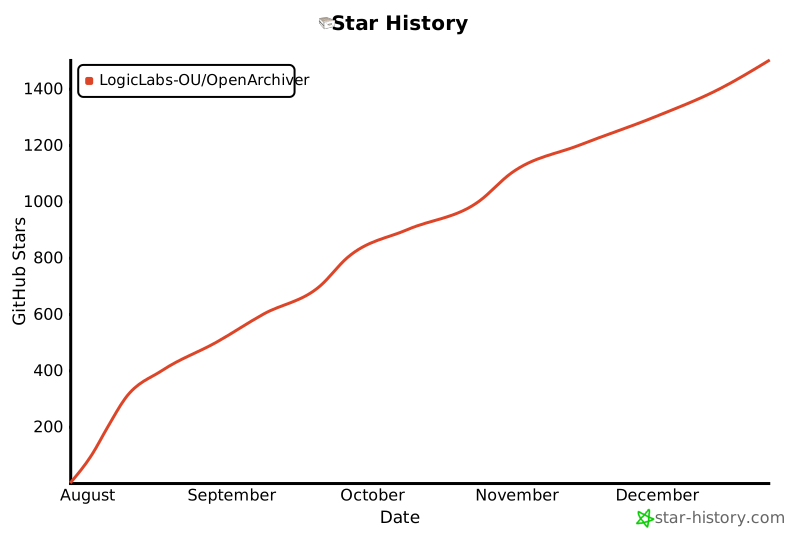](https://www.star-history.com/#LogicLabs-OU/OpenArchiver&Date)
|
||||
## 📈 Star History
|
||||
|
||||
[](https://www.star-history.com/#LogicLabs-OU/OpenArchiver&Date)
|
||||
|
||||
@@ -1,69 +1,80 @@
|
||||
import { defineConfig } from 'vitepress';
|
||||
|
||||
export default defineConfig({
|
||||
head: [
|
||||
[
|
||||
'script',
|
||||
{
|
||||
defer: '',
|
||||
src: 'https://analytics.zenceipt.com/script.js',
|
||||
'data-website-id': '2c8b452e-eab5-4f82-8ead-902d8f8b976f'
|
||||
}
|
||||
]
|
||||
],
|
||||
title: 'Open Archiver',
|
||||
description: 'Official documentation for the Open Archiver project.',
|
||||
themeConfig: {
|
||||
search: {
|
||||
provider: 'local'
|
||||
},
|
||||
logo: {
|
||||
src: '/logo-sq.svg'
|
||||
},
|
||||
nav: [
|
||||
{ text: 'Home', link: '/' },
|
||||
{ text: 'Github', link: 'https://github.com/LogicLabs-OU/OpenArchiver' },
|
||||
{ text: "Website", link: 'https://openarchiver.com/' },
|
||||
{ text: "Discord", link: 'https://discord.gg/MTtD7BhuTQ' }
|
||||
],
|
||||
sidebar: [
|
||||
{
|
||||
text: 'User Guides',
|
||||
items: [
|
||||
{ text: 'Get Started', link: '/' },
|
||||
{ text: 'Installation', link: '/user-guides/installation' },
|
||||
{
|
||||
text: 'Email Providers',
|
||||
link: '/user-guides/email-providers/',
|
||||
collapsed: true,
|
||||
items: [
|
||||
{ text: 'Google Workspace', link: '/user-guides/email-providers/google-workspace' },
|
||||
{ text: 'Generic IMAP Server', link: '/user-guides/email-providers/imap' },
|
||||
{ text: 'Microsoft 365', link: '/user-guides/email-providers/microsoft-365' }
|
||||
]
|
||||
}
|
||||
]
|
||||
},
|
||||
{
|
||||
text: 'API Reference',
|
||||
items: [
|
||||
{ text: 'Overview', link: '/api/' },
|
||||
{ text: 'Authentication', link: '/api/authentication' },
|
||||
{ text: 'Auth', link: '/api/auth' },
|
||||
{ text: 'Archived Email', link: '/api/archived-email' },
|
||||
{ text: 'Dashboard', link: '/api/dashboard' },
|
||||
{ text: 'Ingestion', link: '/api/ingestion' },
|
||||
{ text: 'Search', link: '/api/search' },
|
||||
{ text: 'Storage', link: '/api/storage' }
|
||||
]
|
||||
},
|
||||
{
|
||||
text: 'Services',
|
||||
items: [
|
||||
{ text: 'Overview', link: '/services/' },
|
||||
{ text: 'Storage Service', link: '/services/storage-service' }
|
||||
]
|
||||
}
|
||||
]
|
||||
}
|
||||
head: [
|
||||
[
|
||||
'script',
|
||||
{
|
||||
defer: '',
|
||||
src: 'https://analytics.zenceipt.com/script.js',
|
||||
'data-website-id': '2c8b452e-eab5-4f82-8ead-902d8f8b976f',
|
||||
},
|
||||
],
|
||||
],
|
||||
title: 'Open Archiver',
|
||||
description: 'Official documentation for the Open Archiver project.',
|
||||
themeConfig: {
|
||||
search: {
|
||||
provider: 'local',
|
||||
},
|
||||
logo: {
|
||||
src: '/logo-sq.svg',
|
||||
},
|
||||
nav: [
|
||||
{ text: 'Home', link: '/' },
|
||||
{ text: 'Github', link: 'https://github.com/LogicLabs-OU/OpenArchiver' },
|
||||
{ text: 'Website', link: 'https://openarchiver.com/' },
|
||||
{ text: 'Discord', link: 'https://discord.gg/MTtD7BhuTQ' },
|
||||
],
|
||||
sidebar: [
|
||||
{
|
||||
text: 'User Guides',
|
||||
items: [
|
||||
{ text: 'Get Started', link: '/' },
|
||||
{ text: 'Installation', link: '/user-guides/installation' },
|
||||
{
|
||||
text: 'Email Providers',
|
||||
link: '/user-guides/email-providers/',
|
||||
collapsed: true,
|
||||
items: [
|
||||
{
|
||||
text: 'Generic IMAP Server',
|
||||
link: '/user-guides/email-providers/imap',
|
||||
},
|
||||
{
|
||||
text: 'Google Workspace',
|
||||
link: '/user-guides/email-providers/google-workspace',
|
||||
},
|
||||
{
|
||||
text: 'Microsoft 365',
|
||||
link: '/user-guides/email-providers/microsoft-365',
|
||||
},
|
||||
{ text: 'EML Import', link: '/user-guides/email-providers/eml' },
|
||||
{ text: 'PST Import', link: '/user-guides/email-providers/pst' },
|
||||
],
|
||||
},
|
||||
],
|
||||
},
|
||||
{
|
||||
text: 'API Reference',
|
||||
items: [
|
||||
{ text: 'Overview', link: '/api/' },
|
||||
{ text: 'Authentication', link: '/api/authentication' },
|
||||
{ text: 'Auth', link: '/api/auth' },
|
||||
{ text: 'Archived Email', link: '/api/archived-email' },
|
||||
{ text: 'Dashboard', link: '/api/dashboard' },
|
||||
{ text: 'Ingestion', link: '/api/ingestion' },
|
||||
{ text: 'Search', link: '/api/search' },
|
||||
{ text: 'Storage', link: '/api/storage' },
|
||||
],
|
||||
},
|
||||
{
|
||||
text: 'Services',
|
||||
items: [
|
||||
{ text: 'Overview', link: '/services/' },
|
||||
{ text: 'Storage Service', link: '/services/storage-service' },
|
||||
],
|
||||
},
|
||||
],
|
||||
},
|
||||
});
|
||||
|
||||
@@ -2,16 +2,16 @@
|
||||
|
||||
## User guides
|
||||
|
||||
- [Get started](index.md)
|
||||
- [Installation](user-guides/installation.md)
|
||||
- [email-providers](user-guides/email-providers/index.md)
|
||||
- [Connecting to Google Workspace](user-guides/email-providers/google-workspace.md)
|
||||
- [Connecting to a Generic IMAP Server](user-guides/email-providers/imap.md)
|
||||
- [Connecting to Microsoft 365](user-guides/email-providers/microsoft-365.md)
|
||||
- [Get started](index.md)
|
||||
- [Installation](user-guides/installation.md)
|
||||
- [email-providers](user-guides/email-providers/index.md)
|
||||
- [Connecting to Google Workspace](user-guides/email-providers/google-workspace.md)
|
||||
- [Connecting to a Generic IMAP Server](user-guides/email-providers/imap.md)
|
||||
- [Connecting to Microsoft 365](user-guides/email-providers/microsoft-365.md)
|
||||
|
||||
---
|
||||
|
||||
- [api](api/index.md)
|
||||
- [Ingestion Sources API Documentation](api/ingestion.md)
|
||||
- [services](services/index.md)
|
||||
- [Pluggable Storage Service (StorageService)](services/storage-service.md)
|
||||
- [api](api/index.md)
|
||||
- [Ingestion Sources API Documentation](api/ingestion.md)
|
||||
- [services](services/index.md)
|
||||
- [Pluggable Storage Service (StorageService)](services/storage-service.md)
|
||||
|
||||
@@ -27,29 +27,27 @@ Retrieves a paginated list of archived emails for a specific ingestion source.
|
||||
|
||||
#### Responses
|
||||
|
||||
- **200 OK:** A paginated list of archived emails.
|
||||
- **200 OK:** A paginated list of archived emails.
|
||||
|
||||
```json
|
||||
{
|
||||
"items": [
|
||||
{
|
||||
"id": "email-id",
|
||||
"subject": "Test Email",
|
||||
"from": "sender@example.com",
|
||||
"sentAt": "2023-10-27T10:00:00.000Z",
|
||||
"hasAttachments": true,
|
||||
"recipients": [
|
||||
{ "name": "Recipient 1", "email": "recipient1@example.com" }
|
||||
]
|
||||
}
|
||||
],
|
||||
"total": 100,
|
||||
"page": 1,
|
||||
"limit": 10
|
||||
"items": [
|
||||
{
|
||||
"id": "email-id",
|
||||
"subject": "Test Email",
|
||||
"from": "sender@example.com",
|
||||
"sentAt": "2023-10-27T10:00:00.000Z",
|
||||
"hasAttachments": true,
|
||||
"recipients": [{ "name": "Recipient 1", "email": "recipient1@example.com" }]
|
||||
}
|
||||
],
|
||||
"total": 100,
|
||||
"page": 1,
|
||||
"limit": 10
|
||||
}
|
||||
```
|
||||
|
||||
- **500 Internal Server Error:** An unexpected error occurred.
|
||||
- **500 Internal Server Error:** An unexpected error occurred.
|
||||
|
||||
### GET /api/v1/archived-emails/:id
|
||||
|
||||
@@ -65,32 +63,30 @@ Retrieves a single archived email by its ID, including its raw content and attac
|
||||
|
||||
#### Responses
|
||||
|
||||
- **200 OK:** The archived email details.
|
||||
- **200 OK:** The archived email details.
|
||||
|
||||
```json
|
||||
{
|
||||
"id": "email-id",
|
||||
"subject": "Test Email",
|
||||
"from": "sender@example.com",
|
||||
"sentAt": "2023-10-27T10:00:00.000Z",
|
||||
"hasAttachments": true,
|
||||
"recipients": [
|
||||
{ "name": "Recipient 1", "email": "recipient1@example.com" }
|
||||
],
|
||||
"raw": "...",
|
||||
"attachments": [
|
||||
{
|
||||
"id": "attachment-id",
|
||||
"filename": "document.pdf",
|
||||
"mimeType": "application/pdf",
|
||||
"sizeBytes": 12345
|
||||
}
|
||||
]
|
||||
"id": "email-id",
|
||||
"subject": "Test Email",
|
||||
"from": "sender@example.com",
|
||||
"sentAt": "2023-10-27T10:00:00.000Z",
|
||||
"hasAttachments": true,
|
||||
"recipients": [{ "name": "Recipient 1", "email": "recipient1@example.com" }],
|
||||
"raw": "...",
|
||||
"attachments": [
|
||||
{
|
||||
"id": "attachment-id",
|
||||
"filename": "document.pdf",
|
||||
"mimeType": "application/pdf",
|
||||
"sizeBytes": 12345
|
||||
}
|
||||
]
|
||||
}
|
||||
```
|
||||
|
||||
- **404 Not Found:** The archived email with the specified ID was not found.
|
||||
- **500 Internal Server Error:** An unexpected error occurred.
|
||||
- **404 Not Found:** The archived email with the specified ID was not found.
|
||||
- **500 Internal Server Error:** An unexpected error occurred.
|
||||
|
||||
## Service Methods
|
||||
|
||||
@@ -98,14 +94,14 @@ Retrieves a single archived email by its ID, including its raw content and attac
|
||||
|
||||
Retrieves a paginated list of archived emails from the database for a given ingestion source.
|
||||
|
||||
- **ingestionSourceId:** The ID of the ingestion source.
|
||||
- **page:** The page number for pagination.
|
||||
- **limit:** The number of items per page.
|
||||
- **Returns:** A promise that resolves to a `PaginatedArchivedEmails` object.
|
||||
- **ingestionSourceId:** The ID of the ingestion source.
|
||||
- **page:** The page number for pagination.
|
||||
- **limit:** The number of items per page.
|
||||
- **Returns:** A promise that resolves to a `PaginatedArchivedEmails` object.
|
||||
|
||||
### `getArchivedEmailById(emailId: string): Promise<ArchivedEmail | null>`
|
||||
|
||||
Retrieves a single archived email by its ID, including its raw content and attachments.
|
||||
|
||||
- **emailId:** The ID of the archived email.
|
||||
- **Returns:** A promise that resolves to an `ArchivedEmail` object or `null` if not found.
|
||||
- **emailId:** The ID of the archived email.
|
||||
- **Returns:** A promise that resolves to an `ArchivedEmail` object or `null` if not found.
|
||||
|
||||
@@ -21,40 +21,40 @@ Authenticates a user and returns a JWT if the credentials are valid.
|
||||
|
||||
#### Responses
|
||||
|
||||
- **200 OK:** Authentication successful.
|
||||
- **200 OK:** Authentication successful.
|
||||
|
||||
```json
|
||||
{
|
||||
"accessToken": "your.jwt.token",
|
||||
"user": {
|
||||
"id": "user-id",
|
||||
"email": "user@example.com",
|
||||
"role": "user"
|
||||
}
|
||||
"accessToken": "your.jwt.token",
|
||||
"user": {
|
||||
"id": "user-id",
|
||||
"email": "user@example.com",
|
||||
"role": "user"
|
||||
}
|
||||
}
|
||||
```
|
||||
|
||||
- **400 Bad Request:** Email or password not provided.
|
||||
- **400 Bad Request:** Email or password not provided.
|
||||
|
||||
```json
|
||||
{
|
||||
"message": "Email and password are required"
|
||||
"message": "Email and password are required"
|
||||
}
|
||||
```
|
||||
|
||||
- **401 Unauthorized:** Invalid credentials.
|
||||
- **401 Unauthorized:** Invalid credentials.
|
||||
|
||||
```json
|
||||
{
|
||||
"message": "Invalid credentials"
|
||||
"message": "Invalid credentials"
|
||||
}
|
||||
```
|
||||
|
||||
- **500 Internal Server Error:** An unexpected error occurred.
|
||||
- **500 Internal Server Error:** An unexpected error occurred.
|
||||
|
||||
```json
|
||||
{
|
||||
"message": "An internal server error occurred"
|
||||
"message": "An internal server error occurred"
|
||||
}
|
||||
```
|
||||
|
||||
@@ -64,21 +64,21 @@ Authenticates a user and returns a JWT if the credentials are valid.
|
||||
|
||||
Compares a plain-text password with a hashed password to verify its correctness.
|
||||
|
||||
- **password:** The plain-text password.
|
||||
- **hash:** The hashed password to compare against.
|
||||
- **Returns:** A promise that resolves to `true` if the password is valid, otherwise `false`.
|
||||
- **password:** The plain-text password.
|
||||
- **hash:** The hashed password to compare against.
|
||||
- **Returns:** A promise that resolves to `true` if the password is valid, otherwise `false`.
|
||||
|
||||
### `login(email: string, password: string): Promise<LoginResponse | null>`
|
||||
|
||||
Handles the user login process. It finds the user by email, verifies the password, and generates a JWT upon successful authentication.
|
||||
|
||||
- **email:** The user's email.
|
||||
- **password:** The user's password.
|
||||
- **Returns:** A promise that resolves to a `LoginResponse` object containing the `accessToken` and `user` details, or `null` if authentication fails.
|
||||
- **email:** The user's email.
|
||||
- **password:** The user's password.
|
||||
- **Returns:** A promise that resolves to a `LoginResponse` object containing the `accessToken` and `user` details, or `null` if authentication fails.
|
||||
|
||||
### `verifyToken(token: string): Promise<AuthTokenPayload | null>`
|
||||
|
||||
Verifies the authenticity and expiration of a JWT.
|
||||
|
||||
- **token:** The JWT string to verify.
|
||||
- **Returns:** A promise that resolves to the token's `AuthTokenPayload` if valid, otherwise `null`.
|
||||
- **token:** The JWT string to verify.
|
||||
- **Returns:** A promise that resolves to the token's `AuthTokenPayload` if valid, otherwise `null`.
|
||||
|
||||
@@ -22,12 +22,12 @@ Content-Type: application/json
|
||||
|
||||
```json
|
||||
{
|
||||
"accessToken": "your.jwt.token",
|
||||
"user": {
|
||||
"id": "user-id",
|
||||
"email": "user@example.com",
|
||||
"role": "user"
|
||||
}
|
||||
"accessToken": "your.jwt.token",
|
||||
"user": {
|
||||
"id": "user-id",
|
||||
"email": "user@example.com",
|
||||
"role": "user"
|
||||
}
|
||||
}
|
||||
```
|
||||
|
||||
|
||||
@@ -14,13 +14,13 @@ Retrieves overall statistics, including the total number of archived emails, tot
|
||||
|
||||
#### Responses
|
||||
|
||||
- **200 OK:** An object containing the dashboard statistics.
|
||||
- **200 OK:** An object containing the dashboard statistics.
|
||||
|
||||
```json
|
||||
{
|
||||
"totalEmailsArchived": 12345,
|
||||
"totalStorageUsed": 54321098,
|
||||
"failedIngestionsLast7Days": 3
|
||||
"totalEmailsArchived": 12345,
|
||||
"totalStorageUsed": 54321098,
|
||||
"failedIngestionsLast7Days": 3
|
||||
}
|
||||
```
|
||||
|
||||
@@ -32,20 +32,20 @@ Retrieves the email ingestion history for the last 30 days, grouped by day.
|
||||
|
||||
#### Responses
|
||||
|
||||
- **200 OK:** An object containing the ingestion history.
|
||||
- **200 OK:** An object containing the ingestion history.
|
||||
|
||||
```json
|
||||
{
|
||||
"history": [
|
||||
{
|
||||
"date": "2023-09-27T00:00:00.000Z",
|
||||
"count": 150
|
||||
},
|
||||
{
|
||||
"date": "2023-09-28T00:00:00.000Z",
|
||||
"count": 200
|
||||
}
|
||||
]
|
||||
"history": [
|
||||
{
|
||||
"date": "2023-09-27T00:00:00.000Z",
|
||||
"count": 150
|
||||
},
|
||||
{
|
||||
"date": "2023-09-28T00:00:00.000Z",
|
||||
"count": 200
|
||||
}
|
||||
]
|
||||
}
|
||||
```
|
||||
|
||||
@@ -57,24 +57,24 @@ Retrieves a list of all ingestion sources along with their status and storage us
|
||||
|
||||
#### Responses
|
||||
|
||||
- **200 OK:** An array of ingestion source objects.
|
||||
- **200 OK:** An array of ingestion source objects.
|
||||
|
||||
```json
|
||||
[
|
||||
{
|
||||
"id": "source-id-1",
|
||||
"name": "Google Workspace",
|
||||
"provider": "google",
|
||||
"status": "active",
|
||||
"storageUsed": 12345678
|
||||
},
|
||||
{
|
||||
"id": "source-id-2",
|
||||
"name": "Microsoft 365",
|
||||
"provider": "microsoft",
|
||||
"status": "error",
|
||||
"storageUsed": 87654321
|
||||
}
|
||||
{
|
||||
"id": "source-id-1",
|
||||
"name": "Google Workspace",
|
||||
"provider": "google",
|
||||
"status": "active",
|
||||
"storageUsed": 12345678
|
||||
},
|
||||
{
|
||||
"id": "source-id-2",
|
||||
"name": "Microsoft 365",
|
||||
"provider": "microsoft",
|
||||
"status": "error",
|
||||
"storageUsed": 87654321
|
||||
}
|
||||
]
|
||||
```
|
||||
|
||||
@@ -86,7 +86,7 @@ Retrieves a list of recent synchronization jobs. (Note: This is currently a plac
|
||||
|
||||
#### Responses
|
||||
|
||||
- **200 OK:** An empty array.
|
||||
- **200 OK:** An empty array.
|
||||
|
||||
```json
|
||||
[]
|
||||
@@ -100,15 +100,15 @@ Retrieves insights from the indexed email data, such as the top senders.
|
||||
|
||||
#### Responses
|
||||
|
||||
- **200 OK:** An object containing indexed insights.
|
||||
- **200 OK:** An object containing indexed insights.
|
||||
|
||||
```json
|
||||
{
|
||||
"topSenders": [
|
||||
{
|
||||
"sender": "user@example.com",
|
||||
"count": 42
|
||||
}
|
||||
]
|
||||
"topSenders": [
|
||||
{
|
||||
"sender": "user@example.com",
|
||||
"count": 42
|
||||
}
|
||||
]
|
||||
}
|
||||
```
|
||||
|
||||
@@ -10,9 +10,9 @@ Before making requests to protected endpoints, you must authenticate with the AP
|
||||
|
||||
## API Services
|
||||
|
||||
- [**Auth Service**](./auth.md): Handles user authentication.
|
||||
- [**Archived Email Service**](./archived-email.md): Manages archived emails.
|
||||
- [**Dashboard Service**](./dashboard.md): Provides data for the main dashboard.
|
||||
- [**Ingestion Service**](./ingestion.md): Manages email ingestion sources.
|
||||
- [**Search Service**](./search.md): Handles email search functionality.
|
||||
- [**Storage Service**](./storage.md): Manages file storage and downloads.
|
||||
- [**Auth Service**](./auth.md): Handles user authentication.
|
||||
- [**Archived Email Service**](./archived-email.md): Manages archived emails.
|
||||
- [**Dashboard Service**](./dashboard.md): Provides data for the main dashboard.
|
||||
- [**Ingestion Service**](./ingestion.md): Manages email ingestion sources.
|
||||
- [**Search Service**](./search.md): Handles email search functionality.
|
||||
- [**Storage Service**](./storage.md): Manages file storage and downloads.
|
||||
|
||||
@@ -6,7 +6,7 @@ The Ingestion Service manages ingestion sources, which are configurations for co
|
||||
|
||||
All endpoints in this service require authentication.
|
||||
|
||||
### POST /api/v1/ingestion
|
||||
### POST /api/v1/ingestion-sources
|
||||
|
||||
Creates a new ingestion source.
|
||||
|
||||
@@ -18,18 +18,18 @@ The request body should be a `CreateIngestionSourceDto` object.
|
||||
|
||||
```typescript
|
||||
interface CreateIngestionSourceDto {
|
||||
name: string;
|
||||
provider: 'google' | 'microsoft' | 'generic_imap';
|
||||
providerConfig: IngestionCredentials;
|
||||
name: string;
|
||||
provider: 'google' | 'microsoft' | 'generic_imap';
|
||||
providerConfig: IngestionCredentials;
|
||||
}
|
||||
```
|
||||
|
||||
#### Responses
|
||||
|
||||
- **201 Created:** The newly created ingestion source.
|
||||
- **500 Internal Server Error:** An unexpected error occurred.
|
||||
- **201 Created:** The newly created ingestion source.
|
||||
- **500 Internal Server Error:** An unexpected error occurred.
|
||||
|
||||
### GET /api/v1/ingestion
|
||||
### GET /api/v1/ingestion-sources
|
||||
|
||||
Retrieves all ingestion sources.
|
||||
|
||||
@@ -37,10 +37,10 @@ Retrieves all ingestion sources.
|
||||
|
||||
#### Responses
|
||||
|
||||
- **200 OK:** An array of ingestion source objects.
|
||||
- **500 Internal Server Error:** An unexpected error occurred.
|
||||
- **200 OK:** An array of ingestion source objects.
|
||||
- **500 Internal Server Error:** An unexpected error occurred.
|
||||
|
||||
### GET /api/v1/ingestion/:id
|
||||
### GET /api/v1/ingestion-sources/:id
|
||||
|
||||
Retrieves a single ingestion source by its ID.
|
||||
|
||||
@@ -54,11 +54,11 @@ Retrieves a single ingestion source by its ID.
|
||||
|
||||
#### Responses
|
||||
|
||||
- **200 OK:** The ingestion source object.
|
||||
- **404 Not Found:** Ingestion source not found.
|
||||
- **500 Internal Server Error:** An unexpected error occurred.
|
||||
- **200 OK:** The ingestion source object.
|
||||
- **404 Not Found:** Ingestion source not found.
|
||||
- **500 Internal Server Error:** An unexpected error occurred.
|
||||
|
||||
### PUT /api/v1/ingestion/:id
|
||||
### PUT /api/v1/ingestion-sources/:id
|
||||
|
||||
Updates an existing ingestion source.
|
||||
|
||||
@@ -76,26 +76,20 @@ The request body should be an `UpdateIngestionSourceDto` object.
|
||||
|
||||
```typescript
|
||||
interface UpdateIngestionSourceDto {
|
||||
name?: string;
|
||||
provider?: 'google' | 'microsoft' | 'generic_imap';
|
||||
providerConfig?: IngestionCredentials;
|
||||
status?:
|
||||
| 'pending_auth'
|
||||
| 'auth_success'
|
||||
| 'importing'
|
||||
| 'active'
|
||||
| 'paused'
|
||||
| 'error';
|
||||
name?: string;
|
||||
provider?: 'google' | 'microsoft' | 'generic_imap';
|
||||
providerConfig?: IngestionCredentials;
|
||||
status?: 'pending_auth' | 'auth_success' | 'importing' | 'active' | 'paused' | 'error';
|
||||
}
|
||||
```
|
||||
|
||||
#### Responses
|
||||
|
||||
- **200 OK:** The updated ingestion source object.
|
||||
- **404 Not Found:** Ingestion source not found.
|
||||
- **500 Internal Server Error:** An unexpected error occurred.
|
||||
- **200 OK:** The updated ingestion source object.
|
||||
- **404 Not Found:** Ingestion source not found.
|
||||
- **500 Internal Server Error:** An unexpected error occurred.
|
||||
|
||||
### DELETE /api/v1/ingestion/:id
|
||||
### DELETE /api/v1/ingestion-sources/:id
|
||||
|
||||
Deletes an ingestion source and all associated data.
|
||||
|
||||
@@ -109,11 +103,11 @@ Deletes an ingestion source and all associated data.
|
||||
|
||||
#### Responses
|
||||
|
||||
- **204 No Content:** The ingestion source was deleted successfully.
|
||||
- **404 Not Found:** Ingestion source not found.
|
||||
- **500 Internal Server Error:** An unexpected error occurred.
|
||||
- **204 No Content:** The ingestion source was deleted successfully.
|
||||
- **404 Not Found:** Ingestion source not found.
|
||||
- **500 Internal Server Error:** An unexpected error occurred.
|
||||
|
||||
### POST /api/v1/ingestion/:id/import
|
||||
### POST /api/v1/ingestion-sources/:id/import
|
||||
|
||||
Triggers the initial import process for an ingestion source.
|
||||
|
||||
@@ -127,11 +121,11 @@ Triggers the initial import process for an ingestion source.
|
||||
|
||||
#### Responses
|
||||
|
||||
- **202 Accepted:** The initial import was triggered successfully.
|
||||
- **404 Not Found:** Ingestion source not found.
|
||||
- **500 Internal Server Error:** An unexpected error occurred.
|
||||
- **202 Accepted:** The initial import was triggered successfully.
|
||||
- **404 Not Found:** Ingestion source not found.
|
||||
- **500 Internal Server Error:** An unexpected error occurred.
|
||||
|
||||
### POST /api/v1/ingestion/:id/pause
|
||||
### POST /api/v1/ingestion-sources/:id/pause
|
||||
|
||||
Pauses an active ingestion source.
|
||||
|
||||
@@ -145,11 +139,11 @@ Pauses an active ingestion source.
|
||||
|
||||
#### Responses
|
||||
|
||||
- **200 OK:** The updated ingestion source object with a `paused` status.
|
||||
- **404 Not Found:** Ingestion source not found.
|
||||
- **500 Internal Server Error:** An unexpected error occurred.
|
||||
- **200 OK:** The updated ingestion source object with a `paused` status.
|
||||
- **404 Not Found:** Ingestion source not found.
|
||||
- **500 Internal Server Error:** An unexpected error occurred.
|
||||
|
||||
### POST /api/v1/ingestion/:id/sync
|
||||
### POST /api/v1/ingestion-sources/:id/sync
|
||||
|
||||
Triggers a forced synchronization for an ingestion source.
|
||||
|
||||
@@ -163,6 +157,6 @@ Triggers a forced synchronization for an ingestion source.
|
||||
|
||||
#### Responses
|
||||
|
||||
- **202 Accepted:** The force sync was triggered successfully.
|
||||
- **404 Not Found:** Ingestion source not found.
|
||||
- **500 Internal Server Error:** An unexpected error occurred.
|
||||
- **202 Accepted:** The force sync was triggered successfully.
|
||||
- **404 Not Found:** Ingestion source not found.
|
||||
- **500 Internal Server Error:** An unexpected error occurred.
|
||||
|
||||
@@ -24,27 +24,27 @@ Performs a search query against the indexed emails.
|
||||
|
||||
#### Responses
|
||||
|
||||
- **200 OK:** A search result object.
|
||||
- **200 OK:** A search result object.
|
||||
|
||||
```json
|
||||
{
|
||||
"hits": [
|
||||
{
|
||||
"id": "email-id",
|
||||
"subject": "Test Email",
|
||||
"from": "sender@example.com",
|
||||
"_formatted": {
|
||||
"subject": "<em>Test</em> Email"
|
||||
}
|
||||
}
|
||||
],
|
||||
"total": 1,
|
||||
"page": 1,
|
||||
"limit": 10,
|
||||
"totalPages": 1,
|
||||
"processingTimeMs": 5
|
||||
"hits": [
|
||||
{
|
||||
"id": "email-id",
|
||||
"subject": "Test Email",
|
||||
"from": "sender@example.com",
|
||||
"_formatted": {
|
||||
"subject": "<em>Test</em> Email"
|
||||
}
|
||||
}
|
||||
],
|
||||
"total": 1,
|
||||
"page": 1,
|
||||
"limit": 10,
|
||||
"totalPages": 1,
|
||||
"processingTimeMs": 5
|
||||
}
|
||||
```
|
||||
|
||||
- **400 Bad Request:** Keywords are required.
|
||||
- **500 Internal Server Error:** An unexpected error occurred.
|
||||
- **400 Bad Request:** Keywords are required.
|
||||
- **500 Internal Server Error:** An unexpected error occurred.
|
||||
|
||||
@@ -20,7 +20,7 @@ Downloads a file from the storage.
|
||||
|
||||
#### Responses
|
||||
|
||||
- **200 OK:** The file stream.
|
||||
- **400 Bad Request:** File path is required or invalid.
|
||||
- **404 Not Found:** File not found.
|
||||
- **500 Internal Server Error:** An unexpected error occurred.
|
||||
- **200 OK:** The file stream.
|
||||
- **400 Bad Request:** File path is required or invalid.
|
||||
- **404 Not Found:** File not found.
|
||||
- **500 Internal Server Error:** An unexpected error occurred.
|
||||
|
||||
@@ -10,33 +10,33 @@ Open Archiver provides a robust, self-hosted solution for archiving, storing, in
|
||||
|
||||
## Key Features ✨
|
||||
|
||||
- **Universal Ingestion**: Connect to Google Workspace, Microsoft 365, and standard IMAP servers to perform initial bulk imports and maintain continuous, real-time synchronization.
|
||||
- **Secure & Efficient Storage**: Emails are stored in the standard `.eml` format. The system uses deduplication and compression to minimize storage costs. All data is encrypted at rest.
|
||||
- **Pluggable Storage Backends**: Support both local filesystem storage and S3-compatible object storage (like AWS S3 or MinIO).
|
||||
- **Powerful Search & eDiscovery**: A high-performance search engine indexes the full text of emails and attachments (PDF, DOCX, etc.).
|
||||
- **Compliance & Retention**: Define granular retention policies to automatically manage the lifecycle of your data. Place legal holds on communications to prevent deletion during litigation (TBD).
|
||||
- **Comprehensive Auditing**: An immutable audit trail logs all system activities, ensuring you have a clear record of who accessed what and when (TBD).
|
||||
- **Universal Ingestion**: Connect to Google Workspace, Microsoft 365, and standard IMAP servers to perform initial bulk imports and maintain continuous, real-time synchronization.
|
||||
- **Secure & Efficient Storage**: Emails are stored in the standard `.eml` format. The system uses deduplication and compression to minimize storage costs. All data is encrypted at rest.
|
||||
- **Pluggable Storage Backends**: Support both local filesystem storage and S3-compatible object storage (like AWS S3 or MinIO).
|
||||
- **Powerful Search & eDiscovery**: A high-performance search engine indexes the full text of emails and attachments (PDF, DOCX, etc.).
|
||||
- **Compliance & Retention**: Define granular retention policies to automatically manage the lifecycle of your data. Place legal holds on communications to prevent deletion during litigation (TBD).
|
||||
- **Comprehensive Auditing**: An immutable audit trail logs all system activities, ensuring you have a clear record of who accessed what and when (TBD).
|
||||
|
||||
## Installation 🚀
|
||||
|
||||
To get your own instance of Open Archiver running, follow our detailed installation guide:
|
||||
|
||||
- [Installation Guide](./user-guides/installation.md)
|
||||
- [Installation Guide](./user-guides/installation.md)
|
||||
|
||||
## Data Source Configuration 🔌
|
||||
|
||||
After deploying the application, you will need to configure one or more ingestion sources to begin archiving emails. Follow our detailed guides to connect to your email provider:
|
||||
|
||||
- [Connecting to Google Workspace](./user-guides/email-providers/google-workspace.md)
|
||||
- [Connecting to Microsoft 365](./user-guides/email-providers/microsoft-365.md)
|
||||
- [Connecting to a Generic IMAP Server](./user-guides/email-providers/imap.md)
|
||||
- [Connecting to Google Workspace](./user-guides/email-providers/google-workspace.md)
|
||||
- [Connecting to Microsoft 365](./user-guides/email-providers/microsoft-365.md)
|
||||
- [Connecting to a Generic IMAP Server](./user-guides/email-providers/imap.md)
|
||||
|
||||
## Contributing ❤️
|
||||
|
||||
We welcome contributions from the community!
|
||||
|
||||
- **Reporting Bugs**: If you find a bug, please open an issue on our GitHub repository.
|
||||
- **Suggesting Enhancements**: Have an idea for a new feature? We'd love to hear it. Open an issue to start the discussion.
|
||||
- **Code Contributions**: If you'd like to contribute code, please fork the repository and submit a pull request.
|
||||
- **Reporting Bugs**: If you find a bug, please open an issue on our GitHub repository.
|
||||
- **Suggesting Enhancements**: Have an idea for a new feature? We'd love to hear it. Open an issue to start the discussion.
|
||||
- **Code Contributions**: If you'd like to contribute code, please fork the repository and submit a pull request.
|
||||
|
||||
Please read our `CONTRIBUTING.md` file for more details on our code of conduct and the process for submitting pull requests.
|
||||
|
||||
141
docs/services/IAM-service/iam-policies.md
Normal file
141
docs/services/IAM-service/iam-policies.md
Normal file
@@ -0,0 +1,141 @@
|
||||
# IAM Policies Guide
|
||||
|
||||
This document provides a comprehensive guide to the Identity and Access Management (IAM) policies in Open Archiver. Our policy structure is inspired by AWS IAM, providing a powerful and flexible way to manage permissions.
|
||||
|
||||
## 1. Policy Structure
|
||||
|
||||
A policy is a JSON object that consists of one or more statements. Each statement includes an `Effect`, `Action`, and `Resource`.
|
||||
|
||||
```json
|
||||
{
|
||||
"Effect": "Allow",
|
||||
"Action": ["archive:read", "archive:search"],
|
||||
"Resource": ["archive/all"]
|
||||
}
|
||||
```
|
||||
|
||||
- **`Effect`**: Specifies whether the statement results in an `Allow` or `Deny`. An explicit `Deny` always overrides an `Allow`.
|
||||
- **`Action`**: A list of operations that the policy grants or denies permission to perform. Actions are formatted as `service:operation`.
|
||||
- **`Resource`**: A list of resources to which the actions apply. Resources are specified in a hierarchical format. Wildcards (`*`) can be used.
|
||||
|
||||
## 2. Wildcard Support
|
||||
|
||||
Our IAM system supports wildcards (`*`) in both `Action` and `Resource` fields to provide flexible permission management, as defined in the `PolicyValidator`.
|
||||
|
||||
### Action Wildcards
|
||||
|
||||
You can use wildcards to grant broad permissions for actions:
|
||||
|
||||
- **Global Wildcard (`*`)**: A standalone `*` in the `Action` field grants permission for all possible actions across all services.
|
||||
```json
|
||||
"Action": ["*"]
|
||||
```
|
||||
- **Service-Level Wildcard (`service:*`)**: A wildcard at the end of an action string grants permission for all actions within that specific service.
|
||||
```json
|
||||
"Action": ["archive:*"]
|
||||
```
|
||||
|
||||
### Resource Wildcards
|
||||
|
||||
Wildcards can also be used to specify resources:
|
||||
|
||||
- **Global Wildcard (`*`)**: A standalone `*` in the `Resource` field applies the policy to all resources in the system.
|
||||
```json
|
||||
"Resource": ["*"]
|
||||
```
|
||||
- **Partial Wildcards**: Some services allow wildcards at specific points in the resource path to refer to all resources of a certain type. For example, to target all ingestion sources:
|
||||
```json
|
||||
"Resource": ["ingestion-source/*"]
|
||||
```
|
||||
|
||||
## 3. Actions and Resources by Service
|
||||
|
||||
The following sections define the available actions and resources, categorized by their respective services.
|
||||
|
||||
### Service: `archive`
|
||||
|
||||
The `archive` service pertains to all actions related to accessing and managing archived emails.
|
||||
|
||||
**Actions:**
|
||||
|
||||
| Action | Description |
|
||||
| :--------------- | :--------------------------------------------------------------------- |
|
||||
| `archive:read` | Grants permission to read the content and metadata of archived emails. |
|
||||
| `archive:search` | Grants permission to perform search queries against the email archive. |
|
||||
| `archive:export` | Grants permission to export search results or individual emails. |
|
||||
|
||||
**Resources:**
|
||||
|
||||
| Resource | Description |
|
||||
| :------------------------------------ | :--------------------------------------------------------------------------------------- |
|
||||
| `archive/all` | Represents the entire email archive. |
|
||||
| `archive/ingestion-source/{sourceId}` | Scopes the action to emails from a specific ingestion source. |
|
||||
| `archive/mailbox/{email}` | Scopes the action to a single, specific mailbox, usually identified by an email address. |
|
||||
| `archive/custodian/{custodianId}` | Scopes the action to emails belonging to a specific custodian. |
|
||||
|
||||
---
|
||||
|
||||
### Service: `ingestion`
|
||||
|
||||
The `ingestion` service covers the management of email ingestion sources.
|
||||
|
||||
**Actions:**
|
||||
|
||||
| Action | Description |
|
||||
| :----------------------- | :--------------------------------------------------------------------------- |
|
||||
| `ingestion:createSource` | Grants permission to create a new ingestion source. |
|
||||
| `ingestion:readSource` | Grants permission to view the details of ingestion sources. |
|
||||
| `ingestion:updateSource` | Grants permission to modify the configuration of an ingestion source. |
|
||||
| `ingestion:deleteSource` | Grants permission to delete an ingestion source. |
|
||||
| `ingestion:manageSync` | Grants permission to trigger, pause, or force a sync on an ingestion source. |
|
||||
|
||||
**Resources:**
|
||||
|
||||
| Resource | Description |
|
||||
| :---------------------------- | :-------------------------------------------------------- |
|
||||
| `ingestion-source/*` | Represents all ingestion sources. |
|
||||
| `ingestion-source/{sourceId}` | Scopes the action to a single, specific ingestion source. |
|
||||
|
||||
---
|
||||
|
||||
### Service: `system`
|
||||
|
||||
The `system` service is for managing system-level settings, users, and roles.
|
||||
|
||||
**Actions:**
|
||||
|
||||
| Action | Description |
|
||||
| :---------------------- | :-------------------------------------------------- |
|
||||
| `system:readSettings` | Grants permission to view system settings. |
|
||||
| `system:updateSettings` | Grants permission to modify system settings. |
|
||||
| `system:readUsers` | Grants permission to list and view user accounts. |
|
||||
| `system:createUser` | Grants permission to create new user accounts. |
|
||||
| `system:updateUser` | Grants permission to modify existing user accounts. |
|
||||
| `system:deleteUser` | Grants permission to delete user accounts. |
|
||||
| `system:assignRole` | Grants permission to assign roles to users. |
|
||||
|
||||
**Resources:**
|
||||
|
||||
| Resource | Description |
|
||||
| :--------------------- | :---------------------------------------------------- |
|
||||
| `system/settings` | Represents the system configuration. |
|
||||
| `system/users` | Represents all user accounts within the system. |
|
||||
| `system/user/{userId}` | Scopes the action to a single, specific user account. |
|
||||
|
||||
---
|
||||
|
||||
### Service: `dashboard`
|
||||
|
||||
The `dashboard` service relates to viewing analytics and overview information.
|
||||
|
||||
**Actions:**
|
||||
|
||||
| Action | Description |
|
||||
| :--------------- | :-------------------------------------------------------------- |
|
||||
| `dashboard:read` | Grants permission to view all dashboard widgets and statistics. |
|
||||
|
||||
**Resources:**
|
||||
|
||||
| Resource | Description |
|
||||
| :------------ | :------------------------------------------ |
|
||||
| `dashboard/*` | Represents all components of the dashboard. |
|
||||
@@ -1,2 +1 @@
|
||||
# services
|
||||
|
||||
|
||||
@@ -14,8 +14,8 @@ The `StorageService` is configured via environment variables in the `.env` file.
|
||||
|
||||
The `STORAGE_TYPE` variable determines which provider the service will use.
|
||||
|
||||
- `STORAGE_TYPE=local`: Uses the local server's filesystem.
|
||||
- `STORAGE_TYPE=s3`: Uses an S3-compatible object storage service (e.g., AWS S3, MinIO, Google Cloud Storage).
|
||||
- `STORAGE_TYPE=local`: Uses the local server's filesystem.
|
||||
- `STORAGE_TYPE=s3`: Uses an S3-compatible object storage service (e.g., AWS S3, MinIO, Google Cloud Storage).
|
||||
|
||||
### 2. Local Filesystem Configuration
|
||||
|
||||
@@ -27,7 +27,7 @@ STORAGE_TYPE=local
|
||||
STORAGE_LOCAL_ROOT_PATH=/var/data/open-archiver
|
||||
```
|
||||
|
||||
- `STORAGE_LOCAL_ROOT_PATH`: The absolute path on the server where the archive will be created. The service will create subdirectories within this path as needed.
|
||||
- `STORAGE_LOCAL_ROOT_PATH`: The absolute path on the server where the archive will be created. The service will create subdirectories within this path as needed.
|
||||
|
||||
### 3. S3-Compatible Storage Configuration
|
||||
|
||||
@@ -44,12 +44,12 @@ STORAGE_S3_REGION=us-east-1
|
||||
STORAGE_S3_FORCE_PATH_STYLE=true
|
||||
```
|
||||
|
||||
- `STORAGE_S3_ENDPOINT`: The full URL of the S3 API endpoint.
|
||||
- `STORAGE_S3_BUCKET`: The name of the bucket to use for storage.
|
||||
- `STORAGE_S3_ACCESS_KEY_ID`: The access key for your S3 user.
|
||||
- `STORAGE_S3_SECRET_ACCESS_KEY`: The secret key for your S3 user.
|
||||
- `STORAGE_S3_REGION` (Optional): The AWS region of your bucket. Recommended for AWS S3.
|
||||
- `STORAGE_S3_FORCE_PATH_STYLE` (Optional): Set to `true` when using non-AWS S3 services like MinIO.
|
||||
- `STORAGE_S3_ENDPOINT`: The full URL of the S3 API endpoint.
|
||||
- `STORAGE_S3_BUCKET`: The name of the bucket to use for storage.
|
||||
- `STORAGE_S3_ACCESS_KEY_ID`: The access key for your S3 user.
|
||||
- `STORAGE_S3_SECRET_ACCESS_KEY`: The secret key for your S3 user.
|
||||
- `STORAGE_S3_REGION` (Optional): The AWS region of your bucket. Recommended for AWS S3.
|
||||
- `STORAGE_S3_FORCE_PATH_STYLE` (Optional): Set to `true` when using non-AWS S3 services like MinIO.
|
||||
|
||||
## How to Use the Service
|
||||
|
||||
@@ -61,31 +61,27 @@ The `StorageService` is designed to be used via dependency injection in other se
|
||||
import { StorageService } from './StorageService';
|
||||
|
||||
class IngestionService {
|
||||
private storageService: StorageService;
|
||||
private storageService: StorageService;
|
||||
|
||||
constructor() {
|
||||
// The StorageService is instantiated without any arguments.
|
||||
// It automatically reads the configuration from the environment.
|
||||
this.storageService = new StorageService();
|
||||
}
|
||||
constructor() {
|
||||
// The StorageService is instantiated without any arguments.
|
||||
// It automatically reads the configuration from the environment.
|
||||
this.storageService = new StorageService();
|
||||
}
|
||||
|
||||
public async archiveEmail(
|
||||
rawEmail: Buffer,
|
||||
userId: string,
|
||||
messageId: string
|
||||
): Promise<void> {
|
||||
// Define a structured, unique path for the email.
|
||||
const archivePath = `${userId}/messages/${messageId}.eml`;
|
||||
public async archiveEmail(rawEmail: Buffer, userId: string, messageId: string): Promise<void> {
|
||||
// Define a structured, unique path for the email.
|
||||
const archivePath = `${userId}/messages/${messageId}.eml`;
|
||||
|
||||
try {
|
||||
// Use the service. It doesn't know or care if this is writing
|
||||
// to a local disk or an S3 bucket.
|
||||
await this.storageService.put(archivePath, rawEmail);
|
||||
console.log(`Successfully archived email to ${archivePath}`);
|
||||
} catch (error) {
|
||||
console.error(`Failed to archive email ${messageId}`, error);
|
||||
}
|
||||
}
|
||||
try {
|
||||
// Use the service. It doesn't know or care if this is writing
|
||||
// to a local disk or an S3 bucket.
|
||||
await this.storageService.put(archivePath, rawEmail);
|
||||
console.log(`Successfully archived email to ${archivePath}`);
|
||||
} catch (error) {
|
||||
console.error(`Failed to archive email ${messageId}`, error);
|
||||
}
|
||||
}
|
||||
}
|
||||
```
|
||||
|
||||
@@ -99,9 +95,9 @@ The `StorageService` implements the `IStorageProvider` interface. All methods ar
|
||||
|
||||
Stores a file at the specified path. If a file already exists at that path, it will be overwritten.
|
||||
|
||||
- **`path: string`**: A unique identifier for the file, including its directory structure (e.g., `"user-123/emails/message-abc.eml"`).
|
||||
- **`content: Buffer | NodeJS.ReadableStream`**: The content of the file. It can be a `Buffer` for small files or a `ReadableStream` for large files to ensure memory efficiency.
|
||||
- **Returns**: `Promise<void>` - A promise that resolves when the file has been successfully stored.
|
||||
- **`path: string`**: A unique identifier for the file, including its directory structure (e.g., `"user-123/emails/message-abc.eml"`).
|
||||
- **`content: Buffer | NodeJS.ReadableStream`**: The content of the file. It can be a `Buffer` for small files or a `ReadableStream` for large files to ensure memory efficiency.
|
||||
- **Returns**: `Promise<void>` - A promise that resolves when the file has been successfully stored.
|
||||
|
||||
---
|
||||
|
||||
@@ -109,9 +105,9 @@ Stores a file at the specified path. If a file already exists at that path, it w
|
||||
|
||||
Retrieves a file from the specified path as a readable stream.
|
||||
|
||||
- **`path: string`**: The unique identifier of the file to retrieve.
|
||||
- **Returns**: `Promise<NodeJS.ReadableStream>` - A promise that resolves with a readable stream of the file's content.
|
||||
- **Throws**: An `Error` if the file is not found at the specified path.
|
||||
- **`path: string`**: The unique identifier of the file to retrieve.
|
||||
- **Returns**: `Promise<NodeJS.ReadableStream>` - A promise that resolves with a readable stream of the file's content.
|
||||
- **Throws**: An `Error` if the file is not found at the specified path.
|
||||
|
||||
---
|
||||
|
||||
@@ -119,8 +115,8 @@ Retrieves a file from the specified path as a readable stream.
|
||||
|
||||
Deletes a file from the storage backend.
|
||||
|
||||
- **`path: string`**: The unique identifier of the file to delete.
|
||||
- **Returns**: `Promise<void>` - A promise that resolves when the file is deleted. If the file does not exist, the promise will still resolve successfully without throwing an error.
|
||||
- **`path: string`**: The unique identifier of the file to delete.
|
||||
- **Returns**: `Promise<void>` - A promise that resolves when the file is deleted. If the file does not exist, the promise will still resolve successfully without throwing an error.
|
||||
|
||||
---
|
||||
|
||||
@@ -128,5 +124,5 @@ Deletes a file from the storage backend.
|
||||
|
||||
Checks for the existence of a file.
|
||||
|
||||
- **`path: string`**: The unique identifier of the file to check.
|
||||
- **Returns**: `Promise<boolean>` - A promise that resolves with `true` if the file exists, and `false` otherwise.
|
||||
- **`path: string`**: The unique identifier of the file to check.
|
||||
- **Returns**: `Promise<boolean>` - A promise that resolves with `true` if the file exists, and `false` otherwise.
|
||||
|
||||
36
docs/user-guides/email-providers/eml.md
Normal file
36
docs/user-guides/email-providers/eml.md
Normal file
@@ -0,0 +1,36 @@
|
||||
# EML Import
|
||||
|
||||
OpenArchiver allows you to import EML files from a zip archive. This is useful for importing emails from a variety of sources, including other email clients and services.
|
||||
|
||||
## Preparing the Zip File
|
||||
|
||||
To ensure a successful import, you should compress your .eml files to one zip file according to the following guidelines:
|
||||
|
||||
- **Structure:** The zip file can contain any number of `.eml` files, organized in any folder structure. The folder structure will be preserved in OpenArchiver, so you can use it to organize your emails.
|
||||
- **Compression:** The zip file should be compressed using standard zip compression.
|
||||
|
||||
Here's an example of a valid folder structure:
|
||||
|
||||
```
|
||||
archive.zip
|
||||
├── inbox
|
||||
│ ├── email-01.eml
|
||||
│ └── email-02.eml
|
||||
├── sent
|
||||
│ └── email-03.eml
|
||||
└── drafts
|
||||
├── nested-folder
|
||||
│ └── email-04.eml
|
||||
└── email-05.eml
|
||||
```
|
||||
|
||||
## Creating an EML Ingestion Source
|
||||
|
||||
1. Go to the **Ingestion Sources** page in the OpenArchiver dashboard.
|
||||
2. Click the **Create New** button.
|
||||
3. Select **EML Import** as the provider.
|
||||
4. Enter a name for the ingestion source.
|
||||
5. Click the **Choose File** button and select the zip archive containing your EML files.
|
||||
6. Click the **Submit** button.
|
||||
|
||||
OpenArchiver will then start importing the EML files from the zip archive. The ingestion process may take some time, depending on the size of the archive.
|
||||
@@ -6,8 +6,8 @@ The connection uses a **Google Cloud Service Account** with **Domain-Wide Delega
|
||||
|
||||
## Prerequisites
|
||||
|
||||
- You must have **Super Administrator** privileges in your Google Workspace account.
|
||||
- You must have access to the **Google Cloud Console** associated with your organization.
|
||||
- You must have **Super Administrator** privileges in your Google Workspace account.
|
||||
- You must have access to the **Google Cloud Console** associated with your organization.
|
||||
|
||||
## Setup Overview
|
||||
|
||||
@@ -24,30 +24,27 @@ The setup process involves three main parts:
|
||||
In this part, you will create a service account and enable the APIs it needs to function.
|
||||
|
||||
1. **Create a Google Cloud Project:**
|
||||
|
||||
- Go to the [Google Cloud Console](https://console.cloud.google.com/).
|
||||
- If you don't already have one, create a new project for the archiving service (e.g., "Email Archiver").
|
||||
- Go to the [Google Cloud Console](https://console.cloud.google.com/).
|
||||
- If you don't already have one, create a new project for the archiving service (e.g., "Email Archiver").
|
||||
|
||||
2. **Enable Required APIs:**
|
||||
|
||||
- In your selected project, navigate to the **"APIs & Services" > "Library"** section.
|
||||
- Search for and enable the following two APIs:
|
||||
- **Gmail API**
|
||||
- **Admin SDK API**
|
||||
- In your selected project, navigate to the **"APIs & Services" > "Library"** section.
|
||||
- Search for and enable the following two APIs:
|
||||
- **Gmail API**
|
||||
- **Admin SDK API**
|
||||
|
||||
3. **Create a Service Account:**
|
||||
|
||||
- Navigate to **"IAM & Admin" > "Service Accounts"**.
|
||||
- Click **"Create Service Account"**.
|
||||
- Give the service account a name (e.g., `email-archiver-service`) and a description.
|
||||
- Click **"Create and Continue"**. You do not need to grant this service account any roles on the project. Click **"Done"**.
|
||||
- Navigate to **"IAM & Admin" > "Service Accounts"**.
|
||||
- Click **"Create Service Account"**.
|
||||
- Give the service account a name (e.g., `email-archiver-service`) and a description.
|
||||
- Click **"Create and Continue"**. You do not need to grant this service account any roles on the project. Click **"Done"**.
|
||||
|
||||
4. **Generate a JSON Key:**
|
||||
- Find the service account you just created in the list.
|
||||
- Click the three-dot menu under **"Actions"** and select **"Manage keys"**.
|
||||
- Click **"Add Key"** > **"Create new key"**.
|
||||
- Select **JSON** as the key type and click **"Create"**.
|
||||
- A JSON file will be downloaded to your computer. **Keep this file secure, as it contains private credentials.** You will need the contents of this file in Part 3.
|
||||
- Find the service account you just created in the list.
|
||||
- Click the three-dot menu under **"Actions"** and select **"Manage keys"**.
|
||||
- Click **"Add Key"** > **"Create new key"**.
|
||||
- Select **JSON** as the key type and click **"Create"**.
|
||||
- A JSON file will be downloaded to your computer. **Keep this file secure, as it contains private credentials.** You will need the contents of this file in Part 3.
|
||||
|
||||
### Troubleshooting
|
||||
|
||||
@@ -60,14 +57,14 @@ To resolve this, you must have **Organization Administrator** permissions.
|
||||
1. **Navigate to your Organization:** In the Google Cloud Console, use the project selector at the top of the page to select your organization node (it usually has a building icon).
|
||||
2. **Go to IAM:** From the navigation menu, select **"IAM & Admin" > "IAM"**.
|
||||
3. **Edit Your Permissions:** Find your user account in the list and click the pencil icon to edit roles. Add the following two roles:
|
||||
- `Organization Policy Administrator`
|
||||
- `Organization Administrator`
|
||||
_Note: These roles are only available at the organization level, not the project level._
|
||||
- `Organization Policy Administrator`
|
||||
- `Organization Administrator`
|
||||
_Note: These roles are only available at the organization level, not the project level._
|
||||
4. **Modify the Policy:**
|
||||
- Navigate to **"IAM & Admin" > "Organization Policies"**.
|
||||
- In the filter box, search for the policy **"iam.disableServiceAccountKeyCreation"**.
|
||||
- Click on the policy to edit it.
|
||||
- You can either disable the policy entirely (if your security rules permit) or add a rule to exclude the specific project you are using for the archiver from this policy.
|
||||
- Navigate to **"IAM & Admin" > "Organization Policies"**.
|
||||
- In the filter box, search for the policy **"iam.disableServiceAccountKeyCreation"**.
|
||||
- Click on the policy to edit it.
|
||||
- You can either disable the policy entirely (if your security rules permit) or add a rule to exclude the specific project you are using for the archiver from this policy.
|
||||
5. **Retry Key Creation:** Once the policy is updated, return to your project and you should be able to generate the JSON key as described in Part 1.
|
||||
|
||||
---
|
||||
@@ -77,25 +74,23 @@ To resolve this, you must have **Organization Administrator** permissions.
|
||||
Now, you will authorize the service account you created to access data from your Google Workspace.
|
||||
|
||||
1. **Get the Service Account's Client ID:**
|
||||
|
||||
- Go back to the list of service accounts in the Google Cloud Console.
|
||||
- Click on the service account you created.
|
||||
- Under the **"Details"** tab, find and copy the **Unique ID** (this is the Client ID).
|
||||
- Go back to the list of service accounts in the Google Cloud Console.
|
||||
- Click on the service account you created.
|
||||
- Under the **"Details"** tab, find and copy the **Unique ID** (this is the Client ID).
|
||||
|
||||
2. **Authorize the Client in Google Workspace:**
|
||||
|
||||
- Go to your **Google Workspace Admin Console** at [admin.google.com](https://admin.google.com).
|
||||
- Navigate to **Security > Access and data control > API controls**.
|
||||
- Under the "Domain-wide Delegation" section, click **"Manage Domain-wide Delegation"**.
|
||||
- Click **"Add new"**.
|
||||
- Go to your **Google Workspace Admin Console** at [admin.google.com](https://admin.google.com).
|
||||
- Navigate to **Security > Access and data control > API controls**.
|
||||
- Under the "Domain-wide Delegation" section, click **"Manage Domain-wide Delegation"**.
|
||||
- Click **"Add new"**.
|
||||
|
||||
3. **Enter Client Details and Scopes:**
|
||||
- In the **Client ID** field, paste the **Unique ID** you copied from the service account.
|
||||
- In the **OAuth scopes** field, paste the following two scopes exactly as they appear, separated by a comma:
|
||||
- In the **Client ID** field, paste the **Unique ID** you copied from the service account.
|
||||
- In the **OAuth scopes** field, paste the following two scopes exactly as they appear, separated by a comma:
|
||||
```
|
||||
https://www.googleapis.com/auth/admin.directory.user.readonly,https://www.googleapis.com/auth/gmail.readonly
|
||||
```
|
||||
- Click **"Authorize"**.
|
||||
- Click **"Authorize"**.
|
||||
|
||||
The service account is now permitted to list users and read their email data across your domain.
|
||||
|
||||
@@ -112,11 +107,10 @@ Finally, you will provide the generated credentials to the application.
|
||||
Click the **"Create New"** button.
|
||||
|
||||
3. **Fill in the Configuration Details:**
|
||||
|
||||
- **Name:** Give the source a name (e.g., "Google Workspace Archive").
|
||||
- **Provider:** Select **"Google Workspace"** from the dropdown.
|
||||
- **Service Account Key (JSON):** Open the JSON file you downloaded in Part 1. Copy the entire content of the file and paste it into this text area.
|
||||
- **Impersonated Admin Email:** Enter the email address of a Super Administrator in your Google Workspace (e.g., `admin@your-domain.com`). The service will use this user's authority to discover all other users.
|
||||
- **Name:** Give the source a name (e.g., "Google Workspace Archive").
|
||||
- **Provider:** Select **"Google Workspace"** from the dropdown.
|
||||
- **Service Account Key (JSON):** Open the JSON file you downloaded in Part 1. Copy the entire content of the file and paste it into this text area.
|
||||
- **Impersonated Admin Email:** Enter the email address of a Super Administrator in your Google Workspace (e.g., `admin@your-domain.com`). The service will use this user's authority to discover all other users.
|
||||
|
||||
4. **Save Changes:**
|
||||
Click **"Save changes"**.
|
||||
|
||||
@@ -12,18 +12,17 @@ This guide will walk you through connecting a standard IMAP email account as an
|
||||
|
||||
3. **Fill in the Configuration Details:**
|
||||
You will see a form with several fields. Here is how to fill them out for an IMAP connection:
|
||||
- **Name:** Give your ingestion source a descriptive name that you will easily recognize, such as "Work Email (IMAP)" or "Personal Gmail".
|
||||
|
||||
- **Name:** Give your ingestion source a descriptive name that you will easily recognize, such as "Work Email (IMAP)" or "Personal Gmail".
|
||||
- **Provider:** From the dropdown menu, select **"Generic IMAP"**. This will reveal the specific fields required for an IMAP connection.
|
||||
|
||||
- **Provider:** From the dropdown menu, select **"Generic IMAP"**. This will reveal the specific fields required for an IMAP connection.
|
||||
- **Host:** Enter the server address for your email provider's IMAP service. This often looks like `imap.your-provider.com` or `mail.your-domain.com`.
|
||||
|
||||
- **Host:** Enter the server address for your email provider's IMAP service. This often looks like `imap.your-provider.com` or `mail.your-domain.com`.
|
||||
- **Port:** Enter the port number for the IMAP server. For a secure connection (which is strongly recommended), this is typically `993`.
|
||||
|
||||
- **Port:** Enter the port number for the IMAP server. For a secure connection (which is strongly recommended), this is typically `993`.
|
||||
- **Username:** Enter the full email address or username you use to log in to your email account.
|
||||
|
||||
- **Username:** Enter the full email address or username you use to log in to your email account.
|
||||
|
||||
- **Password:** Enter the password for your email account.
|
||||
- **Password:** Enter the password for your email account.
|
||||
|
||||
4. **Save Changes:**
|
||||
Once you have filled in all the details, click the **"Save changes"** button.
|
||||
@@ -41,9 +40,9 @@ Please consult your email provider's documentation to see if they support app pa
|
||||
1. **Enable 2-Step Verification:** You must have 2-Step Verification turned on for your Google Account.
|
||||
2. **Go to App Passwords:** Visit [myaccount.google.com/apppasswords](https://myaccount.google.com/apppasswords). You may be asked to sign in again.
|
||||
3. **Create the Password:**
|
||||
- At the bottom, click **"Select app"** and choose **"Other (Custom name)"**.
|
||||
- Give it a name you'll recognize, like "OpenArchiver".
|
||||
- Click **"Generate"**.
|
||||
- At the bottom, click **"Select app"** and choose **"Other (Custom name)"**.
|
||||
- Give it a name you'll recognize, like "OpenArchiver".
|
||||
- Click **"Generate"**.
|
||||
4. **Use the Password:** A 16-digit password will be displayed. Copy this password and paste it into the **Password** field in the OpenArchiver ingestion source form.
|
||||
|
||||
### How to Obtain an App Password for Outlook/Microsoft Accounts
|
||||
@@ -51,17 +50,17 @@ Please consult your email provider's documentation to see if they support app pa
|
||||
1. **Enable Two-Step Verification:** You must have two-step verification enabled for your Microsoft account.
|
||||
2. **Go to Security Options:** Sign in to your Microsoft account and navigate to the [Advanced security options](https://account.live.com/proofs/manage/additional).
|
||||
3. **Create a New App Password:**
|
||||
- Scroll down to the **"App passwords"** section.
|
||||
- Click **"Create a new app password"**.
|
||||
- Scroll down to the **"App passwords"** section.
|
||||
- Click **"Create a new app password"**.
|
||||
4. **Use the Password:** A new password will be generated. Use this password in the **Password** field in the OpenArchiver ingestion source form.
|
||||
|
||||
## What Happens Next?
|
||||
|
||||
After you save the connection, the system will attempt to connect to the IMAP server. The status of the ingestion source will update to reflect its current state:
|
||||
|
||||
- **Importing:** The system is performing the initial, one-time import of all emails from your `INBOX`. This may take a while depending on the size of your mailbox.
|
||||
- **Active:** The initial import is complete, and the system will now periodically check for and archive new emails.
|
||||
- **Paused:** The connection is valid, but the system will not check for new emails until you resume it.
|
||||
- **Error:** The system was unable to connect using the provided credentials. Please double-check your Host, Port, Username, and Password and try again.
|
||||
- **Importing:** The system is performing the initial, one-time import of all emails from your `INBOX`. This may take a while depending on the size of your mailbox.
|
||||
- **Active:** The initial import is complete, and the system will now periodically check for and archive new emails.
|
||||
- **Paused:** The connection is valid, but the system will not check for new emails until you resume it.
|
||||
- **Error:** The system was unable to connect using the provided credentials. Please double-check your Host, Port, Username, and Password and try again.
|
||||
|
||||
You can view, edit, pause, or manually sync any of your ingestion sources from the main table on the **Ingestions** page.
|
||||
|
||||
@@ -4,6 +4,8 @@ Open Archiver can connect to a variety of email sources to ingest and archive yo
|
||||
|
||||
Choose your provider from the list below to get started:
|
||||
|
||||
- [Google Workspace](./google-workspace.md)
|
||||
- [Microsoft 365](./microsoft-365.md)
|
||||
- [Generic IMAP Server](./imap.md)
|
||||
- [Google Workspace](./google-workspace.md)
|
||||
- [Microsoft 365](./microsoft-365.md)
|
||||
- [Generic IMAP Server](./imap.md)
|
||||
- [EML Import](./eml.md)
|
||||
- [PST Import](./pst.md)
|
||||
|
||||
@@ -6,7 +6,7 @@ The connection uses the **Microsoft Graph API** and an **App Registration** in M
|
||||
|
||||
## Prerequisites
|
||||
|
||||
- You must have one of the following administrator roles in your Microsoft 365 tenant: **Global Administrator**, **Application Administrator**, or **Cloud Application Administrator**.
|
||||
- You must have one of the following administrator roles in your Microsoft 365 tenant: **Global Administrator**, **Application Administrator**, or **Cloud Application Administrator**.
|
||||
|
||||
## Setup Overview
|
||||
|
||||
@@ -27,9 +27,9 @@ First, you will create an "App registration," which acts as an identity for the
|
||||
2. In the left-hand navigation pane, go to **Identity > Applications > App registrations**.
|
||||
3. Click the **+ New registration** button at the top of the page.
|
||||
4. On the "Register an application" screen:
|
||||
- **Name:** Give the application a descriptive name you will recognize, such as `OpenArchiver Service`.
|
||||
- **Supported account types:** Select **"Accounts in this organizational directory only (Default Directory only - Single tenant)"**. This is the most secure option.
|
||||
- **Redirect URI (optional):** You can leave this blank.
|
||||
- **Name:** Give the application a descriptive name you will recognize, such as `OpenArchiver Service`.
|
||||
- **Supported account types:** Select **"Accounts in this organizational directory only (Default Directory only - Single tenant)"**. This is the most secure option.
|
||||
- **Redirect URI (optional):** You can leave this blank.
|
||||
5. Click the **Register** button. You will be taken to the application's main "Overview" page.
|
||||
|
||||
---
|
||||
@@ -43,8 +43,8 @@ Next, you must grant the application the specific permissions required to read u
|
||||
3. In the "Request API permissions" pane, select **Microsoft Graph**.
|
||||
4. Select **Application permissions**. This is critical as it allows the service to run in the background without a user being signed in.
|
||||
5. In the "Select permissions" search box, find and check the boxes for the following two permissions:
|
||||
- `Mail.Read`
|
||||
- `User.Read.All`
|
||||
- `Mail.Read`
|
||||
- `User.Read.All`
|
||||
6. Click the **Add permissions** button at the bottom.
|
||||
7. **Crucial Final Step:** You will now see the permissions in your list with a warning status. You must grant consent on behalf of your organization. Click the **"Grant admin consent for [Your Organization's Name]"** button located above the permissions table. Click **Yes** in the confirmation dialog. The status for both permissions should now show a green checkmark.
|
||||
|
||||
@@ -57,8 +57,8 @@ The client secret is a password that the archiving service will use to authentic
|
||||
1. In your application's menu, navigate to **Certificates & secrets**.
|
||||
2. Select the **Client secrets** tab and click **+ New client secret**.
|
||||
3. In the pane that appears:
|
||||
- **Description:** Enter a clear description, such as `OpenArchiver Key`.
|
||||
- **Expires:** Select an expiry duration. We recommend **12 or 24 months**. Set a calendar reminder to renew it before it expires to prevent service interruption.
|
||||
- **Description:** Enter a clear description, such as `OpenArchiver Key`.
|
||||
- **Expires:** Select an expiry duration. We recommend **12 or 24 months**. Set a calendar reminder to renew it before it expires to prevent service interruption.
|
||||
4. Click **Add**.
|
||||
5. **IMMEDIATELY COPY THE SECRET:** The secret is now visible in the **"Value"** column. This is the only time it will be fully displayed. Copy this value now and store it in a secure password manager before navigating away. If you lose it, you must create a new one.
|
||||
|
||||
@@ -75,12 +75,11 @@ You now have the three pieces of information required to configure the connectio
|
||||
Click the **"Create New"** button.
|
||||
|
||||
3. **Fill in the Configuration Details:**
|
||||
|
||||
- **Name:** Give the source a name (e.g., "Microsoft 365 Archive").
|
||||
- **Provider:** Select **"Microsoft 365"** from the dropdown.
|
||||
- **Application (Client) ID:** Go to the **Overview** page of your app registration in the Entra admin center and copy this value.
|
||||
- **Directory (Tenant) ID:** This value is also on the **Overview** page.
|
||||
- **Client Secret Value:** Paste the secret **Value** (not the Secret ID) that you copied and saved in the previous step.
|
||||
- **Name:** Give the source a name (e.g., "Microsoft 365 Archive").
|
||||
- **Provider:** Select **"Microsoft 365"** from the dropdown.
|
||||
- **Application (Client) ID:** Go to the **Overview** page of your app registration in the Entra admin center and copy this value.
|
||||
- **Directory (Tenant) ID:** This value is also on the **Overview** page.
|
||||
- **Client Secret Value:** Paste the secret **Value** (not the Secret ID) that you copied and saved in the previous step.
|
||||
|
||||
4. **Save Changes:**
|
||||
Click **"Save changes"**.
|
||||
|
||||
21
docs/user-guides/email-providers/pst.md
Normal file
21
docs/user-guides/email-providers/pst.md
Normal file
@@ -0,0 +1,21 @@
|
||||
# PST Import
|
||||
|
||||
OpenArchiver allows you to import PST files. This is useful for importing emails from a variety of sources, including Microsoft Outlook.
|
||||
|
||||
## Preparing the PST File
|
||||
|
||||
To ensure a successful import, you should prepare your PST file according to the following guidelines:
|
||||
|
||||
- **Structure:** The PST file can contain any number of emails, organized in any folder structure. The folder structure will be preserved in OpenArchiver, so you can use it to organize your emails.
|
||||
- **Password Protection:** OpenArchiver does not support password-protected PST files. Please remove the password from your PST file before importing it.
|
||||
|
||||
## Creating a PST Ingestion Source
|
||||
|
||||
1. Go to the **Ingestion Sources** page in the OpenArchiver dashboard.
|
||||
2. Click the **Create New** button.
|
||||
3. Select **PST Import** as the provider.
|
||||
4. Enter a name for the ingestion source.
|
||||
5. Click the **Choose File** button and select the PST file.
|
||||
6. Click the **Submit** button.
|
||||
|
||||
OpenArchiver will then start importing the emails from the PST file. The ingestion process may take some time, depending on the size of the file.
|
||||
@@ -4,9 +4,9 @@ This guide will walk you through setting up Open Archiver using Docker Compose.
|
||||
|
||||
## Prerequisites
|
||||
|
||||
- [Docker](https://docs.docker.com/get-docker/) and [Docker Compose](https://docs.docker.com/compose/install/) installed on your server or local machine.
|
||||
- A server or local machine with at least 4GB of RAM (2GB of RAM if you use external Postgres, Redis (Valkey) and Meilisearch instances).
|
||||
- [Git](https://git-scm.com/book/en/v2/Getting-Started-Installing-Git) installed on your server or local machine.
|
||||
- [Docker](https://docs.docker.com/get-docker/) and [Docker Compose](https://docs.docker.com/compose/install/) installed on your server or local machine.
|
||||
- A server or local machine with at least 4GB of RAM (2GB of RAM if you use external Postgres, Redis (Valkey) and Meilisearch instances).
|
||||
- [Git](https://git-scm.com/book/en/v2/Getting-Started-Installing-Git) installed on your server or local machine.
|
||||
|
||||
## 1. Clone the Repository
|
||||
|
||||
@@ -33,12 +33,11 @@ Now, open the `.env` file in a text editor and customize the settings.
|
||||
|
||||
You must change the following placeholder values to secure your instance:
|
||||
|
||||
- `POSTGRES_PASSWORD`: A strong, unique password for the database.
|
||||
- `REDIS_PASSWORD`: A strong, unique password for the Valkey/Redis service.
|
||||
- `MEILI_MASTER_KEY`: A complex key for Meilisearch.
|
||||
- `JWT_SECRET`: A long, random string for signing authentication tokens.
|
||||
- `ADMIN_PASSWORD`: A strong password for the initial admin user.
|
||||
- `ENCRYPTION_KEY`: A 32-byte hex string for encrypting sensitive data in the database. You can generate one with the following command:
|
||||
- `POSTGRES_PASSWORD`: A strong, unique password for the database.
|
||||
- `REDIS_PASSWORD`: A strong, unique password for the Valkey/Redis service.
|
||||
- `MEILI_MASTER_KEY`: A complex key for Meilisearch.
|
||||
- `JWT_SECRET`: A long, random string for signing authentication tokens.
|
||||
- `ENCRYPTION_KEY`: A 32-byte hex string for encrypting sensitive data in the database. You can generate one with the following command:
|
||||
```bash
|
||||
openssl rand -hex 32
|
||||
```
|
||||
@@ -66,11 +65,12 @@ Here is a complete list of environment variables available for configuration:
|
||||
|
||||
#### Application Settings
|
||||
|
||||
| Variable | Description | Default Value |
|
||||
| --------------- | ---------------------------------- | ------------- |
|
||||
| `NODE_ENV` | The application environment. | `development` |
|
||||
| `PORT_BACKEND` | The port for the backend service. | `4000` |
|
||||
| `PORT_FRONTEND` | The port for the frontend service. | `3000` |
|
||||
| Variable | Description | Default Value |
|
||||
| ---------------- | ----------------------------------------------------------------------------------------------------- | ------------- |
|
||||
| `NODE_ENV` | The application environment. | `development` |
|
||||
| `PORT_BACKEND` | The port for the backend service. | `4000` |
|
||||
| `PORT_FRONTEND` | The port for the frontend service. | `3000` |
|
||||
| `SYNC_FREQUENCY` | The frequency of continuous email syncing. See [cron syntax](https://crontab.guru/) for more details. | `* * * * *` |
|
||||
|
||||
#### Docker Compose Service Configuration
|
||||
|
||||
@@ -91,27 +91,26 @@ These variables are used by `docker-compose.yml` to configure the services.
|
||||
|
||||
#### Storage Settings
|
||||
|
||||
| Variable | Description | Default Value |
|
||||
| ------------------------------ | ------------------------------------------------------------------------------------- | ------------------------- |
|
||||
| `STORAGE_TYPE` | The storage backend to use (`local` or `s3`). | `local` |
|
||||
| `STORAGE_LOCAL_ROOT_PATH` | The root path for local file storage. | `/var/data/open-archiver` |
|
||||
| `STORAGE_S3_ENDPOINT` | The endpoint for S3-compatible storage (required if `STORAGE_TYPE` is `s3`). | |
|
||||
| `STORAGE_S3_BUCKET` | The bucket name for S3-compatible storage (required if `STORAGE_TYPE` is `s3`). | |
|
||||
| `STORAGE_S3_ACCESS_KEY_ID` | The access key ID for S3-compatible storage (required if `STORAGE_TYPE` is `s3`). | |
|
||||
| `STORAGE_S3_SECRET_ACCESS_KEY` | The secret access key for S3-compatible storage (required if `STORAGE_TYPE` is `s3`). | |
|
||||
| `STORAGE_S3_REGION` | The region for S3-compatible storage (required if `STORAGE_TYPE` is `s3`). | |
|
||||
| `STORAGE_S3_FORCE_PATH_STYLE` | Force path-style addressing for S3 (optional). | `false` |
|
||||
| Variable | Description | Default Value |
|
||||
| ------------------------------ | ----------------------------------------------------------------------------------------------------------- | ------------------------- |
|
||||
| `STORAGE_TYPE` | The storage backend to use (`local` or `s3`). | `local` |
|
||||
| `BODY_SIZE_LIMIT` | The maximum request body size for uploads. Can be a number in bytes or a string with a unit (e.g., `100M`). | `100M` |
|
||||
| `STORAGE_LOCAL_ROOT_PATH` | The root path for local file storage. | `/var/data/open-archiver` |
|
||||
| `STORAGE_S3_ENDPOINT` | The endpoint for S3-compatible storage (required if `STORAGE_TYPE` is `s3`). | |
|
||||
| `STORAGE_S3_BUCKET` | The bucket name for S3-compatible storage (required if `STORAGE_TYPE` is `s3`). | |
|
||||
| `STORAGE_S3_ACCESS_KEY_ID` | The access key ID for S3-compatible storage (required if `STORAGE_TYPE` is `s3`). | |
|
||||
| `STORAGE_S3_SECRET_ACCESS_KEY` | The secret access key for S3-compatible storage (required if `STORAGE_TYPE` is `s3`). | |
|
||||
| `STORAGE_S3_REGION` | The region for S3-compatible storage (required if `STORAGE_TYPE` is `s3`). | |
|
||||
| `STORAGE_S3_FORCE_PATH_STYLE` | Force path-style addressing for S3 (optional). | `false` |
|
||||
|
||||
#### Security & Authentication
|
||||
|
||||
| Variable | Description | Default Value |
|
||||
| ---------------- | --------------------------------------------------- | ------------------------------------------ |
|
||||
| `JWT_SECRET` | A secret key for signing JWT tokens. | `a-very-secret-key-that-you-should-change` |
|
||||
| `JWT_EXPIRES_IN` | The expiration time for JWT tokens. | `7d` |
|
||||
| `ADMIN_EMAIL` | The email for the initial admin user. | `admin@local.com` |
|
||||
| `ADMIN_PASSWORD` | The password for the initial admin user. | `a_strong_password_that_you_should_change` |
|
||||
| `SUPER_API_KEY` | An API key with super admin privileges. | |
|
||||
| `ENCRYPTION_KEY` | A 32-byte hex string for encrypting sensitive data. | |
|
||||
| Variable | Description | Default Value |
|
||||
| ---------------- | ------------------------------------------------------------------- | ------------------------------------------ |
|
||||
| `JWT_SECRET` | A secret key for signing JWT tokens. | `a-very-secret-key-that-you-should-change` |
|
||||
| `JWT_EXPIRES_IN` | The expiration time for JWT tokens. | `7d` |
|
||||
| `SUPER_API_KEY` | An API key with super admin privileges. | |
|
||||
| `ENCRYPTION_KEY` | A 32-byte hex string for encrypting sensitive data in the database. | |
|
||||
|
||||
## 3. Run the Application
|
||||
|
||||
@@ -123,9 +122,9 @@ docker compose up -d
|
||||
|
||||
This command will:
|
||||
|
||||
- Pull the required Docker images for the frontend, backend, database, and other services.
|
||||
- Create and start the containers in the background (`-d` flag).
|
||||
- Create the persistent volumes for your data.
|
||||
- Pull the required Docker images for the frontend, backend, database, and other services.
|
||||
- Create and start the containers in the background (`-d` flag).
|
||||
- Create the persistent volumes for your data.
|
||||
|
||||
You can check the status of the running containers with:
|
||||
|
||||
@@ -143,9 +142,9 @@ You can log in with the `ADMIN_EMAIL` and `ADMIN_PASSWORD` you configured in you
|
||||
|
||||
After successfully deploying and logging into Open Archiver, the next step is to configure your ingestion sources to start archiving emails.
|
||||
|
||||
- [Connecting to Google Workspace](./email-providers/google-workspace.md)
|
||||
- [Connecting to Microsoft 365](./email-providers/microsoft-365.md)
|
||||
- [Connecting to a Generic IMAP Server](./email-providers/imap.md)
|
||||
- [Connecting to Google Workspace](./email-providers/google-workspace.md)
|
||||
- [Connecting to Microsoft 365](./email-providers/microsoft-365.md)
|
||||
- [Connecting to a Generic IMAP Server](./email-providers/imap.md)
|
||||
|
||||
## Updating Your Installation
|
||||
|
||||
@@ -161,3 +160,140 @@ docker compose pull
|
||||
# Restart the services with the new images
|
||||
docker compose up -d
|
||||
```
|
||||
|
||||
## Deploying on Coolify
|
||||
|
||||
If you are deploying Open Archiver on [Coolify](https://coolify.io/), it is recommended to let Coolify manage the Docker networks for you. This can help avoid potential routing conflicts and simplify your setup.
|
||||
|
||||
To do this, you will need to make a small modification to your `docker-compose.yml` file.
|
||||
|
||||
### Modify `docker-compose.yml` for Coolify
|
||||
|
||||
1. **Open your `docker-compose.yml` file** in a text editor.
|
||||
|
||||
2. **Remove all `networks` sections** from the file. This includes the network configuration for each service and the top-level network definition.
|
||||
|
||||
Specifically, you need to remove:
|
||||
- The `networks: - open-archiver-net` lines from the `open-archiver`, `postgres`, `valkey`, and `meilisearch` services.
|
||||
- The entire `networks:` block at the end of the file.
|
||||
|
||||
Here is an example of what to remove from a service:
|
||||
|
||||
```diff
|
||||
services:
|
||||
open-archiver:
|
||||
image: logiclabshq/open-archiver:latest
|
||||
# ... other settings
|
||||
- networks:
|
||||
- - open-archiver-net
|
||||
```
|
||||
|
||||
And remove this entire block from the end of the file:
|
||||
|
||||
```diff
|
||||
- networks:
|
||||
- open-archiver-net:
|
||||
- driver: bridge
|
||||
```
|
||||
|
||||
3. **Save the modified `docker-compose.yml` file.**
|
||||
|
||||
By removing these sections, you allow Coolify to automatically create and manage the necessary networks, ensuring that all services can communicate with each other and are correctly exposed through Coolify's reverse proxy.
|
||||
|
||||
After making these changes, you can proceed with deploying your application on Coolify as you normally would.
|
||||
|
||||
## Where is my data stored (When using local storage and Docker)?
|
||||
|
||||
If you are using local storage to store your emails, based on your `docker-compose.yml` file, your data is being stored in what's called a "named volume" (`archiver-data`). That's why you're not seeing the files in the `./data/open-archiver` directory you created.
|
||||
|
||||
1. **List all Docker volumes**:
|
||||
|
||||
Run this command to see all the volumes on your system:
|
||||
|
||||
```bash
|
||||
docker volume ls
|
||||
```
|
||||
|
||||
2. **Identify the correct volume**:
|
||||
|
||||
Look through the list for a volume name that ends with `_archiver-data`. The part before that will be your project's directory name. For example, if your project is in a folder named `OpenArchiver`, the volume will be `openarchiver_archiver-data` But it can be a randomly generated hash.
|
||||
|
||||
3. **Inspect the correct volume**:
|
||||
|
||||
Once you've identified the correct volume name, use it in the `inspect` command. For example:
|
||||
|
||||
```bash
|
||||
docker volume inspect <your_volume_name_here>
|
||||
```
|
||||
|
||||
This will give you the correct `Mountpoint` path where your data is being stored. It will look something like this (the exact path will vary depending on your system):
|
||||
|
||||
```json
|
||||
{
|
||||
"CreatedAt": "2025-07-25T11:22:19Z",
|
||||
"Driver": "local",
|
||||
"Labels": {
|
||||
"com.docker.compose.config-hash": "---",
|
||||
"com.docker.compose.project": "---",
|
||||
"com.docker.compose.version": "2.38.2",
|
||||
"com.docker.compose.volume": "us8wwos0o4ok4go4gc8cog84_archiver-data"
|
||||
},
|
||||
"Mountpoint": "/var/lib/docker/volumes/us8wwos0o4ok4go4gc8cog84_archiver-data/_data",
|
||||
"Name": "us8wwos0o4ok4go4gc8cog84_archiver-data",
|
||||
"Options": null,
|
||||
"Scope": "local"
|
||||
}
|
||||
```
|
||||
|
||||
In this example, the data is located at `/var/lib/docker/volumes/us8wwos0o4ok4go4gc8cog84_archiver-data/_data`. You can then `cd` into that directory to see your files.
|
||||
|
||||
### To save data to a specific folder
|
||||
|
||||
To save the data to a specific folder on your machine, you'll need to make a change to your `docker-compose.yml`. You need to switch from a named volume to a "bind mount".
|
||||
|
||||
Here’s how you can do it:
|
||||
|
||||
1. **Edit `docker-compose.yml`**:
|
||||
|
||||
Open the `docker-compose.yml` file and find the `open-archiver` service. You're going to change the `volumes` section.
|
||||
|
||||
**Change this:**
|
||||
|
||||
```yaml
|
||||
services:
|
||||
open-archiver:
|
||||
# ... other config
|
||||
volumes:
|
||||
- archiver-data:/var/data/open-archiver
|
||||
```
|
||||
|
||||
**To this:**
|
||||
|
||||
```yaml
|
||||
services:
|
||||
open-archiver:
|
||||
# ... other config
|
||||
volumes:
|
||||
- ./data/open-archiver:/var/data/open-archiver
|
||||
```
|
||||
|
||||
You'll also want to remove the `archiver-data` volume definition at the bottom of the file, since it's no longer needed.
|
||||
|
||||
**Remove this whole block:**
|
||||
|
||||
```yaml
|
||||
volumes:
|
||||
# ... other volumes
|
||||
archiver-data:
|
||||
driver: local
|
||||
```
|
||||
|
||||
2. **Restart your containers**:
|
||||
|
||||
After you've saved the changes, run the following command in your terminal to apply them. The `--force-recreate` flag will ensure the container is recreated with the new volume settings.
|
||||
|
||||
```bash
|
||||
docker-compose up -d --force-recreate
|
||||
```
|
||||
|
||||
After this, any new data will be saved directly into the `./data/open-archiver` folder in your project directory.
|
||||
|
||||
73
package.json
73
package.json
@@ -1,36 +1,41 @@
|
||||
{
|
||||
"name": "open-archiver",
|
||||
"private": true,
|
||||
"scripts": {
|
||||
"dev": "dotenv -- pnpm --filter \"./packages/*\" --parallel dev",
|
||||
"build": "pnpm --filter \"./packages/*\" build",
|
||||
"start": "dotenv -- pnpm --filter \"./packages/*\" --parallel start",
|
||||
"start:workers": "dotenv -- concurrently \"pnpm --filter @open-archiver/backend start:ingestion-worker\" \"pnpm --filter @open-archiver/backend start:indexing-worker\" \"pnpm --filter @open-archiver/backend start:sync-scheduler\"",
|
||||
"start:workers:dev": "dotenv -- concurrently \"pnpm --filter @open-archiver/backend start:ingestion-worker:dev\" \"pnpm --filter @open-archiver/backend start:indexing-worker:dev\" \"pnpm --filter @open-archiver/backend start:sync-scheduler:dev\"",
|
||||
"db:generate": "dotenv -- pnpm --filter @open-archiver/backend db:generate",
|
||||
"db:migrate": "dotenv -- pnpm --filter @open-archiver/backend db:migrate",
|
||||
"db:migrate:dev": "dotenv -- pnpm --filter @open-archiver/backend db:migrate:dev",
|
||||
"docker-start": "concurrently \"pnpm start:workers\" \"pnpm start\"",
|
||||
"docs:dev": "vitepress dev docs --port 3009",
|
||||
"docs:build": "vitepress build docs",
|
||||
"docs:preview": "vitepress preview docs"
|
||||
},
|
||||
"dependencies": {
|
||||
"concurrently": "^9.2.0",
|
||||
"dotenv-cli": "8.0.0"
|
||||
},
|
||||
"devDependencies": {
|
||||
"typescript": "5.8.3",
|
||||
"vitepress": "^1.6.3"
|
||||
},
|
||||
"packageManager": "pnpm@10.13.1",
|
||||
"engines": {
|
||||
"node": ">=22.0.0",
|
||||
"pnpm": "10.13.1"
|
||||
},
|
||||
"pnpm": {
|
||||
"onlyBuiltDependencies": [
|
||||
"esbuild"
|
||||
]
|
||||
}
|
||||
"name": "open-archiver",
|
||||
"private": true,
|
||||
"scripts": {
|
||||
"dev": "dotenv -- pnpm --filter \"./packages/*\" --parallel dev",
|
||||
"build": "pnpm --filter \"./packages/*\" build",
|
||||
"start": "dotenv -- pnpm --filter \"./packages/*\" --parallel start",
|
||||
"start:workers": "dotenv -- concurrently \"pnpm --filter @open-archiver/backend start:ingestion-worker\" \"pnpm --filter @open-archiver/backend start:indexing-worker\" \"pnpm --filter @open-archiver/backend start:sync-scheduler\"",
|
||||
"start:workers:dev": "dotenv -- concurrently \"pnpm --filter @open-archiver/backend start:ingestion-worker:dev\" \"pnpm --filter @open-archiver/backend start:indexing-worker:dev\" \"pnpm --filter @open-archiver/backend start:sync-scheduler:dev\"",
|
||||
"db:generate": "dotenv -- pnpm --filter @open-archiver/backend db:generate",
|
||||
"db:migrate": "dotenv -- pnpm --filter @open-archiver/backend db:migrate",
|
||||
"db:migrate:dev": "dotenv -- pnpm --filter @open-archiver/backend db:migrate:dev",
|
||||
"docker-start": "concurrently \"pnpm start:workers\" \"pnpm start\"",
|
||||
"docs:dev": "vitepress dev docs --port 3009",
|
||||
"docs:build": "vitepress build docs",
|
||||
"docs:preview": "vitepress preview docs",
|
||||
"format": "prettier --write .",
|
||||
"lint": "prettier --check ."
|
||||
},
|
||||
"dependencies": {
|
||||
"concurrently": "^9.2.0",
|
||||
"dotenv-cli": "8.0.0"
|
||||
},
|
||||
"devDependencies": {
|
||||
"prettier": "^3.6.2",
|
||||
"prettier-plugin-svelte": "^3.4.0",
|
||||
"prettier-plugin-tailwindcss": "^0.6.14",
|
||||
"typescript": "5.8.3",
|
||||
"vitepress": "^1.6.4"
|
||||
},
|
||||
"packageManager": "pnpm@10.13.1",
|
||||
"engines": {
|
||||
"node": ">=22.0.0",
|
||||
"pnpm": "10.13.1"
|
||||
},
|
||||
"pnpm": {
|
||||
"onlyBuiltDependencies": [
|
||||
"esbuild"
|
||||
]
|
||||
}
|
||||
}
|
||||
|
||||
@@ -4,16 +4,16 @@ import { config } from 'dotenv';
|
||||
config();
|
||||
|
||||
if (!process.env.DATABASE_URL) {
|
||||
throw new Error('DATABASE_URL is not set in the .env file');
|
||||
throw new Error('DATABASE_URL is not set in the .env file');
|
||||
}
|
||||
|
||||
export default defineConfig({
|
||||
schema: './src/database/schema.ts',
|
||||
out: './src/database/migrations',
|
||||
dialect: 'postgresql',
|
||||
dbCredentials: {
|
||||
url: process.env.DATABASE_URL,
|
||||
},
|
||||
verbose: true,
|
||||
strict: true,
|
||||
schema: './src/database/schema.ts',
|
||||
out: './src/database/migrations',
|
||||
dialect: 'postgresql',
|
||||
dbCredentials: {
|
||||
url: process.env.DATABASE_URL,
|
||||
},
|
||||
verbose: true,
|
||||
strict: true,
|
||||
});
|
||||
|
||||
@@ -1,66 +1,75 @@
|
||||
{
|
||||
"name": "@open-archiver/backend",
|
||||
"version": "0.1.0",
|
||||
"private": true,
|
||||
"main": "dist/index.js",
|
||||
"scripts": {
|
||||
"dev": "ts-node-dev --respawn --transpile-only src/index.ts ",
|
||||
"build": "tsc",
|
||||
"start": "node dist/index.js",
|
||||
"start:ingestion-worker": "node dist/workers/ingestion.worker.js",
|
||||
"start:indexing-worker": "node dist/workers/indexing.worker.js",
|
||||
"start:sync-scheduler": "node dist/jobs/schedulers/sync-scheduler.js",
|
||||
"start:ingestion-worker:dev": "ts-node-dev --respawn --transpile-only src/workers/ingestion.worker.ts",
|
||||
"start:indexing-worker:dev": "ts-node-dev --respawn --transpile-only src/workers/indexing.worker.ts",
|
||||
"start:sync-scheduler:dev": "ts-node-dev --respawn --transpile-only src/jobs/schedulers/sync-scheduler.ts",
|
||||
"db:generate": "drizzle-kit generate --config=drizzle.config.ts",
|
||||
"db:push": "drizzle-kit push --config=drizzle.config.ts",
|
||||
"db:migrate": "node dist/database/migrate.js",
|
||||
"db:migrate:dev": "ts-node-dev src/database/migrate.ts"
|
||||
},
|
||||
"dependencies": {
|
||||
"@aws-sdk/client-s3": "^3.844.0",
|
||||
"@aws-sdk/lib-storage": "^3.844.0",
|
||||
"@azure/msal-node": "^3.6.3",
|
||||
"@microsoft/microsoft-graph-client": "^3.0.7",
|
||||
"@open-archiver/types": "workspace:*",
|
||||
"axios": "^1.10.0",
|
||||
"bcryptjs": "^3.0.2",
|
||||
"bullmq": "^5.56.3",
|
||||
"cross-fetch": "^4.1.0",
|
||||
"deepmerge-ts": "^7.1.5",
|
||||
"dotenv": "^17.2.0",
|
||||
"drizzle-kit": "^0.31.4",
|
||||
"drizzle-orm": "^0.44.2",
|
||||
"express": "^5.1.0",
|
||||
"express-rate-limit": "^8.0.1",
|
||||
"express-validator": "^7.2.1",
|
||||
"google-auth-library": "^10.1.0",
|
||||
"googleapis": "^152.0.0",
|
||||
"imapflow": "^1.0.191",
|
||||
"jose": "^6.0.11",
|
||||
"mailparser": "^3.7.4",
|
||||
"mammoth": "^1.9.1",
|
||||
"meilisearch": "^0.51.0",
|
||||
"pdf2json": "^3.1.6",
|
||||
"pg": "^8.16.3",
|
||||
"pino": "^9.7.0",
|
||||
"pino-pretty": "^13.0.0",
|
||||
"postgres": "^3.4.7",
|
||||
"reflect-metadata": "^0.2.2",
|
||||
"sqlite3": "^5.1.7",
|
||||
"tsconfig-paths": "^4.2.0",
|
||||
"xlsx": "^0.18.5"
|
||||
},
|
||||
"devDependencies": {
|
||||
"@bull-board/api": "^6.11.0",
|
||||
"@bull-board/express": "^6.11.0",
|
||||
"@types/express": "^5.0.3",
|
||||
"@types/mailparser": "^3.4.6",
|
||||
"@types/microsoft-graph": "^2.40.1",
|
||||
"@types/node": "^24.0.12",
|
||||
"bull-board": "^2.1.3",
|
||||
"ts-node-dev": "^2.0.0",
|
||||
"typescript": "^5.8.3"
|
||||
}
|
||||
"name": "@open-archiver/backend",
|
||||
"version": "0.1.0",
|
||||
"private": true,
|
||||
"main": "dist/index.js",
|
||||
"scripts": {
|
||||
"dev": "ts-node-dev --respawn --transpile-only src/index.ts ",
|
||||
"build": "tsc",
|
||||
"start": "node dist/index.js",
|
||||
"start:ingestion-worker": "node dist/workers/ingestion.worker.js",
|
||||
"start:indexing-worker": "node dist/workers/indexing.worker.js",
|
||||
"start:sync-scheduler": "node dist/jobs/schedulers/sync-scheduler.js",
|
||||
"start:ingestion-worker:dev": "ts-node-dev --respawn --transpile-only src/workers/ingestion.worker.ts",
|
||||
"start:indexing-worker:dev": "ts-node-dev --respawn --transpile-only src/workers/indexing.worker.ts",
|
||||
"start:sync-scheduler:dev": "ts-node-dev --respawn --transpile-only src/jobs/schedulers/sync-scheduler.ts",
|
||||
"db:generate": "drizzle-kit generate --config=drizzle.config.ts",
|
||||
"db:push": "drizzle-kit push --config=drizzle.config.ts",
|
||||
"db:migrate": "node dist/database/migrate.js",
|
||||
"db:migrate:dev": "ts-node-dev src/database/migrate.ts"
|
||||
},
|
||||
"dependencies": {
|
||||
"@aws-sdk/client-s3": "^3.844.0",
|
||||
"@aws-sdk/lib-storage": "^3.844.0",
|
||||
"@azure/msal-node": "^3.6.3",
|
||||
"@microsoft/microsoft-graph-client": "^3.0.7",
|
||||
"@open-archiver/types": "workspace:*",
|
||||
"archiver": "^7.0.1",
|
||||
"axios": "^1.10.0",
|
||||
"bcryptjs": "^3.0.2",
|
||||
"bullmq": "^5.56.3",
|
||||
"busboy": "^1.6.0",
|
||||
"cross-fetch": "^4.1.0",
|
||||
"deepmerge-ts": "^7.1.5",
|
||||
"dotenv": "^17.2.0",
|
||||
"drizzle-kit": "^0.31.4",
|
||||
"drizzle-orm": "^0.44.2",
|
||||
"express": "^5.1.0",
|
||||
"express-rate-limit": "^8.0.1",
|
||||
"express-validator": "^7.2.1",
|
||||
"google-auth-library": "^10.1.0",
|
||||
"googleapis": "^152.0.0",
|
||||
"imapflow": "^1.0.191",
|
||||
"jose": "^6.0.11",
|
||||
"mailparser": "^3.7.4",
|
||||
"mammoth": "^1.9.1",
|
||||
"meilisearch": "^0.51.0",
|
||||
"multer": "^2.0.2",
|
||||
"pdf2json": "^3.1.6",
|
||||
"pg": "^8.16.3",
|
||||
"pino": "^9.7.0",
|
||||
"pino-pretty": "^13.0.0",
|
||||
"postgres": "^3.4.7",
|
||||
"pst-extractor": "^1.11.0",
|
||||
"reflect-metadata": "^0.2.2",
|
||||
"sqlite3": "^5.1.7",
|
||||
"tsconfig-paths": "^4.2.0",
|
||||
"xlsx": "^0.18.5",
|
||||
"yauzl": "^3.2.0"
|
||||
},
|
||||
"devDependencies": {
|
||||
"@bull-board/api": "^6.11.0",
|
||||
"@bull-board/express": "^6.11.0",
|
||||
"@types/archiver": "^6.0.3",
|
||||
"@types/busboy": "^1.5.4",
|
||||
"@types/express": "^5.0.3",
|
||||
"@types/mailparser": "^3.4.6",
|
||||
"@types/microsoft-graph": "^2.40.1",
|
||||
"@types/multer": "^2.0.0",
|
||||
"@types/node": "^24.0.12",
|
||||
"@types/yauzl": "^2.10.3",
|
||||
"bull-board": "^2.1.3",
|
||||
"ts-node-dev": "^2.0.0",
|
||||
"typescript": "^5.8.3"
|
||||
}
|
||||
}
|
||||
|
||||
@@ -1,36 +1,57 @@
|
||||
import { Request, Response } from 'express';
|
||||
import { ArchivedEmailService } from '../../services/ArchivedEmailService';
|
||||
import { config } from '../../config';
|
||||
|
||||
export class ArchivedEmailController {
|
||||
public getArchivedEmails = async (req: Request, res: Response): Promise<Response> => {
|
||||
try {
|
||||
const { ingestionSourceId } = req.params;
|
||||
const page = parseInt(req.query.page as string, 10) || 1;
|
||||
const limit = parseInt(req.query.limit as string, 10) || 10;
|
||||
public getArchivedEmails = async (req: Request, res: Response): Promise<Response> => {
|
||||
try {
|
||||
const { ingestionSourceId } = req.params;
|
||||
const page = parseInt(req.query.page as string, 10) || 1;
|
||||
const limit = parseInt(req.query.limit as string, 10) || 10;
|
||||
|
||||
const result = await ArchivedEmailService.getArchivedEmails(
|
||||
ingestionSourceId,
|
||||
page,
|
||||
limit
|
||||
);
|
||||
return res.status(200).json(result);
|
||||
} catch (error) {
|
||||
console.error('Get archived emails error:', error);
|
||||
return res.status(500).json({ message: 'An internal server error occurred' });
|
||||
}
|
||||
};
|
||||
const result = await ArchivedEmailService.getArchivedEmails(
|
||||
ingestionSourceId,
|
||||
page,
|
||||
limit
|
||||
);
|
||||
return res.status(200).json(result);
|
||||
} catch (error) {
|
||||
console.error('Get archived emails error:', error);
|
||||
return res.status(500).json({ message: 'An internal server error occurred' });
|
||||
}
|
||||
};
|
||||
|
||||
public getArchivedEmailById = async (req: Request, res: Response): Promise<Response> => {
|
||||
try {
|
||||
const { id } = req.params;
|
||||
const email = await ArchivedEmailService.getArchivedEmailById(id);
|
||||
if (!email) {
|
||||
return res.status(404).json({ message: 'Archived email not found' });
|
||||
}
|
||||
return res.status(200).json(email);
|
||||
} catch (error) {
|
||||
console.error(`Get archived email by id ${req.params.id} error:`, error);
|
||||
return res.status(500).json({ message: 'An internal server error occurred' });
|
||||
}
|
||||
};
|
||||
public getArchivedEmailById = async (req: Request, res: Response): Promise<Response> => {
|
||||
try {
|
||||
const { id } = req.params;
|
||||
const email = await ArchivedEmailService.getArchivedEmailById(id);
|
||||
if (!email) {
|
||||
return res.status(404).json({ message: 'Archived email not found' });
|
||||
}
|
||||
return res.status(200).json(email);
|
||||
} catch (error) {
|
||||
console.error(`Get archived email by id ${req.params.id} error:`, error);
|
||||
return res.status(500).json({ message: 'An internal server error occurred' });
|
||||
}
|
||||
};
|
||||
|
||||
public deleteArchivedEmail = async (req: Request, res: Response): Promise<Response> => {
|
||||
if (config.app.isDemo) {
|
||||
return res.status(403).json({ message: 'This operation is not allowed in demo mode.' });
|
||||
}
|
||||
try {
|
||||
const { id } = req.params;
|
||||
await ArchivedEmailService.deleteArchivedEmail(id);
|
||||
return res.status(204).send();
|
||||
} catch (error) {
|
||||
console.error(`Delete archived email ${req.params.id} error:`, error);
|
||||
if (error instanceof Error) {
|
||||
if (error.message === 'Archived email not found') {
|
||||
return res.status(404).json({ message: error.message });
|
||||
}
|
||||
return res.status(500).json({ message: error.message });
|
||||
}
|
||||
return res.status(500).json({ message: 'An internal server error occurred' });
|
||||
}
|
||||
};
|
||||
}
|
||||
|
||||
@@ -1,31 +1,99 @@
|
||||
import type { Request, Response } from 'express';
|
||||
import type { IAuthService } from '../../services/AuthService';
|
||||
import { AuthService } from '../../services/AuthService';
|
||||
import { UserService } from '../../services/UserService';
|
||||
import { db } from '../../database';
|
||||
import * as schema from '../../database/schema';
|
||||
import { sql } from 'drizzle-orm';
|
||||
import 'dotenv/config';
|
||||
|
||||
export class AuthController {
|
||||
#authService: IAuthService;
|
||||
#authService: AuthService;
|
||||
#userService: UserService;
|
||||
|
||||
constructor(authService: IAuthService) {
|
||||
this.#authService = authService;
|
||||
}
|
||||
constructor(authService: AuthService, userService: UserService) {
|
||||
this.#authService = authService;
|
||||
this.#userService = userService;
|
||||
}
|
||||
/**
|
||||
* Only used for setting up the instance, should only be displayed once upon instance set up.
|
||||
* @param req
|
||||
* @param res
|
||||
* @returns
|
||||
*/
|
||||
public setup = async (req: Request, res: Response): Promise<Response> => {
|
||||
const { email, password, first_name, last_name } = req.body;
|
||||
|
||||
public login = async (req: Request, res: Response): Promise<Response> => {
|
||||
const { email, password } = req.body;
|
||||
if (!email || !password || !first_name || !last_name) {
|
||||
return res.status(400).json({ message: 'Email, password, and name are required' });
|
||||
}
|
||||
|
||||
if (!email || !password) {
|
||||
return res.status(400).json({ message: 'Email and password are required' });
|
||||
}
|
||||
try {
|
||||
const userCountResult = await db
|
||||
.select({ count: sql<number>`count(*)` })
|
||||
.from(schema.users);
|
||||
const userCount = Number(userCountResult[0].count);
|
||||
|
||||
try {
|
||||
const result = await this.#authService.login(email, password);
|
||||
if (userCount > 0) {
|
||||
return res.status(403).json({ message: 'Setup has already been completed.' });
|
||||
}
|
||||
|
||||
if (!result) {
|
||||
return res.status(401).json({ message: 'Invalid credentials' });
|
||||
}
|
||||
const newUser = await this.#userService.createAdminUser(
|
||||
{ email, password, first_name, last_name },
|
||||
true
|
||||
);
|
||||
const result = await this.#authService.login(email, password);
|
||||
return res.status(201).json(result);
|
||||
} catch (error) {
|
||||
console.error('Setup error:', error);
|
||||
return res.status(500).json({ message: 'An internal server error occurred' });
|
||||
}
|
||||
};
|
||||
|
||||
return res.status(200).json(result);
|
||||
} catch (error) {
|
||||
console.error('Login error:', error);
|
||||
return res.status(500).json({ message: 'An internal server error occurred' });
|
||||
}
|
||||
};
|
||||
public login = async (req: Request, res: Response): Promise<Response> => {
|
||||
const { email, password } = req.body;
|
||||
|
||||
if (!email || !password) {
|
||||
return res.status(400).json({ message: 'Email and password are required' });
|
||||
}
|
||||
|
||||
try {
|
||||
const result = await this.#authService.login(email, password);
|
||||
|
||||
if (!result) {
|
||||
return res.status(401).json({ message: 'Invalid credentials' });
|
||||
}
|
||||
|
||||
return res.status(200).json(result);
|
||||
} catch (error) {
|
||||
console.error('Login error:', error);
|
||||
return res.status(500).json({ message: 'An internal server error occurred' });
|
||||
}
|
||||
};
|
||||
|
||||
public status = async (req: Request, res: Response): Promise<Response> => {
|
||||
try {
|
||||
const userCountResult = await db
|
||||
.select({ count: sql<number>`count(*)` })
|
||||
.from(schema.users);
|
||||
const userCount = Number(userCountResult[0].count);
|
||||
const needsSetup = userCount === 0;
|
||||
// in case user uses older version with admin user variables, we will create the admin user using those variables.
|
||||
if (needsSetup && process.env.ADMIN_EMAIL && process.env.ADMIN_PASSWORD) {
|
||||
await this.#userService.createAdminUser(
|
||||
{
|
||||
email: process.env.ADMIN_EMAIL,
|
||||
password: process.env.ADMIN_PASSWORD,
|
||||
first_name: 'Admin',
|
||||
last_name: 'User',
|
||||
},
|
||||
true
|
||||
);
|
||||
return res.status(200).json({ needsSetup: false });
|
||||
}
|
||||
return res.status(200).json({ needsSetup });
|
||||
} catch (error) {
|
||||
console.error('Status check error:', error);
|
||||
return res.status(500).json({ message: 'An internal server error occurred' });
|
||||
}
|
||||
};
|
||||
}
|
||||
|
||||
@@ -2,30 +2,30 @@ import { Request, Response } from 'express';
|
||||
import { dashboardService } from '../../services/DashboardService';
|
||||
|
||||
class DashboardController {
|
||||
public async getStats(req: Request, res: Response) {
|
||||
const stats = await dashboardService.getStats();
|
||||
res.json(stats);
|
||||
}
|
||||
public async getStats(req: Request, res: Response) {
|
||||
const stats = await dashboardService.getStats();
|
||||
res.json(stats);
|
||||
}
|
||||
|
||||
public async getIngestionHistory(req: Request, res: Response) {
|
||||
const history = await dashboardService.getIngestionHistory();
|
||||
res.json(history);
|
||||
}
|
||||
public async getIngestionHistory(req: Request, res: Response) {
|
||||
const history = await dashboardService.getIngestionHistory();
|
||||
res.json(history);
|
||||
}
|
||||
|
||||
public async getIngestionSources(req: Request, res: Response) {
|
||||
const sources = await dashboardService.getIngestionSources();
|
||||
res.json(sources);
|
||||
}
|
||||
public async getIngestionSources(req: Request, res: Response) {
|
||||
const sources = await dashboardService.getIngestionSources();
|
||||
res.json(sources);
|
||||
}
|
||||
|
||||
public async getRecentSyncs(req: Request, res: Response) {
|
||||
const syncs = await dashboardService.getRecentSyncs();
|
||||
res.json(syncs);
|
||||
}
|
||||
public async getRecentSyncs(req: Request, res: Response) {
|
||||
const syncs = await dashboardService.getRecentSyncs();
|
||||
res.json(syncs);
|
||||
}
|
||||
|
||||
public async getIndexedInsights(req: Request, res: Response) {
|
||||
const insights = await dashboardService.getIndexedInsights();
|
||||
res.json(insights);
|
||||
}
|
||||
public async getIndexedInsights(req: Request, res: Response) {
|
||||
const insights = await dashboardService.getIndexedInsights();
|
||||
res.json(insights);
|
||||
}
|
||||
}
|
||||
|
||||
export const dashboardController = new DashboardController();
|
||||
|
||||
71
packages/backend/src/api/controllers/iam.controller.ts
Normal file
71
packages/backend/src/api/controllers/iam.controller.ts
Normal file
@@ -0,0 +1,71 @@
|
||||
import { Request, Response } from 'express';
|
||||
import { IamService } from '../../services/IamService';
|
||||
import { PolicyValidator } from '../../iam-policy/policy-validator';
|
||||
import type { PolicyStatement } from '@open-archiver/types';
|
||||
|
||||
export class IamController {
|
||||
#iamService: IamService;
|
||||
|
||||
constructor(iamService: IamService) {
|
||||
this.#iamService = iamService;
|
||||
}
|
||||
|
||||
public getRoles = async (req: Request, res: Response): Promise<void> => {
|
||||
try {
|
||||
const roles = await this.#iamService.getRoles();
|
||||
res.status(200).json(roles);
|
||||
} catch (error) {
|
||||
res.status(500).json({ error: 'Failed to get roles.' });
|
||||
}
|
||||
};
|
||||
|
||||
public getRoleById = async (req: Request, res: Response): Promise<void> => {
|
||||
const { id } = req.params;
|
||||
|
||||
try {
|
||||
const role = await this.#iamService.getRoleById(id);
|
||||
if (role) {
|
||||
res.status(200).json(role);
|
||||
} else {
|
||||
res.status(404).json({ error: 'Role not found.' });
|
||||
}
|
||||
} catch (error) {
|
||||
res.status(500).json({ error: 'Failed to get role.' });
|
||||
}
|
||||
};
|
||||
|
||||
public createRole = async (req: Request, res: Response): Promise<void> => {
|
||||
const { name, policy } = req.body;
|
||||
|
||||
if (!name || !policy) {
|
||||
res.status(400).json({ error: 'Missing required fields: name and policy.' });
|
||||
return;
|
||||
}
|
||||
|
||||
for (const statement of policy) {
|
||||
const { valid, reason } = PolicyValidator.isValid(statement as PolicyStatement);
|
||||
if (!valid) {
|
||||
res.status(400).json({ error: `Invalid policy statement: ${reason}` });
|
||||
return;
|
||||
}
|
||||
}
|
||||
|
||||
try {
|
||||
const role = await this.#iamService.createRole(name, policy);
|
||||
res.status(201).json(role);
|
||||
} catch (error) {
|
||||
res.status(500).json({ error: 'Failed to create role.' });
|
||||
}
|
||||
};
|
||||
|
||||
public deleteRole = async (req: Request, res: Response): Promise<void> => {
|
||||
const { id } = req.params;
|
||||
|
||||
try {
|
||||
await this.#iamService.deleteRole(id);
|
||||
res.status(204).send();
|
||||
} catch (error) {
|
||||
res.status(500).json({ error: 'Failed to delete role.' });
|
||||
}
|
||||
};
|
||||
}
|
||||
@@ -1,153 +1,156 @@
|
||||
import { Request, Response } from 'express';
|
||||
import { IngestionService } from '../../services/IngestionService';
|
||||
import {
|
||||
CreateIngestionSourceDto,
|
||||
UpdateIngestionSourceDto,
|
||||
IngestionSource,
|
||||
SafeIngestionSource
|
||||
CreateIngestionSourceDto,
|
||||
UpdateIngestionSourceDto,
|
||||
IngestionSource,
|
||||
SafeIngestionSource,
|
||||
} from '@open-archiver/types';
|
||||
import { logger } from '../../config/logger';
|
||||
import { config } from '../../config';
|
||||
|
||||
export class IngestionController {
|
||||
/**
|
||||
* Converts an IngestionSource object to a safe version for client-side consumption
|
||||
* by removing the credentials.
|
||||
* @param source The full IngestionSource object.
|
||||
* @returns An object conforming to the SafeIngestionSource type.
|
||||
*/
|
||||
private toSafeIngestionSource(source: IngestionSource): SafeIngestionSource {
|
||||
const { credentials, ...safeSource } = source;
|
||||
return safeSource;
|
||||
}
|
||||
/**
|
||||
* Converts an IngestionSource object to a safe version for client-side consumption
|
||||
* by removing the credentials.
|
||||
* @param source The full IngestionSource object.
|
||||
* @returns An object conforming to the SafeIngestionSource type.
|
||||
*/
|
||||
private toSafeIngestionSource(source: IngestionSource): SafeIngestionSource {
|
||||
const { credentials, ...safeSource } = source;
|
||||
return safeSource;
|
||||
}
|
||||
|
||||
public create = async (req: Request, res: Response): Promise<Response> => {
|
||||
if (config.app.isDemo) {
|
||||
return res.status(403).json({ message: 'This operation is not allowed in demo mode.' });
|
||||
}
|
||||
try {
|
||||
const dto: CreateIngestionSourceDto = req.body;
|
||||
const newSource = await IngestionService.create(dto);
|
||||
const safeSource = this.toSafeIngestionSource(newSource);
|
||||
return res.status(201).json(safeSource);
|
||||
} catch (error: any) {
|
||||
logger.error({ err: error }, 'Create ingestion source error');
|
||||
// Return a 400 Bad Request for connection errors
|
||||
return res.status(400).json({ message: error.message || 'Failed to create ingestion source due to a connection error.' });
|
||||
}
|
||||
};
|
||||
public create = async (req: Request, res: Response): Promise<Response> => {
|
||||
if (config.app.isDemo) {
|
||||
return res.status(403).json({ message: 'This operation is not allowed in demo mode.' });
|
||||
}
|
||||
try {
|
||||
const dto: CreateIngestionSourceDto = req.body;
|
||||
const newSource = await IngestionService.create(dto);
|
||||
const safeSource = this.toSafeIngestionSource(newSource);
|
||||
return res.status(201).json(safeSource);
|
||||
} catch (error: any) {
|
||||
logger.error({ err: error }, 'Create ingestion source error');
|
||||
// Return a 400 Bad Request for connection errors
|
||||
return res.status(400).json({
|
||||
message:
|
||||
error.message || 'Failed to create ingestion source due to a connection error.',
|
||||
});
|
||||
}
|
||||
};
|
||||
|
||||
public findAll = async (req: Request, res: Response): Promise<Response> => {
|
||||
try {
|
||||
const sources = await IngestionService.findAll();
|
||||
const safeSources = sources.map(this.toSafeIngestionSource);
|
||||
return res.status(200).json(safeSources);
|
||||
} catch (error) {
|
||||
console.error('Find all ingestion sources error:', error);
|
||||
return res.status(500).json({ message: 'An internal server error occurred' });
|
||||
}
|
||||
};
|
||||
public findAll = async (req: Request, res: Response): Promise<Response> => {
|
||||
try {
|
||||
const sources = await IngestionService.findAll();
|
||||
const safeSources = sources.map(this.toSafeIngestionSource);
|
||||
return res.status(200).json(safeSources);
|
||||
} catch (error) {
|
||||
console.error('Find all ingestion sources error:', error);
|
||||
return res.status(500).json({ message: 'An internal server error occurred' });
|
||||
}
|
||||
};
|
||||
|
||||
public findById = async (req: Request, res: Response): Promise<Response> => {
|
||||
try {
|
||||
const { id } = req.params;
|
||||
const source = await IngestionService.findById(id);
|
||||
const safeSource = this.toSafeIngestionSource(source);
|
||||
return res.status(200).json(safeSource);
|
||||
} catch (error) {
|
||||
console.error(`Find ingestion source by id ${req.params.id} error:`, error);
|
||||
if (error instanceof Error && error.message === 'Ingestion source not found') {
|
||||
return res.status(404).json({ message: error.message });
|
||||
}
|
||||
return res.status(500).json({ message: 'An internal server error occurred' });
|
||||
}
|
||||
};
|
||||
public findById = async (req: Request, res: Response): Promise<Response> => {
|
||||
try {
|
||||
const { id } = req.params;
|
||||
const source = await IngestionService.findById(id);
|
||||
const safeSource = this.toSafeIngestionSource(source);
|
||||
return res.status(200).json(safeSource);
|
||||
} catch (error) {
|
||||
console.error(`Find ingestion source by id ${req.params.id} error:`, error);
|
||||
if (error instanceof Error && error.message === 'Ingestion source not found') {
|
||||
return res.status(404).json({ message: error.message });
|
||||
}
|
||||
return res.status(500).json({ message: 'An internal server error occurred' });
|
||||
}
|
||||
};
|
||||
|
||||
public update = async (req: Request, res: Response): Promise<Response> => {
|
||||
if (config.app.isDemo) {
|
||||
return res.status(403).json({ message: 'This operation is not allowed in demo mode.' });
|
||||
}
|
||||
try {
|
||||
const { id } = req.params;
|
||||
const dto: UpdateIngestionSourceDto = req.body;
|
||||
const updatedSource = await IngestionService.update(id, dto);
|
||||
const safeSource = this.toSafeIngestionSource(updatedSource);
|
||||
return res.status(200).json(safeSource);
|
||||
} catch (error) {
|
||||
console.error(`Update ingestion source ${req.params.id} error:`, error);
|
||||
if (error instanceof Error && error.message === 'Ingestion source not found') {
|
||||
return res.status(404).json({ message: error.message });
|
||||
}
|
||||
return res.status(500).json({ message: 'An internal server error occurred' });
|
||||
}
|
||||
};
|
||||
public update = async (req: Request, res: Response): Promise<Response> => {
|
||||
if (config.app.isDemo) {
|
||||
return res.status(403).json({ message: 'This operation is not allowed in demo mode.' });
|
||||
}
|
||||
try {
|
||||
const { id } = req.params;
|
||||
const dto: UpdateIngestionSourceDto = req.body;
|
||||
const updatedSource = await IngestionService.update(id, dto);
|
||||
const safeSource = this.toSafeIngestionSource(updatedSource);
|
||||
return res.status(200).json(safeSource);
|
||||
} catch (error) {
|
||||
console.error(`Update ingestion source ${req.params.id} error:`, error);
|
||||
if (error instanceof Error && error.message === 'Ingestion source not found') {
|
||||
return res.status(404).json({ message: error.message });
|
||||
}
|
||||
return res.status(500).json({ message: 'An internal server error occurred' });
|
||||
}
|
||||
};
|
||||
|
||||
public delete = async (req: Request, res: Response): Promise<Response> => {
|
||||
if (config.app.isDemo) {
|
||||
return res.status(403).json({ message: 'This operation is not allowed in demo mode.' });
|
||||
}
|
||||
try {
|
||||
const { id } = req.params;
|
||||
await IngestionService.delete(id);
|
||||
return res.status(204).send();
|
||||
} catch (error) {
|
||||
console.error(`Delete ingestion source ${req.params.id} error:`, error);
|
||||
if (error instanceof Error && error.message === 'Ingestion source not found') {
|
||||
return res.status(404).json({ message: error.message });
|
||||
}
|
||||
return res.status(500).json({ message: 'An internal server error occurred' });
|
||||
}
|
||||
};
|
||||
public delete = async (req: Request, res: Response): Promise<Response> => {
|
||||
if (config.app.isDemo) {
|
||||
return res.status(403).json({ message: 'This operation is not allowed in demo mode.' });
|
||||
}
|
||||
try {
|
||||
const { id } = req.params;
|
||||
await IngestionService.delete(id);
|
||||
return res.status(204).send();
|
||||
} catch (error) {
|
||||
console.error(`Delete ingestion source ${req.params.id} error:`, error);
|
||||
if (error instanceof Error && error.message === 'Ingestion source not found') {
|
||||
return res.status(404).json({ message: error.message });
|
||||
}
|
||||
return res.status(500).json({ message: 'An internal server error occurred' });
|
||||
}
|
||||
};
|
||||
|
||||
public triggerInitialImport = async (req: Request, res: Response): Promise<Response> => {
|
||||
if (config.app.isDemo) {
|
||||
return res.status(403).json({ message: 'This operation is not allowed in demo mode.' });
|
||||
}
|
||||
try {
|
||||
const { id } = req.params;
|
||||
await IngestionService.triggerInitialImport(id);
|
||||
return res.status(202).json({ message: 'Initial import triggered successfully.' });
|
||||
} catch (error) {
|
||||
console.error(`Trigger initial import for ${req.params.id} error:`, error);
|
||||
if (error instanceof Error && error.message === 'Ingestion source not found') {
|
||||
return res.status(404).json({ message: error.message });
|
||||
}
|
||||
return res.status(500).json({ message: 'An internal server error occurred' });
|
||||
}
|
||||
};
|
||||
public triggerInitialImport = async (req: Request, res: Response): Promise<Response> => {
|
||||
if (config.app.isDemo) {
|
||||
return res.status(403).json({ message: 'This operation is not allowed in demo mode.' });
|
||||
}
|
||||
try {
|
||||
const { id } = req.params;
|
||||
await IngestionService.triggerInitialImport(id);
|
||||
return res.status(202).json({ message: 'Initial import triggered successfully.' });
|
||||
} catch (error) {
|
||||
console.error(`Trigger initial import for ${req.params.id} error:`, error);
|
||||
if (error instanceof Error && error.message === 'Ingestion source not found') {
|
||||
return res.status(404).json({ message: error.message });
|
||||
}
|
||||
return res.status(500).json({ message: 'An internal server error occurred' });
|
||||
}
|
||||
};
|
||||
|
||||
public pause = async (req: Request, res: Response): Promise<Response> => {
|
||||
if (config.app.isDemo) {
|
||||
return res.status(403).json({ message: 'This operation is not allowed in demo mode.' });
|
||||
}
|
||||
try {
|
||||
const { id } = req.params;
|
||||
const updatedSource = await IngestionService.update(id, { status: 'paused' });
|
||||
const safeSource = this.toSafeIngestionSource(updatedSource);
|
||||
return res.status(200).json(safeSource);
|
||||
} catch (error) {
|
||||
console.error(`Pause ingestion source ${req.params.id} error:`, error);
|
||||
if (error instanceof Error && error.message === 'Ingestion source not found') {
|
||||
return res.status(404).json({ message: error.message });
|
||||
}
|
||||
return res.status(500).json({ message: 'An internal server error occurred' });
|
||||
}
|
||||
};
|
||||
public pause = async (req: Request, res: Response): Promise<Response> => {
|
||||
if (config.app.isDemo) {
|
||||
return res.status(403).json({ message: 'This operation is not allowed in demo mode.' });
|
||||
}
|
||||
try {
|
||||
const { id } = req.params;
|
||||
const updatedSource = await IngestionService.update(id, { status: 'paused' });
|
||||
const safeSource = this.toSafeIngestionSource(updatedSource);
|
||||
return res.status(200).json(safeSource);
|
||||
} catch (error) {
|
||||
console.error(`Pause ingestion source ${req.params.id} error:`, error);
|
||||
if (error instanceof Error && error.message === 'Ingestion source not found') {
|
||||
return res.status(404).json({ message: error.message });
|
||||
}
|
||||
return res.status(500).json({ message: 'An internal server error occurred' });
|
||||
}
|
||||
};
|
||||
|
||||
public triggerForceSync = async (req: Request, res: Response): Promise<Response> => {
|
||||
if (config.app.isDemo) {
|
||||
return res.status(403).json({ message: 'This operation is not allowed in demo mode.' });
|
||||
}
|
||||
try {
|
||||
const { id } = req.params;
|
||||
await IngestionService.triggerForceSync(id);
|
||||
return res.status(202).json({ message: 'Force sync triggered successfully.' });
|
||||
} catch (error) {
|
||||
console.error(`Trigger force sync for ${req.params.id} error:`, error);
|
||||
if (error instanceof Error && error.message === 'Ingestion source not found') {
|
||||
return res.status(404).json({ message: error.message });
|
||||
}
|
||||
return res.status(500).json({ message: 'An internal server error occurred' });
|
||||
}
|
||||
};
|
||||
public triggerForceSync = async (req: Request, res: Response): Promise<Response> => {
|
||||
if (config.app.isDemo) {
|
||||
return res.status(403).json({ message: 'This operation is not allowed in demo mode.' });
|
||||
}
|
||||
try {
|
||||
const { id } = req.params;
|
||||
await IngestionService.triggerForceSync(id);
|
||||
return res.status(202).json({ message: 'Force sync triggered successfully.' });
|
||||
} catch (error) {
|
||||
console.error(`Trigger force sync for ${req.params.id} error:`, error);
|
||||
if (error instanceof Error && error.message === 'Ingestion source not found') {
|
||||
return res.status(404).json({ message: error.message });
|
||||
}
|
||||
return res.status(500).json({ message: 'An internal server error occurred' });
|
||||
}
|
||||
};
|
||||
}
|
||||
|
||||
@@ -3,32 +3,32 @@ import { SearchService } from '../../services/SearchService';
|
||||
import { MatchingStrategies } from 'meilisearch';
|
||||
|
||||
export class SearchController {
|
||||
private searchService: SearchService;
|
||||
private searchService: SearchService;
|
||||
|
||||
constructor() {
|
||||
this.searchService = new SearchService();
|
||||
}
|
||||
constructor() {
|
||||
this.searchService = new SearchService();
|
||||
}
|
||||
|
||||
public search = async (req: Request, res: Response): Promise<void> => {
|
||||
try {
|
||||
const { keywords, page, limit, matchingStrategy } = req.query;
|
||||
public search = async (req: Request, res: Response): Promise<void> => {
|
||||
try {
|
||||
const { keywords, page, limit, matchingStrategy } = req.query;
|
||||
|
||||
if (!keywords) {
|
||||
res.status(400).json({ message: 'Keywords are required' });
|
||||
return;
|
||||
}
|
||||
if (!keywords) {
|
||||
res.status(400).json({ message: 'Keywords are required' });
|
||||
return;
|
||||
}
|
||||
|
||||
const results = await this.searchService.searchEmails({
|
||||
query: keywords as string,
|
||||
page: page ? parseInt(page as string) : 1,
|
||||
limit: limit ? parseInt(limit as string) : 10,
|
||||
matchingStrategy: matchingStrategy as MatchingStrategies
|
||||
});
|
||||
const results = await this.searchService.searchEmails({
|
||||
query: keywords as string,
|
||||
page: page ? parseInt(page as string) : 1,
|
||||
limit: limit ? parseInt(limit as string) : 10,
|
||||
matchingStrategy: matchingStrategy as MatchingStrategies,
|
||||
});
|
||||
|
||||
res.status(200).json(results);
|
||||
} catch (error) {
|
||||
const message = error instanceof Error ? error.message : 'An unknown error occurred';
|
||||
res.status(500).json({ message });
|
||||
}
|
||||
};
|
||||
res.status(200).json(results);
|
||||
} catch (error) {
|
||||
const message = error instanceof Error ? error.message : 'An unknown error occurred';
|
||||
res.status(500).json({ message });
|
||||
}
|
||||
};
|
||||
}
|
||||
|
||||
@@ -4,47 +4,47 @@ import * as path from 'path';
|
||||
import { storage as storageConfig } from '../../config/storage';
|
||||
|
||||
export class StorageController {
|
||||
constructor(private storageService: StorageService) { }
|
||||
constructor(private storageService: StorageService) {}
|
||||
|
||||
public downloadFile = async (req: Request, res: Response): Promise<void> => {
|
||||
const unsafePath = req.query.path as string;
|
||||
public downloadFile = async (req: Request, res: Response): Promise<void> => {
|
||||
const unsafePath = req.query.path as string;
|
||||
|
||||
if (!unsafePath) {
|
||||
res.status(400).send('File path is required');
|
||||
return;
|
||||
}
|
||||
if (!unsafePath) {
|
||||
res.status(400).send('File path is required');
|
||||
return;
|
||||
}
|
||||
|
||||
// Normalize the path to prevent directory traversal
|
||||
const normalizedPath = path.normalize(unsafePath).replace(/^(\.\.(\/|\\|$))+/, '');
|
||||
// Normalize the path to prevent directory traversal
|
||||
const normalizedPath = path.normalize(unsafePath).replace(/^(\.\.(\/|\\|$))+/, '');
|
||||
|
||||
// Determine the base path from storage configuration
|
||||
const basePath = storageConfig.type === 'local' ? storageConfig.rootPath : '/';
|
||||
// Determine the base path from storage configuration
|
||||
const basePath = storageConfig.type === 'local' ? storageConfig.rootPath : '/';
|
||||
|
||||
// Resolve the full path and ensure it's within the storage directory
|
||||
const fullPath = path.join(basePath, normalizedPath);
|
||||
// Resolve the full path and ensure it's within the storage directory
|
||||
const fullPath = path.join(basePath, normalizedPath);
|
||||
|
||||
if (!fullPath.startsWith(basePath)) {
|
||||
res.status(400).send('Invalid file path');
|
||||
return;
|
||||
}
|
||||
if (!fullPath.startsWith(basePath)) {
|
||||
res.status(400).send('Invalid file path');
|
||||
return;
|
||||
}
|
||||
|
||||
// Use the sanitized, relative path for storage service operations
|
||||
const safePath = path.relative(basePath, fullPath);
|
||||
// Use the sanitized, relative path for storage service operations
|
||||
const safePath = path.relative(basePath, fullPath);
|
||||
|
||||
try {
|
||||
const fileExists = await this.storageService.exists(safePath);
|
||||
if (!fileExists) {
|
||||
res.status(404).send('File not found');
|
||||
return;
|
||||
}
|
||||
try {
|
||||
const fileExists = await this.storageService.exists(safePath);
|
||||
if (!fileExists) {
|
||||
res.status(404).send('File not found');
|
||||
return;
|
||||
}
|
||||
|
||||
const fileStream = await this.storageService.get(safePath);
|
||||
const fileName = path.basename(safePath);
|
||||
res.setHeader('Content-Disposition', `attachment; filename="${fileName}"`);
|
||||
fileStream.pipe(res);
|
||||
} catch (error) {
|
||||
console.error('Error downloading file:', error);
|
||||
res.status(500).send('Error downloading file');
|
||||
}
|
||||
};
|
||||
const fileStream = await this.storageService.get(safePath);
|
||||
const fileName = path.basename(safePath);
|
||||
res.setHeader('Content-Disposition', `attachment; filename="${fileName}"`);
|
||||
fileStream.pipe(res);
|
||||
} catch (error) {
|
||||
console.error('Error downloading file:', error);
|
||||
res.status(500).send('Error downloading file');
|
||||
}
|
||||
};
|
||||
}
|
||||
|
||||
25
packages/backend/src/api/controllers/upload.controller.ts
Normal file
25
packages/backend/src/api/controllers/upload.controller.ts
Normal file
@@ -0,0 +1,25 @@
|
||||
import { Request, Response } from 'express';
|
||||
import { StorageService } from '../../services/StorageService';
|
||||
import { randomUUID } from 'crypto';
|
||||
import busboy from 'busboy';
|
||||
import { config } from '../../config/index';
|
||||
|
||||
export const uploadFile = async (req: Request, res: Response) => {
|
||||
const storage = new StorageService();
|
||||
const bb = busboy({ headers: req.headers });
|
||||
let filePath = '';
|
||||
let originalFilename = '';
|
||||
|
||||
bb.on('file', (fieldname, file, filename) => {
|
||||
originalFilename = filename.filename;
|
||||
const uuid = randomUUID();
|
||||
filePath = `${config.storage.openArchiverFolderName}/tmp/${uuid}-${originalFilename}`;
|
||||
storage.put(filePath, file);
|
||||
});
|
||||
|
||||
bb.on('finish', () => {
|
||||
res.json({ filePath });
|
||||
});
|
||||
|
||||
req.pipe(bb);
|
||||
};
|
||||
@@ -2,9 +2,9 @@ import rateLimit from 'express-rate-limit';
|
||||
|
||||
// Rate limiter to prevent brute-force attacks on the login endpoint
|
||||
export const loginRateLimiter = rateLimit({
|
||||
windowMs: 15 * 60 * 1000, // 15 minutes
|
||||
max: 10, // Limit each IP to 10 login requests per windowMs
|
||||
message: 'Too many login attempts from this IP, please try again after 15 minutes',
|
||||
standardHeaders: true, // Return rate limit info in the `RateLimit-*` headers
|
||||
legacyHeaders: false, // Disable the `X-RateLimit-*` headers
|
||||
windowMs: 15 * 60 * 1000, // 15 minutes
|
||||
max: 10, // Limit each IP to 10 login requests per windowMs
|
||||
message: 'Too many login attempts from this IP, please try again after 15 minutes',
|
||||
standardHeaders: true, // Return rate limit info in the `RateLimit-*` headers
|
||||
legacyHeaders: false, // Disable the `X-RateLimit-*` headers
|
||||
});
|
||||
|
||||
@@ -1,39 +1,41 @@
|
||||
import type { Request, Response, NextFunction } from 'express';
|
||||
import type { IAuthService } from '../../services/AuthService';
|
||||
import type { AuthService } from '../../services/AuthService';
|
||||
import type { AuthTokenPayload } from '@open-archiver/types';
|
||||
import 'dotenv/config';
|
||||
// By using module augmentation, we can add our custom 'user' property
|
||||
// to the Express Request interface in a type-safe way.
|
||||
declare global {
|
||||
namespace Express {
|
||||
export interface Request {
|
||||
user?: AuthTokenPayload;
|
||||
}
|
||||
}
|
||||
namespace Express {
|
||||
export interface Request {
|
||||
user?: AuthTokenPayload;
|
||||
}
|
||||
}
|
||||
}
|
||||
|
||||
export const requireAuth = (authService: IAuthService) => {
|
||||
return async (req: Request, res: Response, next: NextFunction) => {
|
||||
const authHeader = req.headers.authorization;
|
||||
if (!authHeader || !authHeader.startsWith('Bearer ')) {
|
||||
return res.status(401).json({ message: 'Unauthorized: No token provided' });
|
||||
}
|
||||
const token = authHeader.split(' ')[1];
|
||||
try {
|
||||
// use a SUPER_API_KEY for all authentications. add process.env.SUPER_API_KEY conditional check in case user didn't set a SUPER_API_KEY.
|
||||
if (process.env.SUPER_API_KEY && token === process.env.SUPER_API_KEY) {
|
||||
next();
|
||||
return;
|
||||
}
|
||||
const payload = await authService.verifyToken(token);
|
||||
if (!payload) {
|
||||
return res.status(401).json({ message: 'Unauthorized: Invalid token' });
|
||||
}
|
||||
req.user = payload;
|
||||
next();
|
||||
} catch (error) {
|
||||
console.error('Authentication error:', error);
|
||||
return res.status(500).json({ message: 'An internal server error occurred during authentication' });
|
||||
}
|
||||
};
|
||||
export const requireAuth = (authService: AuthService) => {
|
||||
return async (req: Request, res: Response, next: NextFunction) => {
|
||||
const authHeader = req.headers.authorization;
|
||||
if (!authHeader || !authHeader.startsWith('Bearer ')) {
|
||||
return res.status(401).json({ message: 'Unauthorized: No token provided' });
|
||||
}
|
||||
const token = authHeader.split(' ')[1];
|
||||
try {
|
||||
// use a SUPER_API_KEY for all authentications. add process.env.SUPER_API_KEY conditional check in case user didn't set a SUPER_API_KEY.
|
||||
if (process.env.SUPER_API_KEY && token === process.env.SUPER_API_KEY) {
|
||||
next();
|
||||
return;
|
||||
}
|
||||
const payload = await authService.verifyToken(token);
|
||||
if (!payload) {
|
||||
return res.status(401).json({ message: 'Unauthorized: Invalid token' });
|
||||
}
|
||||
req.user = payload;
|
||||
next();
|
||||
} catch (error) {
|
||||
console.error('Authentication error:', error);
|
||||
return res
|
||||
.status(500)
|
||||
.json({ message: 'An internal server error occurred during authentication' });
|
||||
}
|
||||
};
|
||||
};
|
||||
|
||||
@@ -1,20 +1,22 @@
|
||||
import { Router } from 'express';
|
||||
import { ArchivedEmailController } from '../controllers/archived-email.controller';
|
||||
import { requireAuth } from '../middleware/requireAuth';
|
||||
import { IAuthService } from '../../services/AuthService';
|
||||
import { AuthService } from '../../services/AuthService';
|
||||
|
||||
export const createArchivedEmailRouter = (
|
||||
archivedEmailController: ArchivedEmailController,
|
||||
authService: IAuthService
|
||||
archivedEmailController: ArchivedEmailController,
|
||||
authService: AuthService
|
||||
): Router => {
|
||||
const router = Router();
|
||||
const router = Router();
|
||||
|
||||
// Secure all routes in this module
|
||||
router.use(requireAuth(authService));
|
||||
// Secure all routes in this module
|
||||
router.use(requireAuth(authService));
|
||||
|
||||
router.get('/ingestion-source/:ingestionSourceId', archivedEmailController.getArchivedEmails);
|
||||
router.get('/ingestion-source/:ingestionSourceId', archivedEmailController.getArchivedEmails);
|
||||
|
||||
router.get('/:id', archivedEmailController.getArchivedEmailById);
|
||||
router.get('/:id', archivedEmailController.getArchivedEmailById);
|
||||
|
||||
return router;
|
||||
router.delete('/:id', archivedEmailController.deleteArchivedEmail);
|
||||
|
||||
return router;
|
||||
};
|
||||
|
||||
@@ -3,14 +3,28 @@ import { loginRateLimiter } from '../middleware/rateLimiter';
|
||||
import type { AuthController } from '../controllers/auth.controller';
|
||||
|
||||
export const createAuthRouter = (authController: AuthController): Router => {
|
||||
const router = Router();
|
||||
const router = Router();
|
||||
|
||||
/**
|
||||
* @route POST /api/v1/auth/login
|
||||
* @description Authenticates a user and returns a JWT.
|
||||
* @access Public
|
||||
*/
|
||||
router.post('/login', loginRateLimiter, authController.login);
|
||||
/**
|
||||
* @route POST /api/v1/auth/setup
|
||||
* @description Creates the initial administrator user.
|
||||
* @access Public
|
||||
*/
|
||||
router.post('/setup', loginRateLimiter, authController.setup);
|
||||
|
||||
return router;
|
||||
/**
|
||||
* @route POST /api/v1/auth/login
|
||||
* @description Authenticates a user and returns a JWT.
|
||||
* @access Public
|
||||
*/
|
||||
router.post('/login', loginRateLimiter, authController.login);
|
||||
|
||||
/**
|
||||
* @route GET /api/v1/auth/status
|
||||
* @description Checks if the application has been set up.
|
||||
* @access Public
|
||||
*/
|
||||
router.get('/status', authController.status);
|
||||
|
||||
return router;
|
||||
};
|
||||
|
||||
@@ -1,18 +1,18 @@
|
||||
import { Router } from 'express';
|
||||
import { dashboardController } from '../controllers/dashboard.controller';
|
||||
import { requireAuth } from '../middleware/requireAuth';
|
||||
import { IAuthService } from '../../services/AuthService';
|
||||
import { AuthService } from '../../services/AuthService';
|
||||
|
||||
export const createDashboardRouter = (authService: IAuthService): Router => {
|
||||
const router = Router();
|
||||
export const createDashboardRouter = (authService: AuthService): Router => {
|
||||
const router = Router();
|
||||
|
||||
router.use(requireAuth(authService));
|
||||
router.use(requireAuth(authService));
|
||||
|
||||
router.get('/stats', dashboardController.getStats);
|
||||
router.get('/ingestion-history', dashboardController.getIngestionHistory);
|
||||
router.get('/ingestion-sources', dashboardController.getIngestionSources);
|
||||
router.get('/recent-syncs', dashboardController.getRecentSyncs);
|
||||
router.get('/indexed-insights', dashboardController.getIndexedInsights);
|
||||
router.get('/stats', dashboardController.getStats);
|
||||
router.get('/ingestion-history', dashboardController.getIngestionHistory);
|
||||
router.get('/ingestion-sources', dashboardController.getIngestionSources);
|
||||
router.get('/recent-syncs', dashboardController.getRecentSyncs);
|
||||
router.get('/indexed-insights', dashboardController.getIndexedInsights);
|
||||
|
||||
return router;
|
||||
return router;
|
||||
};
|
||||
|
||||
36
packages/backend/src/api/routes/iam.routes.ts
Normal file
36
packages/backend/src/api/routes/iam.routes.ts
Normal file
@@ -0,0 +1,36 @@
|
||||
import { Router } from 'express';
|
||||
import { requireAuth } from '../middleware/requireAuth';
|
||||
import type { IamController } from '../controllers/iam.controller';
|
||||
|
||||
export const createIamRouter = (iamController: IamController): Router => {
|
||||
const router = Router();
|
||||
|
||||
/**
|
||||
* @route GET /api/v1/iam/roles
|
||||
* @description Gets all roles.
|
||||
* @access Private
|
||||
*/
|
||||
router.get('/roles', requireAuth, iamController.getRoles);
|
||||
|
||||
/**
|
||||
* @route GET /api/v1/iam/roles/:id
|
||||
* @description Gets a role by ID.
|
||||
* @access Private
|
||||
*/
|
||||
router.get('/roles/:id', requireAuth, iamController.getRoleById);
|
||||
|
||||
/**
|
||||
* @route POST /api/v1/iam/roles
|
||||
* @description Creates a new role.
|
||||
* @access Private
|
||||
*/
|
||||
router.post('/roles', requireAuth, iamController.createRole);
|
||||
|
||||
/**
|
||||
* @route DELETE /api/v1/iam/roles/:id
|
||||
* @description Deletes a role.
|
||||
* @access Private
|
||||
*/
|
||||
router.delete('/roles/:id', requireAuth, iamController.deleteRole);
|
||||
return router;
|
||||
};
|
||||
@@ -1,32 +1,32 @@
|
||||
import { Router } from 'express';
|
||||
import { IngestionController } from '../controllers/ingestion.controller';
|
||||
import { requireAuth } from '../middleware/requireAuth';
|
||||
import { IAuthService } from '../../services/AuthService';
|
||||
import { AuthService } from '../../services/AuthService';
|
||||
|
||||
export const createIngestionRouter = (
|
||||
ingestionController: IngestionController,
|
||||
authService: IAuthService
|
||||
ingestionController: IngestionController,
|
||||
authService: AuthService
|
||||
): Router => {
|
||||
const router = Router();
|
||||
const router = Router();
|
||||
|
||||
// Secure all routes in this module
|
||||
router.use(requireAuth(authService));
|
||||
// Secure all routes in this module
|
||||
router.use(requireAuth(authService));
|
||||
|
||||
router.post('/', ingestionController.create);
|
||||
router.post('/', ingestionController.create);
|
||||
|
||||
router.get('/', ingestionController.findAll);
|
||||
router.get('/', ingestionController.findAll);
|
||||
|
||||
router.get('/:id', ingestionController.findById);
|
||||
router.get('/:id', ingestionController.findById);
|
||||
|
||||
router.put('/:id', ingestionController.update);
|
||||
router.put('/:id', ingestionController.update);
|
||||
|
||||
router.delete('/:id', ingestionController.delete);
|
||||
router.delete('/:id', ingestionController.delete);
|
||||
|
||||
router.post('/:id/import', ingestionController.triggerInitialImport);
|
||||
router.post('/:id/import', ingestionController.triggerInitialImport);
|
||||
|
||||
router.post('/:id/pause', ingestionController.pause);
|
||||
router.post('/:id/pause', ingestionController.pause);
|
||||
|
||||
router.post('/:id/sync', ingestionController.triggerForceSync);
|
||||
router.post('/:id/sync', ingestionController.triggerForceSync);
|
||||
|
||||
return router;
|
||||
return router;
|
||||
};
|
||||
|
||||
@@ -1,17 +1,17 @@
|
||||
import { Router } from 'express';
|
||||
import { SearchController } from '../controllers/search.controller';
|
||||
import { requireAuth } from '../middleware/requireAuth';
|
||||
import { IAuthService } from '../../services/AuthService';
|
||||
import { AuthService } from '../../services/AuthService';
|
||||
|
||||
export const createSearchRouter = (
|
||||
searchController: SearchController,
|
||||
authService: IAuthService
|
||||
searchController: SearchController,
|
||||
authService: AuthService
|
||||
): Router => {
|
||||
const router = Router();
|
||||
const router = Router();
|
||||
|
||||
router.use(requireAuth(authService));
|
||||
router.use(requireAuth(authService));
|
||||
|
||||
router.get('/', searchController.search);
|
||||
router.get('/', searchController.search);
|
||||
|
||||
return router;
|
||||
return router;
|
||||
};
|
||||
|
||||
@@ -1,18 +1,18 @@
|
||||
import { Router } from 'express';
|
||||
import { StorageController } from '../controllers/storage.controller';
|
||||
import { requireAuth } from '../middleware/requireAuth';
|
||||
import { IAuthService } from '../../services/AuthService';
|
||||
import { AuthService } from '../../services/AuthService';
|
||||
|
||||
export const createStorageRouter = (
|
||||
storageController: StorageController,
|
||||
authService: IAuthService
|
||||
storageController: StorageController,
|
||||
authService: AuthService
|
||||
): Router => {
|
||||
const router = Router();
|
||||
const router = Router();
|
||||
|
||||
// Secure all routes in this module
|
||||
router.use(requireAuth(authService));
|
||||
// Secure all routes in this module
|
||||
router.use(requireAuth(authService));
|
||||
|
||||
router.get('/download', storageController.downloadFile);
|
||||
router.get('/download', storageController.downloadFile);
|
||||
|
||||
return router;
|
||||
return router;
|
||||
};
|
||||
|
||||
@@ -3,7 +3,4 @@ import { ingestionQueue } from '../../jobs/queues';
|
||||
|
||||
const router: Router = Router();
|
||||
|
||||
|
||||
|
||||
|
||||
export default router;
|
||||
|
||||
14
packages/backend/src/api/routes/upload.routes.ts
Normal file
14
packages/backend/src/api/routes/upload.routes.ts
Normal file
@@ -0,0 +1,14 @@
|
||||
import { Router } from 'express';
|
||||
import { uploadFile } from '../controllers/upload.controller';
|
||||
import { requireAuth } from '../middleware/requireAuth';
|
||||
import { AuthService } from '../../services/AuthService';
|
||||
|
||||
export const createUploadRouter = (authService: AuthService): Router => {
|
||||
const router = Router();
|
||||
|
||||
router.use(requireAuth(authService));
|
||||
|
||||
router.post('/', uploadFile);
|
||||
|
||||
return router;
|
||||
};
|
||||
@@ -1,8 +1,9 @@
|
||||
import 'dotenv/config';
|
||||
|
||||
export const app = {
|
||||
nodeEnv: process.env.NODE_ENV || 'development',
|
||||
port: process.env.PORT_BACKEND ? parseInt(process.env.PORT_BACKEND, 10) : 4000,
|
||||
encryptionKey: process.env.ENCRYPTION_KEY,
|
||||
isDemo: process.env.IS_DEMO === 'true',
|
||||
nodeEnv: process.env.NODE_ENV || 'development',
|
||||
port: process.env.PORT_BACKEND ? parseInt(process.env.PORT_BACKEND, 10) : 4000,
|
||||
encryptionKey: process.env.ENCRYPTION_KEY,
|
||||
isDemo: process.env.IS_DEMO === 'true',
|
||||
syncFrequency: process.env.SYNC_FREQUENCY || '* * * * *', //default to 1 minute
|
||||
};
|
||||
|
||||
@@ -4,8 +4,8 @@ import { searchConfig } from './search';
|
||||
import { connection as redisConfig } from './redis';
|
||||
|
||||
export const config = {
|
||||
storage,
|
||||
app,
|
||||
search: searchConfig,
|
||||
redis: redisConfig,
|
||||
storage,
|
||||
app,
|
||||
search: searchConfig,
|
||||
redis: redisConfig,
|
||||
};
|
||||
|
||||
@@ -1,11 +1,11 @@
|
||||
import pino from 'pino';
|
||||
|
||||
export const logger = pino({
|
||||
level: process.env.LOG_LEVEL || 'info',
|
||||
transport: {
|
||||
target: 'pino-pretty',
|
||||
options: {
|
||||
colorize: true
|
||||
}
|
||||
}
|
||||
level: process.env.LOG_LEVEL || 'info',
|
||||
transport: {
|
||||
target: 'pino-pretty',
|
||||
options: {
|
||||
colorize: true,
|
||||
},
|
||||
},
|
||||
});
|
||||
|
||||
@@ -4,16 +4,16 @@ import 'dotenv/config';
|
||||
* @see https://github.com/taskforcesh/bullmq/blob/master/docs/gitbook/guide/connections.md
|
||||
*/
|
||||
const connectionOptions: any = {
|
||||
host: process.env.REDIS_HOST || 'localhost',
|
||||
port: (process.env.REDIS_PORT && parseInt(process.env.REDIS_PORT, 10)) || 6379,
|
||||
password: process.env.REDIS_PASSWORD,
|
||||
enableReadyCheck: true,
|
||||
host: process.env.REDIS_HOST || 'localhost',
|
||||
port: (process.env.REDIS_PORT && parseInt(process.env.REDIS_PORT, 10)) || 6379,
|
||||
password: process.env.REDIS_PASSWORD,
|
||||
enableReadyCheck: true,
|
||||
};
|
||||
|
||||
if (process.env.REDIS_TLS_ENABLED === 'true') {
|
||||
connectionOptions.tls = {
|
||||
rejectUnauthorized: false
|
||||
};
|
||||
connectionOptions.tls = {
|
||||
rejectUnauthorized: false,
|
||||
};
|
||||
}
|
||||
|
||||
export const connection = connectionOptions;
|
||||
|
||||
@@ -1,6 +1,6 @@
|
||||
import 'dotenv/config';
|
||||
|
||||
export const searchConfig = {
|
||||
host: process.env.MEILI_HOST || 'http://127.0.0.1:7700',
|
||||
apiKey: process.env.MEILI_MASTER_KEY || '',
|
||||
host: process.env.MEILI_HOST || 'http://127.0.0.1:7700',
|
||||
apiKey: process.env.MEILI_MASTER_KEY || '',
|
||||
};
|
||||
|
||||
@@ -2,37 +2,39 @@ import { StorageConfig } from '@open-archiver/types';
|
||||
import 'dotenv/config';
|
||||
|
||||
const storageType = process.env.STORAGE_TYPE;
|
||||
|
||||
const openArchiverFolderName = 'open-archiver';
|
||||
let storageConfig: StorageConfig;
|
||||
|
||||
if (storageType === 'local') {
|
||||
if (!process.env.STORAGE_LOCAL_ROOT_PATH) {
|
||||
throw new Error('STORAGE_LOCAL_ROOT_PATH is not defined in the environment variables');
|
||||
}
|
||||
storageConfig = {
|
||||
type: 'local',
|
||||
rootPath: process.env.STORAGE_LOCAL_ROOT_PATH,
|
||||
};
|
||||
if (!process.env.STORAGE_LOCAL_ROOT_PATH) {
|
||||
throw new Error('STORAGE_LOCAL_ROOT_PATH is not defined in the environment variables');
|
||||
}
|
||||
storageConfig = {
|
||||
type: 'local',
|
||||
rootPath: process.env.STORAGE_LOCAL_ROOT_PATH,
|
||||
openArchiverFolderName: openArchiverFolderName,
|
||||
};
|
||||
} else if (storageType === 's3') {
|
||||
if (
|
||||
!process.env.STORAGE_S3_ENDPOINT ||
|
||||
!process.env.STORAGE_S3_BUCKET ||
|
||||
!process.env.STORAGE_S3_ACCESS_KEY_ID ||
|
||||
!process.env.STORAGE_S3_SECRET_ACCESS_KEY
|
||||
) {
|
||||
throw new Error('One or more S3 storage environment variables are not defined');
|
||||
}
|
||||
storageConfig = {
|
||||
type: 's3',
|
||||
endpoint: process.env.STORAGE_S3_ENDPOINT,
|
||||
bucket: process.env.STORAGE_S3_BUCKET,
|
||||
accessKeyId: process.env.STORAGE_S3_ACCESS_KEY_ID,
|
||||
secretAccessKey: process.env.STORAGE_S3_SECRET_ACCESS_KEY,
|
||||
region: process.env.STORAGE_S3_REGION,
|
||||
forcePathStyle: process.env.STORAGE_S3_FORCE_PATH_STYLE === 'true',
|
||||
};
|
||||
if (
|
||||
!process.env.STORAGE_S3_ENDPOINT ||
|
||||
!process.env.STORAGE_S3_BUCKET ||
|
||||
!process.env.STORAGE_S3_ACCESS_KEY_ID ||
|
||||
!process.env.STORAGE_S3_SECRET_ACCESS_KEY
|
||||
) {
|
||||
throw new Error('One or more S3 storage environment variables are not defined');
|
||||
}
|
||||
storageConfig = {
|
||||
type: 's3',
|
||||
endpoint: process.env.STORAGE_S3_ENDPOINT,
|
||||
bucket: process.env.STORAGE_S3_BUCKET,
|
||||
accessKeyId: process.env.STORAGE_S3_ACCESS_KEY_ID,
|
||||
secretAccessKey: process.env.STORAGE_S3_SECRET_ACCESS_KEY,
|
||||
region: process.env.STORAGE_S3_REGION,
|
||||
forcePathStyle: process.env.STORAGE_S3_FORCE_PATH_STYLE === 'true',
|
||||
openArchiverFolderName: openArchiverFolderName,
|
||||
};
|
||||
} else {
|
||||
throw new Error(`Invalid STORAGE_TYPE: ${storageType}`);
|
||||
throw new Error(`Invalid STORAGE_TYPE: ${storageType}`);
|
||||
}
|
||||
|
||||
export const storage = storageConfig;
|
||||
|
||||
@@ -3,10 +3,12 @@ import postgres from 'postgres';
|
||||
import 'dotenv/config';
|
||||
|
||||
import * as schema from './schema';
|
||||
import { encodeDatabaseUrl } from '../helpers/db';
|
||||
|
||||
if (!process.env.DATABASE_URL) {
|
||||
throw new Error('DATABASE_URL is not set in the .env file');
|
||||
throw new Error('DATABASE_URL is not set in the .env file');
|
||||
}
|
||||
|
||||
const client = postgres(process.env.DATABASE_URL);
|
||||
const connectionString = encodeDatabaseUrl(process.env.DATABASE_URL);
|
||||
const client = postgres(connectionString);
|
||||
export const db = drizzle(client, { schema });
|
||||
|
||||
@@ -2,26 +2,28 @@ import { migrate } from 'drizzle-orm/postgres-js/migrator';
|
||||
import { drizzle } from 'drizzle-orm/postgres-js';
|
||||
import postgres from 'postgres';
|
||||
import { config } from 'dotenv';
|
||||
import { encodeDatabaseUrl } from '../helpers/db';
|
||||
|
||||
config();
|
||||
|
||||
const runMigrate = async () => {
|
||||
if (!process.env.DATABASE_URL) {
|
||||
throw new Error('DATABASE_URL is not set in the .env file');
|
||||
}
|
||||
if (!process.env.DATABASE_URL) {
|
||||
throw new Error('DATABASE_URL is not set in the .env file');
|
||||
}
|
||||
|
||||
const connection = postgres(process.env.DATABASE_URL, { max: 1 });
|
||||
const db = drizzle(connection);
|
||||
const connectionString = encodeDatabaseUrl(process.env.DATABASE_URL);
|
||||
const connection = postgres(connectionString, { max: 1 });
|
||||
const db = drizzle(connection);
|
||||
|
||||
console.log('Running migrations...');
|
||||
console.log('Running migrations...');
|
||||
|
||||
await migrate(db, { migrationsFolder: 'src/database/migrations' });
|
||||
await migrate(db, { migrationsFolder: 'src/database/migrations' });
|
||||
|
||||
console.log('Migrations completed!');
|
||||
process.exit(0);
|
||||
console.log('Migrations completed!');
|
||||
process.exit(0);
|
||||
};
|
||||
|
||||
runMigrate().catch((err) => {
|
||||
console.error('Migration failed!', err);
|
||||
process.exit(1);
|
||||
console.error('Migration failed!', err);
|
||||
process.exit(1);
|
||||
});
|
||||
|
||||
@@ -0,0 +1,36 @@
|
||||
CREATE TABLE "roles" (
|
||||
"id" uuid PRIMARY KEY DEFAULT gen_random_uuid() NOT NULL,
|
||||
"name" text NOT NULL,
|
||||
"policies" jsonb DEFAULT '[]'::jsonb NOT NULL,
|
||||
"created_at" timestamp DEFAULT now() NOT NULL,
|
||||
"updated_at" timestamp DEFAULT now() NOT NULL,
|
||||
CONSTRAINT "roles_name_unique" UNIQUE("name")
|
||||
);
|
||||
--> statement-breakpoint
|
||||
CREATE TABLE "sessions" (
|
||||
"id" text PRIMARY KEY NOT NULL,
|
||||
"user_id" uuid NOT NULL,
|
||||
"expires_at" timestamp with time zone NOT NULL
|
||||
);
|
||||
--> statement-breakpoint
|
||||
CREATE TABLE "user_roles" (
|
||||
"user_id" uuid NOT NULL,
|
||||
"role_id" uuid NOT NULL,
|
||||
CONSTRAINT "user_roles_user_id_role_id_pk" PRIMARY KEY("user_id","role_id")
|
||||
);
|
||||
--> statement-breakpoint
|
||||
CREATE TABLE "users" (
|
||||
"id" uuid PRIMARY KEY DEFAULT gen_random_uuid() NOT NULL,
|
||||
"email" text NOT NULL,
|
||||
"name" text,
|
||||
"password" text,
|
||||
"provider" text DEFAULT 'local',
|
||||
"provider_id" text,
|
||||
"created_at" timestamp DEFAULT now() NOT NULL,
|
||||
"updated_at" timestamp DEFAULT now() NOT NULL,
|
||||
CONSTRAINT "users_email_unique" UNIQUE("email")
|
||||
);
|
||||
--> statement-breakpoint
|
||||
ALTER TABLE "sessions" ADD CONSTRAINT "sessions_user_id_users_id_fk" FOREIGN KEY ("user_id") REFERENCES "public"."users"("id") ON DELETE cascade ON UPDATE no action;--> statement-breakpoint
|
||||
ALTER TABLE "user_roles" ADD CONSTRAINT "user_roles_user_id_users_id_fk" FOREIGN KEY ("user_id") REFERENCES "public"."users"("id") ON DELETE cascade ON UPDATE no action;--> statement-breakpoint
|
||||
ALTER TABLE "user_roles" ADD CONSTRAINT "user_roles_role_id_roles_id_fk" FOREIGN KEY ("role_id") REFERENCES "public"."roles"("id") ON DELETE cascade ON UPDATE no action;
|
||||
@@ -0,0 +1,2 @@
|
||||
ALTER TABLE "users" RENAME COLUMN "name" TO "first_name";--> statement-breakpoint
|
||||
ALTER TABLE "users" ADD COLUMN "last_name" text;
|
||||
@@ -0,0 +1,2 @@
|
||||
ALTER TYPE "public"."ingestion_provider" ADD VALUE 'pst_import';--> statement-breakpoint
|
||||
ALTER TYPE "public"."ingestion_status" ADD VALUE 'imported';
|
||||
@@ -0,0 +1,2 @@
|
||||
ALTER TABLE "archived_emails" ADD COLUMN "path" text;--> statement-breakpoint
|
||||
ALTER TABLE "archived_emails" ADD COLUMN "tags" jsonb;
|
||||
@@ -0,0 +1 @@
|
||||
ALTER TYPE "public"."ingestion_provider" ADD VALUE 'eml_import';
|
||||
File diff suppressed because it is too large
Load Diff
File diff suppressed because it is too large
Load Diff
File diff suppressed because it is too large
Load Diff
File diff suppressed because it is too large
Load Diff
File diff suppressed because it is too large
Load Diff
File diff suppressed because it is too large
Load Diff
File diff suppressed because it is too large
Load Diff
File diff suppressed because it is too large
Load Diff
File diff suppressed because it is too large
Load Diff
File diff suppressed because it is too large
Load Diff
1026
packages/backend/src/database/migrations/meta/0010_snapshot.json
Normal file
1026
packages/backend/src/database/migrations/meta/0010_snapshot.json
Normal file
File diff suppressed because it is too large
Load Diff
1032
packages/backend/src/database/migrations/meta/0011_snapshot.json
Normal file
1032
packages/backend/src/database/migrations/meta/0011_snapshot.json
Normal file
File diff suppressed because it is too large
Load Diff
1033
packages/backend/src/database/migrations/meta/0012_snapshot.json
Normal file
1033
packages/backend/src/database/migrations/meta/0012_snapshot.json
Normal file
File diff suppressed because it is too large
Load Diff
1045
packages/backend/src/database/migrations/meta/0013_snapshot.json
Normal file
1045
packages/backend/src/database/migrations/meta/0013_snapshot.json
Normal file
File diff suppressed because it is too large
Load Diff
1051
packages/backend/src/database/migrations/meta/0014_snapshot.json
Normal file
1051
packages/backend/src/database/migrations/meta/0014_snapshot.json
Normal file
File diff suppressed because it is too large
Load Diff
@@ -1,76 +1,111 @@
|
||||
{
|
||||
"version": "7",
|
||||
"dialect": "postgresql",
|
||||
"entries": [
|
||||
{
|
||||
"idx": 0,
|
||||
"version": "7",
|
||||
"when": 1752225352591,
|
||||
"tag": "0000_amusing_namora",
|
||||
"breakpoints": true
|
||||
},
|
||||
{
|
||||
"idx": 1,
|
||||
"version": "7",
|
||||
"when": 1752326803882,
|
||||
"tag": "0001_odd_night_thrasher",
|
||||
"breakpoints": true
|
||||
},
|
||||
{
|
||||
"idx": 2,
|
||||
"version": "7",
|
||||
"when": 1752332648392,
|
||||
"tag": "0002_lethal_quentin_quire",
|
||||
"breakpoints": true
|
||||
},
|
||||
{
|
||||
"idx": 3,
|
||||
"version": "7",
|
||||
"when": 1752332967084,
|
||||
"tag": "0003_petite_wrecker",
|
||||
"breakpoints": true
|
||||
},
|
||||
{
|
||||
"idx": 4,
|
||||
"version": "7",
|
||||
"when": 1752606108876,
|
||||
"tag": "0004_sleepy_paper_doll",
|
||||
"breakpoints": true
|
||||
},
|
||||
{
|
||||
"idx": 5,
|
||||
"version": "7",
|
||||
"when": 1752606327253,
|
||||
"tag": "0005_chunky_sue_storm",
|
||||
"breakpoints": true
|
||||
},
|
||||
{
|
||||
"idx": 6,
|
||||
"version": "7",
|
||||
"when": 1753112018514,
|
||||
"tag": "0006_majestic_caretaker",
|
||||
"breakpoints": true
|
||||
},
|
||||
{
|
||||
"idx": 7,
|
||||
"version": "7",
|
||||
"when": 1753190159356,
|
||||
"tag": "0007_handy_archangel",
|
||||
"breakpoints": true
|
||||
},
|
||||
{
|
||||
"idx": 8,
|
||||
"version": "7",
|
||||
"when": 1753370737317,
|
||||
"tag": "0008_eminent_the_spike",
|
||||
"breakpoints": true
|
||||
},
|
||||
{
|
||||
"idx": 9,
|
||||
"version": "7",
|
||||
"when": 1754337938241,
|
||||
"tag": "0009_late_lenny_balinger",
|
||||
"breakpoints": true
|
||||
}
|
||||
]
|
||||
}
|
||||
"version": "7",
|
||||
"dialect": "postgresql",
|
||||
"entries": [
|
||||
{
|
||||
"idx": 0,
|
||||
"version": "7",
|
||||
"when": 1752225352591,
|
||||
"tag": "0000_amusing_namora",
|
||||
"breakpoints": true
|
||||
},
|
||||
{
|
||||
"idx": 1,
|
||||
"version": "7",
|
||||
"when": 1752326803882,
|
||||
"tag": "0001_odd_night_thrasher",
|
||||
"breakpoints": true
|
||||
},
|
||||
{
|
||||
"idx": 2,
|
||||
"version": "7",
|
||||
"when": 1752332648392,
|
||||
"tag": "0002_lethal_quentin_quire",
|
||||
"breakpoints": true
|
||||
},
|
||||
{
|
||||
"idx": 3,
|
||||
"version": "7",
|
||||
"when": 1752332967084,
|
||||
"tag": "0003_petite_wrecker",
|
||||
"breakpoints": true
|
||||
},
|
||||
{
|
||||
"idx": 4,
|
||||
"version": "7",
|
||||
"when": 1752606108876,
|
||||
"tag": "0004_sleepy_paper_doll",
|
||||
"breakpoints": true
|
||||
},
|
||||
{
|
||||
"idx": 5,
|
||||
"version": "7",
|
||||
"when": 1752606327253,
|
||||
"tag": "0005_chunky_sue_storm",
|
||||
"breakpoints": true
|
||||
},
|
||||
{
|
||||
"idx": 6,
|
||||
"version": "7",
|
||||
"when": 1753112018514,
|
||||
"tag": "0006_majestic_caretaker",
|
||||
"breakpoints": true
|
||||
},
|
||||
{
|
||||
"idx": 7,
|
||||
"version": "7",
|
||||
"when": 1753190159356,
|
||||
"tag": "0007_handy_archangel",
|
||||
"breakpoints": true
|
||||
},
|
||||
{
|
||||
"idx": 8,
|
||||
"version": "7",
|
||||
"when": 1753370737317,
|
||||
"tag": "0008_eminent_the_spike",
|
||||
"breakpoints": true
|
||||
},
|
||||
{
|
||||
"idx": 9,
|
||||
"version": "7",
|
||||
"when": 1754337938241,
|
||||
"tag": "0009_late_lenny_balinger",
|
||||
"breakpoints": true
|
||||
},
|
||||
{
|
||||
"idx": 10,
|
||||
"version": "7",
|
||||
"when": 1754420780849,
|
||||
"tag": "0010_perpetual_lightspeed",
|
||||
"breakpoints": true
|
||||
},
|
||||
{
|
||||
"idx": 11,
|
||||
"version": "7",
|
||||
"when": 1754422064158,
|
||||
"tag": "0011_tan_blackheart",
|
||||
"breakpoints": true
|
||||
},
|
||||
{
|
||||
"idx": 12,
|
||||
"version": "7",
|
||||
"when": 1754476962901,
|
||||
"tag": "0012_warm_the_stranger",
|
||||
"breakpoints": true
|
||||
},
|
||||
{
|
||||
"idx": 13,
|
||||
"version": "7",
|
||||
"when": 1754659373517,
|
||||
"tag": "0013_classy_talkback",
|
||||
"breakpoints": true
|
||||
},
|
||||
{
|
||||
"idx": 14,
|
||||
"version": "7",
|
||||
"when": 1754831765718,
|
||||
"tag": "0014_foamy_vapor",
|
||||
"breakpoints": true
|
||||
}
|
||||
]
|
||||
}
|
||||
|
||||
@@ -4,3 +4,4 @@ export * from './schema/audit-logs';
|
||||
export * from './schema/compliance';
|
||||
export * from './schema/custodians';
|
||||
export * from './schema/ingestion-sources';
|
||||
export * from './schema/users';
|
||||
|
||||
@@ -3,38 +3,36 @@ import { boolean, jsonb, pgTable, text, timestamp, uuid, bigint, index } from 'd
|
||||
import { ingestionSources } from './ingestion-sources';
|
||||
|
||||
export const archivedEmails = pgTable(
|
||||
'archived_emails',
|
||||
{
|
||||
id: uuid('id').primaryKey().defaultRandom(),
|
||||
threadId: text('thread_id'),
|
||||
ingestionSourceId: uuid('ingestion_source_id')
|
||||
.notNull()
|
||||
.references(() => ingestionSources.id, { onDelete: 'cascade' }),
|
||||
userEmail: text('user_email').notNull(),
|
||||
messageIdHeader: text('message_id_header'),
|
||||
sentAt: timestamp('sent_at', { withTimezone: true }).notNull(),
|
||||
subject: text('subject'),
|
||||
senderName: text('sender_name'),
|
||||
senderEmail: text('sender_email').notNull(),
|
||||
recipients: jsonb('recipients'),
|
||||
storagePath: text('storage_path').notNull(),
|
||||
storageHashSha256: text('storage_hash_sha256').notNull(),
|
||||
sizeBytes: bigint('size_bytes', { mode: 'number' }).notNull(),
|
||||
isIndexed: boolean('is_indexed').notNull().default(false),
|
||||
hasAttachments: boolean('has_attachments').notNull().default(false),
|
||||
isOnLegalHold: boolean('is_on_legal_hold').notNull().default(false),
|
||||
archivedAt: timestamp('archived_at', { withTimezone: true }).notNull().defaultNow(),
|
||||
},
|
||||
(table) => {
|
||||
return {
|
||||
threadIdIdx: index('thread_id_idx').on(table.threadId)
|
||||
};
|
||||
}
|
||||
'archived_emails',
|
||||
{
|
||||
id: uuid('id').primaryKey().defaultRandom(),
|
||||
threadId: text('thread_id'),
|
||||
ingestionSourceId: uuid('ingestion_source_id')
|
||||
.notNull()
|
||||
.references(() => ingestionSources.id, { onDelete: 'cascade' }),
|
||||
userEmail: text('user_email').notNull(),
|
||||
messageIdHeader: text('message_id_header'),
|
||||
sentAt: timestamp('sent_at', { withTimezone: true }).notNull(),
|
||||
subject: text('subject'),
|
||||
senderName: text('sender_name'),
|
||||
senderEmail: text('sender_email').notNull(),
|
||||
recipients: jsonb('recipients'),
|
||||
storagePath: text('storage_path').notNull(),
|
||||
storageHashSha256: text('storage_hash_sha256').notNull(),
|
||||
sizeBytes: bigint('size_bytes', { mode: 'number' }).notNull(),
|
||||
isIndexed: boolean('is_indexed').notNull().default(false),
|
||||
hasAttachments: boolean('has_attachments').notNull().default(false),
|
||||
isOnLegalHold: boolean('is_on_legal_hold').notNull().default(false),
|
||||
archivedAt: timestamp('archived_at', { withTimezone: true }).notNull().defaultNow(),
|
||||
path: text('path'),
|
||||
tags: jsonb('tags'),
|
||||
},
|
||||
(table) => [index('thread_id_idx').on(table.threadId)]
|
||||
);
|
||||
|
||||
export const archivedEmailsRelations = relations(archivedEmails, ({ one }) => ({
|
||||
ingestionSource: one(ingestionSources, {
|
||||
fields: [archivedEmails.ingestionSourceId],
|
||||
references: [ingestionSources.id]
|
||||
})
|
||||
ingestionSource: one(ingestionSources, {
|
||||
fields: [archivedEmails.ingestionSourceId],
|
||||
references: [ingestionSources.id],
|
||||
}),
|
||||
}));
|
||||
|
||||
@@ -3,32 +3,40 @@ import { pgTable, text, uuid, bigint, primaryKey } from 'drizzle-orm/pg-core';
|
||||
import { archivedEmails } from './archived-emails';
|
||||
|
||||
export const attachments = pgTable('attachments', {
|
||||
id: uuid('id').primaryKey().defaultRandom(),
|
||||
filename: text('filename').notNull(),
|
||||
mimeType: text('mime_type'),
|
||||
sizeBytes: bigint('size_bytes', { mode: 'number' }).notNull(),
|
||||
contentHashSha256: text('content_hash_sha256').notNull().unique(),
|
||||
storagePath: text('storage_path').notNull(),
|
||||
id: uuid('id').primaryKey().defaultRandom(),
|
||||
filename: text('filename').notNull(),
|
||||
mimeType: text('mime_type'),
|
||||
sizeBytes: bigint('size_bytes', { mode: 'number' }).notNull(),
|
||||
contentHashSha256: text('content_hash_sha256').notNull().unique(),
|
||||
storagePath: text('storage_path').notNull(),
|
||||
});
|
||||
|
||||
export const emailAttachments = pgTable('email_attachments', {
|
||||
emailId: uuid('email_id').notNull().references(() => archivedEmails.id, { onDelete: 'cascade' }),
|
||||
attachmentId: uuid('attachment_id').notNull().references(() => attachments.id, { onDelete: 'restrict' }),
|
||||
}, (t) => ({
|
||||
pk: primaryKey({ columns: [t.emailId, t.attachmentId] }),
|
||||
}));
|
||||
export const emailAttachments = pgTable(
|
||||
'email_attachments',
|
||||
{
|
||||
emailId: uuid('email_id')
|
||||
.notNull()
|
||||
.references(() => archivedEmails.id, { onDelete: 'cascade' }),
|
||||
attachmentId: uuid('attachment_id')
|
||||
.notNull()
|
||||
.references(() => attachments.id, { onDelete: 'restrict' }),
|
||||
},
|
||||
(t) => ({
|
||||
pk: primaryKey({ columns: [t.emailId, t.attachmentId] }),
|
||||
})
|
||||
);
|
||||
|
||||
export const attachmentsRelations = relations(attachments, ({ many }) => ({
|
||||
emailAttachments: many(emailAttachments),
|
||||
emailAttachments: many(emailAttachments),
|
||||
}));
|
||||
|
||||
export const emailAttachmentsRelations = relations(emailAttachments, ({ one }) => ({
|
||||
archivedEmail: one(archivedEmails, {
|
||||
fields: [emailAttachments.emailId],
|
||||
references: [archivedEmails.id],
|
||||
}),
|
||||
attachment: one(attachments, {
|
||||
fields: [emailAttachments.attachmentId],
|
||||
references: [attachments.id],
|
||||
}),
|
||||
archivedEmail: one(archivedEmails, {
|
||||
fields: [emailAttachments.emailId],
|
||||
references: [archivedEmails.id],
|
||||
}),
|
||||
attachment: one(attachments, {
|
||||
fields: [emailAttachments.attachmentId],
|
||||
references: [attachments.id],
|
||||
}),
|
||||
}));
|
||||
|
||||
@@ -1,12 +1,12 @@
|
||||
import { bigserial, boolean, jsonb, pgTable, text, timestamp } from 'drizzle-orm/pg-core';
|
||||
|
||||
export const auditLogs = pgTable('audit_logs', {
|
||||
id: bigserial('id', { mode: 'number' }).primaryKey(),
|
||||
timestamp: timestamp('timestamp', { withTimezone: true }).notNull().defaultNow(),
|
||||
actorIdentifier: text('actor_identifier').notNull(),
|
||||
action: text('action').notNull(),
|
||||
targetType: text('target_type'),
|
||||
targetId: text('target_id'),
|
||||
details: jsonb('details'),
|
||||
isTamperEvident: boolean('is_tamper_evident').default(false),
|
||||
id: bigserial('id', { mode: 'number' }).primaryKey(),
|
||||
timestamp: timestamp('timestamp', { withTimezone: true }).notNull().defaultNow(),
|
||||
actorIdentifier: text('actor_identifier').notNull(),
|
||||
action: text('action').notNull(),
|
||||
targetType: text('target_type'),
|
||||
targetId: text('target_id'),
|
||||
details: jsonb('details'),
|
||||
isTamperEvident: boolean('is_tamper_evident').default(false),
|
||||
});
|
||||
|
||||
@@ -1,80 +1,94 @@
|
||||
import { relations } from 'drizzle-orm';
|
||||
import { boolean, integer, jsonb, pgEnum, pgTable, text, timestamp, uuid } from 'drizzle-orm/pg-core';
|
||||
import {
|
||||
boolean,
|
||||
integer,
|
||||
jsonb,
|
||||
pgEnum,
|
||||
pgTable,
|
||||
text,
|
||||
timestamp,
|
||||
uuid,
|
||||
} from 'drizzle-orm/pg-core';
|
||||
import { custodians } from './custodians';
|
||||
|
||||
// --- Enums ---
|
||||
|
||||
export const retentionActionEnum = pgEnum('retention_action', ['delete_permanently', 'notify_admin']);
|
||||
export const retentionActionEnum = pgEnum('retention_action', [
|
||||
'delete_permanently',
|
||||
'notify_admin',
|
||||
]);
|
||||
|
||||
// --- Tables ---
|
||||
|
||||
export const retentionPolicies = pgTable('retention_policies', {
|
||||
id: uuid('id').primaryKey().defaultRandom(),
|
||||
name: text('name').notNull().unique(),
|
||||
description: text('description'),
|
||||
priority: integer('priority').notNull(),
|
||||
retentionPeriodDays: integer('retention_period_days').notNull(),
|
||||
actionOnExpiry: retentionActionEnum('action_on_expiry').notNull(),
|
||||
isEnabled: boolean('is_enabled').notNull().default(true),
|
||||
conditions: jsonb('conditions'),
|
||||
createdAt: timestamp('created_at', { withTimezone: true }).notNull().defaultNow(),
|
||||
updatedAt: timestamp('updated_at', { withTimezone: true }).notNull().defaultNow(),
|
||||
id: uuid('id').primaryKey().defaultRandom(),
|
||||
name: text('name').notNull().unique(),
|
||||
description: text('description'),
|
||||
priority: integer('priority').notNull(),
|
||||
retentionPeriodDays: integer('retention_period_days').notNull(),
|
||||
actionOnExpiry: retentionActionEnum('action_on_expiry').notNull(),
|
||||
isEnabled: boolean('is_enabled').notNull().default(true),
|
||||
conditions: jsonb('conditions'),
|
||||
createdAt: timestamp('created_at', { withTimezone: true }).notNull().defaultNow(),
|
||||
updatedAt: timestamp('updated_at', { withTimezone: true }).notNull().defaultNow(),
|
||||
});
|
||||
|
||||
export const ediscoveryCases = pgTable('ediscovery_cases', {
|
||||
id: uuid('id').primaryKey().defaultRandom(),
|
||||
name: text('name').notNull().unique(),
|
||||
description: text('description'),
|
||||
status: text('status').notNull().default('open'),
|
||||
createdByIdentifier: text('created_by_identifier').notNull(),
|
||||
createdAt: timestamp('created_at', { withTimezone: true }).notNull().defaultNow(),
|
||||
updatedAt: timestamp('updated_at', { withTimezone: true }).notNull().defaultNow(),
|
||||
id: uuid('id').primaryKey().defaultRandom(),
|
||||
name: text('name').notNull().unique(),
|
||||
description: text('description'),
|
||||
status: text('status').notNull().default('open'),
|
||||
createdByIdentifier: text('created_by_identifier').notNull(),
|
||||
createdAt: timestamp('created_at', { withTimezone: true }).notNull().defaultNow(),
|
||||
updatedAt: timestamp('updated_at', { withTimezone: true }).notNull().defaultNow(),
|
||||
});
|
||||
|
||||
export const legalHolds = pgTable('legal_holds', {
|
||||
id: uuid('id').primaryKey().defaultRandom(),
|
||||
caseId: uuid('case_id').notNull().references(() => ediscoveryCases.id, { onDelete: 'cascade' }),
|
||||
custodianId: uuid('custodian_id').references(() => custodians.id, { onDelete: 'cascade' }),
|
||||
holdCriteria: jsonb('hold_criteria'),
|
||||
reason: text('reason'),
|
||||
appliedByIdentifier: text('applied_by_identifier').notNull(),
|
||||
appliedAt: timestamp('applied_at', { withTimezone: true }).notNull().defaultNow(),
|
||||
removedAt: timestamp('removed_at', { withTimezone: true }),
|
||||
id: uuid('id').primaryKey().defaultRandom(),
|
||||
caseId: uuid('case_id')
|
||||
.notNull()
|
||||
.references(() => ediscoveryCases.id, { onDelete: 'cascade' }),
|
||||
custodianId: uuid('custodian_id').references(() => custodians.id, { onDelete: 'cascade' }),
|
||||
holdCriteria: jsonb('hold_criteria'),
|
||||
reason: text('reason'),
|
||||
appliedByIdentifier: text('applied_by_identifier').notNull(),
|
||||
appliedAt: timestamp('applied_at', { withTimezone: true }).notNull().defaultNow(),
|
||||
removedAt: timestamp('removed_at', { withTimezone: true }),
|
||||
});
|
||||
|
||||
export const exportJobs = pgTable('export_jobs', {
|
||||
id: uuid('id').primaryKey().defaultRandom(),
|
||||
caseId: uuid('case_id').references(() => ediscoveryCases.id, { onDelete: 'set null' }),
|
||||
format: text('format').notNull(),
|
||||
status: text('status').notNull().default('pending'),
|
||||
query: jsonb('query').notNull(),
|
||||
filePath: text('file_path'),
|
||||
createdByIdentifier: text('created_by_identifier').notNull(),
|
||||
createdAt: timestamp('created_at', { withTimezone: true }).notNull().defaultNow(),
|
||||
completedAt: timestamp('completed_at', { withTimezone: true }),
|
||||
id: uuid('id').primaryKey().defaultRandom(),
|
||||
caseId: uuid('case_id').references(() => ediscoveryCases.id, { onDelete: 'set null' }),
|
||||
format: text('format').notNull(),
|
||||
status: text('status').notNull().default('pending'),
|
||||
query: jsonb('query').notNull(),
|
||||
filePath: text('file_path'),
|
||||
createdByIdentifier: text('created_by_identifier').notNull(),
|
||||
createdAt: timestamp('created_at', { withTimezone: true }).notNull().defaultNow(),
|
||||
completedAt: timestamp('completed_at', { withTimezone: true }),
|
||||
});
|
||||
|
||||
// --- Relations ---
|
||||
|
||||
export const ediscoveryCasesRelations = relations(ediscoveryCases, ({ many }) => ({
|
||||
legalHolds: many(legalHolds),
|
||||
exportJobs: many(exportJobs),
|
||||
legalHolds: many(legalHolds),
|
||||
exportJobs: many(exportJobs),
|
||||
}));
|
||||
|
||||
export const legalHoldsRelations = relations(legalHolds, ({ one }) => ({
|
||||
ediscoveryCase: one(ediscoveryCases, {
|
||||
fields: [legalHolds.caseId],
|
||||
references: [ediscoveryCases.id],
|
||||
}),
|
||||
custodian: one(custodians, {
|
||||
fields: [legalHolds.custodianId],
|
||||
references: [custodians.id],
|
||||
}),
|
||||
ediscoveryCase: one(ediscoveryCases, {
|
||||
fields: [legalHolds.caseId],
|
||||
references: [ediscoveryCases.id],
|
||||
}),
|
||||
custodian: one(custodians, {
|
||||
fields: [legalHolds.custodianId],
|
||||
references: [custodians.id],
|
||||
}),
|
||||
}));
|
||||
|
||||
export const exportJobsRelations = relations(exportJobs, ({ one }) => ({
|
||||
ediscoveryCase: one(ediscoveryCases, {
|
||||
fields: [exportJobs.caseId],
|
||||
references: [ediscoveryCases.id],
|
||||
}),
|
||||
ediscoveryCase: one(ediscoveryCases, {
|
||||
fields: [exportJobs.caseId],
|
||||
references: [ediscoveryCases.id],
|
||||
}),
|
||||
}));
|
||||
|
||||
@@ -2,10 +2,10 @@ import { pgTable, text, timestamp, uuid } from 'drizzle-orm/pg-core';
|
||||
import { ingestionProviderEnum } from './ingestion-sources';
|
||||
|
||||
export const custodians = pgTable('custodians', {
|
||||
id: uuid('id').primaryKey().defaultRandom(),
|
||||
email: text('email').notNull().unique(),
|
||||
displayName: text('display_name'),
|
||||
sourceType: ingestionProviderEnum('source_type').notNull(),
|
||||
createdAt: timestamp('created_at', { withTimezone: true }).notNull().defaultNow(),
|
||||
updatedAt: timestamp('updated_at', { withTimezone: true }).notNull().defaultNow()
|
||||
id: uuid('id').primaryKey().defaultRandom(),
|
||||
email: text('email').notNull().unique(),
|
||||
displayName: text('display_name'),
|
||||
sourceType: ingestionProviderEnum('source_type').notNull(),
|
||||
createdAt: timestamp('created_at', { withTimezone: true }).notNull().defaultNow(),
|
||||
updatedAt: timestamp('updated_at', { withTimezone: true }).notNull().defaultNow(),
|
||||
});
|
||||
|
||||
@@ -1,31 +1,34 @@
|
||||
import { jsonb, pgEnum, pgTable, text, timestamp, uuid } from 'drizzle-orm/pg-core';
|
||||
|
||||
export const ingestionProviderEnum = pgEnum('ingestion_provider', [
|
||||
'google_workspace',
|
||||
'microsoft_365',
|
||||
'generic_imap'
|
||||
'google_workspace',
|
||||
'microsoft_365',
|
||||
'generic_imap',
|
||||
'pst_import',
|
||||
'eml_import',
|
||||
]);
|
||||
|
||||
export const ingestionStatusEnum = pgEnum('ingestion_status', [
|
||||
'active',
|
||||
'paused',
|
||||
'error',
|
||||
'pending_auth',
|
||||
'syncing',
|
||||
'importing',
|
||||
'auth_success'
|
||||
'active',
|
||||
'paused',
|
||||
'error',
|
||||
'pending_auth',
|
||||
'syncing',
|
||||
'importing',
|
||||
'auth_success',
|
||||
'imported',
|
||||
]);
|
||||
|
||||
export const ingestionSources = pgTable('ingestion_sources', {
|
||||
id: uuid('id').primaryKey().defaultRandom(),
|
||||
name: text('name').notNull(),
|
||||
provider: ingestionProviderEnum('provider').notNull(),
|
||||
credentials: text('credentials'),
|
||||
status: ingestionStatusEnum('status').notNull().default('pending_auth'),
|
||||
lastSyncStartedAt: timestamp('last_sync_started_at', { withTimezone: true }),
|
||||
lastSyncFinishedAt: timestamp('last_sync_finished_at', { withTimezone: true }),
|
||||
lastSyncStatusMessage: text('last_sync_status_message'),
|
||||
syncState: jsonb('sync_state'),
|
||||
createdAt: timestamp('created_at', { withTimezone: true }).notNull().defaultNow(),
|
||||
updatedAt: timestamp('updated_at', { withTimezone: true }).notNull().defaultNow()
|
||||
id: uuid('id').primaryKey().defaultRandom(),
|
||||
name: text('name').notNull(),
|
||||
provider: ingestionProviderEnum('provider').notNull(),
|
||||
credentials: text('credentials'),
|
||||
status: ingestionStatusEnum('status').notNull().default('pending_auth'),
|
||||
lastSyncStartedAt: timestamp('last_sync_started_at', { withTimezone: true }),
|
||||
lastSyncFinishedAt: timestamp('last_sync_finished_at', { withTimezone: true }),
|
||||
lastSyncStatusMessage: text('last_sync_status_message'),
|
||||
syncState: jsonb('sync_state'),
|
||||
createdAt: timestamp('created_at', { withTimezone: true }).notNull().defaultNow(),
|
||||
updatedAt: timestamp('updated_at', { withTimezone: true }).notNull().defaultNow(),
|
||||
});
|
||||
|
||||
85
packages/backend/src/database/schema/users.ts
Normal file
85
packages/backend/src/database/schema/users.ts
Normal file
@@ -0,0 +1,85 @@
|
||||
import { relations, sql } from 'drizzle-orm';
|
||||
import { pgTable, text, timestamp, uuid, primaryKey, jsonb } from 'drizzle-orm/pg-core';
|
||||
import type { PolicyStatement } from '@open-archiver/types';
|
||||
|
||||
/**
|
||||
* The `users` table stores the core user information for authentication and identification.
|
||||
*/
|
||||
export const users = pgTable('users', {
|
||||
id: uuid('id').primaryKey().defaultRandom(),
|
||||
email: text('email').notNull().unique(),
|
||||
first_name: text('first_name'),
|
||||
last_name: text('last_name'),
|
||||
password: text('password'),
|
||||
provider: text('provider').default('local'),
|
||||
providerId: text('provider_id'),
|
||||
createdAt: timestamp('created_at').defaultNow().notNull(),
|
||||
updatedAt: timestamp('updated_at').defaultNow().notNull(),
|
||||
});
|
||||
|
||||
/**
|
||||
* The `sessions` table stores user session information for managing login state.
|
||||
* It links a session to a user and records its expiration time.
|
||||
*/
|
||||
export const sessions = pgTable('sessions', {
|
||||
id: text('id').primaryKey(),
|
||||
userId: uuid('user_id')
|
||||
.notNull()
|
||||
.references(() => users.id, { onDelete: 'cascade' }),
|
||||
expiresAt: timestamp('expires_at', {
|
||||
withTimezone: true,
|
||||
mode: 'date',
|
||||
}).notNull(),
|
||||
});
|
||||
|
||||
/**
|
||||
* The `roles` table defines the roles that can be assigned to users.
|
||||
* Each role has a name and a set of policies that define its permissions.
|
||||
*/
|
||||
export const roles = pgTable('roles', {
|
||||
id: uuid('id').primaryKey().defaultRandom(),
|
||||
name: text('name').notNull().unique(),
|
||||
policies: jsonb('policies')
|
||||
.$type<PolicyStatement[]>()
|
||||
.notNull()
|
||||
.default(sql`'[]'::jsonb`),
|
||||
createdAt: timestamp('created_at').defaultNow().notNull(),
|
||||
updatedAt: timestamp('updated_at').defaultNow().notNull(),
|
||||
});
|
||||
|
||||
/**
|
||||
* The `user_roles` table is a join table that maps users to their assigned roles.
|
||||
* This many-to-many relationship allows a user to have multiple roles.
|
||||
*/
|
||||
export const userRoles = pgTable(
|
||||
'user_roles',
|
||||
{
|
||||
userId: uuid('user_id')
|
||||
.notNull()
|
||||
.references(() => users.id, { onDelete: 'cascade' }),
|
||||
roleId: uuid('role_id')
|
||||
.notNull()
|
||||
.references(() => roles.id, { onDelete: 'cascade' }),
|
||||
},
|
||||
(t) => [primaryKey({ columns: [t.userId, t.roleId] })]
|
||||
);
|
||||
|
||||
// Define relationships for Drizzle ORM
|
||||
export const usersRelations = relations(users, ({ many }) => ({
|
||||
userRoles: many(userRoles),
|
||||
}));
|
||||
|
||||
export const rolesRelations = relations(roles, ({ many }) => ({
|
||||
userRoles: many(userRoles),
|
||||
}));
|
||||
|
||||
export const userRolesRelations = relations(userRoles, ({ one }) => ({
|
||||
role: one(roles, {
|
||||
fields: [userRoles.roleId],
|
||||
references: [roles.id],
|
||||
}),
|
||||
user: one(users, {
|
||||
fields: [userRoles.userId],
|
||||
references: [users.id],
|
||||
}),
|
||||
}));
|
||||
12
packages/backend/src/helpers/db.ts
Normal file
12
packages/backend/src/helpers/db.ts
Normal file
@@ -0,0 +1,12 @@
|
||||
export const encodeDatabaseUrl = (databaseUrl: string): string => {
|
||||
try {
|
||||
const url = new URL(databaseUrl);
|
||||
if (url.password) {
|
||||
url.password = encodeURIComponent(url.password);
|
||||
}
|
||||
return url.toString();
|
||||
} catch (error) {
|
||||
console.error('Invalid DATABASE_URL, please check your .env file.', error);
|
||||
throw new Error('Invalid DATABASE_URL');
|
||||
}
|
||||
};
|
||||
@@ -1,8 +1,8 @@
|
||||
export function streamToBuffer(stream: NodeJS.ReadableStream): Promise<Buffer> {
|
||||
return new Promise((resolve, reject) => {
|
||||
const chunks: Buffer[] = [];
|
||||
stream.on('data', (chunk) => chunks.push(chunk));
|
||||
stream.on('error', reject);
|
||||
stream.on('end', () => resolve(Buffer.concat(chunks)));
|
||||
});
|
||||
return new Promise((resolve, reject) => {
|
||||
const chunks: Buffer[] = [];
|
||||
stream.on('data', (chunk) => chunks.push(chunk));
|
||||
stream.on('error', reject);
|
||||
stream.on('end', () => resolve(Buffer.concat(chunks)));
|
||||
});
|
||||
}
|
||||
|
||||
@@ -3,66 +3,68 @@ import mammoth from 'mammoth';
|
||||
import xlsx from 'xlsx';
|
||||
|
||||
function extractTextFromPdf(buffer: Buffer): Promise<string> {
|
||||
return new Promise((resolve, reject) => {
|
||||
const pdfParser = new PDFParser(null, true);
|
||||
return new Promise((resolve) => {
|
||||
const pdfParser = new PDFParser(null, true);
|
||||
let completed = false;
|
||||
|
||||
pdfParser.on('pdfParser_dataError', (errData: any) =>
|
||||
reject(new Error(errData.parserError))
|
||||
);
|
||||
pdfParser.on('pdfParser_dataReady', () => {
|
||||
resolve(pdfParser.getRawTextContent());
|
||||
});
|
||||
const finish = (text: string) => {
|
||||
if (completed) return;
|
||||
completed = true;
|
||||
pdfParser.removeAllListeners();
|
||||
resolve(text);
|
||||
};
|
||||
|
||||
pdfParser.parseBuffer(buffer);
|
||||
});
|
||||
pdfParser.on('pdfParser_dataError', () => finish(''));
|
||||
pdfParser.on('pdfParser_dataReady', () => finish(pdfParser.getRawTextContent()));
|
||||
|
||||
try {
|
||||
pdfParser.parseBuffer(buffer);
|
||||
} catch (err) {
|
||||
console.error('Error parsing PDF buffer', err);
|
||||
finish('');
|
||||
}
|
||||
|
||||
// Prevent hanging if the parser never emits events
|
||||
setTimeout(() => finish(''), 10000);
|
||||
});
|
||||
}
|
||||
|
||||
export async function extractText(
|
||||
buffer: Buffer,
|
||||
mimeType: string
|
||||
): Promise<string> {
|
||||
try {
|
||||
if (mimeType === 'application/pdf') {
|
||||
return await extractTextFromPdf(buffer);
|
||||
}
|
||||
export async function extractText(buffer: Buffer, mimeType: string): Promise<string> {
|
||||
try {
|
||||
if (mimeType === 'application/pdf') {
|
||||
return await extractTextFromPdf(buffer);
|
||||
}
|
||||
|
||||
if (
|
||||
mimeType ===
|
||||
'application/vnd.openxmlformats-officedocument.wordprocessingml.document'
|
||||
) {
|
||||
const { value } = await mammoth.extractRawText({ buffer });
|
||||
return value;
|
||||
}
|
||||
if (
|
||||
mimeType === 'application/vnd.openxmlformats-officedocument.wordprocessingml.document'
|
||||
) {
|
||||
const { value } = await mammoth.extractRawText({ buffer });
|
||||
return value;
|
||||
}
|
||||
|
||||
if (
|
||||
mimeType ===
|
||||
'application/vnd.openxmlformats-officedocument.spreadsheetml.sheet'
|
||||
) {
|
||||
const workbook = xlsx.read(buffer, { type: 'buffer' });
|
||||
let fullText = '';
|
||||
for (const sheetName of workbook.SheetNames) {
|
||||
const sheet = workbook.Sheets[sheetName];
|
||||
const sheetText = xlsx.utils.sheet_to_txt(sheet);
|
||||
fullText += sheetText + '\n';
|
||||
}
|
||||
return fullText;
|
||||
}
|
||||
if (mimeType === 'application/vnd.openxmlformats-officedocument.spreadsheetml.sheet') {
|
||||
const workbook = xlsx.read(buffer, { type: 'buffer' });
|
||||
let fullText = '';
|
||||
for (const sheetName of workbook.SheetNames) {
|
||||
const sheet = workbook.Sheets[sheetName];
|
||||
const sheetText = xlsx.utils.sheet_to_txt(sheet);
|
||||
fullText += sheetText + '\n';
|
||||
}
|
||||
return fullText;
|
||||
}
|
||||
|
||||
if (
|
||||
mimeType.startsWith('text/') ||
|
||||
mimeType === 'application/json' ||
|
||||
mimeType === 'application/xml'
|
||||
) {
|
||||
return buffer.toString('utf-8');
|
||||
}
|
||||
} catch (error) {
|
||||
console.error(
|
||||
`Error extracting text from attachment with MIME type ${mimeType}:`,
|
||||
error
|
||||
);
|
||||
return ''; // Return empty string on failure
|
||||
}
|
||||
if (
|
||||
mimeType.startsWith('text/') ||
|
||||
mimeType === 'application/json' ||
|
||||
mimeType === 'application/xml'
|
||||
) {
|
||||
return buffer.toString('utf-8');
|
||||
}
|
||||
} catch (error) {
|
||||
console.error(`Error extracting text from attachment with MIME type ${mimeType}:`, error);
|
||||
return ''; // Return empty string on failure
|
||||
}
|
||||
|
||||
console.warn(`Unsupported MIME type for text extraction: ${mimeType}`);
|
||||
return ''; // Return empty string for unsupported types
|
||||
console.warn(`Unsupported MIME type for text extraction: ${mimeType}`);
|
||||
return ''; // Return empty string for unsupported types
|
||||
}
|
||||
|
||||
116
packages/backend/src/iam-policy/iam-definitions.ts
Normal file
116
packages/backend/src/iam-policy/iam-definitions.ts
Normal file
@@ -0,0 +1,116 @@
|
||||
/**
|
||||
* @file This file serves as the single source of truth for all Identity and Access Management (IAM)
|
||||
* definitions within Open Archiver. Centralizing these definitions is an industry-standard practice
|
||||
* that offers several key benefits:
|
||||
*
|
||||
* 1. **Prevents "Magic Strings"**: Avoids the use of hardcoded strings for actions and resources
|
||||
* throughout the codebase, reducing the risk of typos and inconsistencies.
|
||||
* 2. **Single Source of Truth**: Provides a clear, comprehensive, and maintainable list of all
|
||||
* possible permissions in the system.
|
||||
* 3. **Enables Validation**: Allows for the creation of a robust validation function that can
|
||||
* programmatically check if a policy statement is valid before it is saved.
|
||||
* 4. **Simplifies Auditing**: Makes it easy to audit and understand the scope of permissions
|
||||
* that can be granted.
|
||||
*
|
||||
* The structure is inspired by AWS IAM, using a `service:operation` format for actions and a
|
||||
* hierarchical, slash-separated path for resources.
|
||||
*/
|
||||
|
||||
// ===================================================================================
|
||||
// SERVICE: archive
|
||||
// ===================================================================================
|
||||
|
||||
const ARCHIVE_ACTIONS = {
|
||||
READ: 'archive:read',
|
||||
SEARCH: 'archive:search',
|
||||
EXPORT: 'archive:export',
|
||||
} as const;
|
||||
|
||||
const ARCHIVE_RESOURCES = {
|
||||
ALL: 'archive/all',
|
||||
INGESTION_SOURCE: 'archive/ingestion-source/*',
|
||||
MAILBOX: 'archive/mailbox/*',
|
||||
CUSTODIAN: 'archive/custodian/*',
|
||||
} as const;
|
||||
|
||||
// ===================================================================================
|
||||
// SERVICE: ingestion
|
||||
// ===================================================================================
|
||||
|
||||
const INGESTION_ACTIONS = {
|
||||
CREATE_SOURCE: 'ingestion:createSource',
|
||||
READ_SOURCE: 'ingestion:readSource',
|
||||
UPDATE_SOURCE: 'ingestion:updateSource',
|
||||
DELETE_SOURCE: 'ingestion:deleteSource',
|
||||
MANAGE_SYNC: 'ingestion:manageSync', // Covers triggering, pausing, and forcing syncs
|
||||
} as const;
|
||||
|
||||
const INGESTION_RESOURCES = {
|
||||
ALL: 'ingestion-source/*',
|
||||
SOURCE: 'ingestion-source/{sourceId}',
|
||||
} as const;
|
||||
|
||||
// ===================================================================================
|
||||
// SERVICE: system
|
||||
// ===================================================================================
|
||||
|
||||
const SYSTEM_ACTIONS = {
|
||||
READ_SETTINGS: 'system:readSettings',
|
||||
UPDATE_SETTINGS: 'system:updateSettings',
|
||||
READ_USERS: 'system:readUsers',
|
||||
CREATE_USER: 'system:createUser',
|
||||
UPDATE_USER: 'system:updateUser',
|
||||
DELETE_USER: 'system:deleteUser',
|
||||
ASSIGN_ROLE: 'system:assignRole',
|
||||
} as const;
|
||||
|
||||
const SYSTEM_RESOURCES = {
|
||||
SETTINGS: 'system/settings',
|
||||
USERS: 'system/users',
|
||||
USER: 'system/user/{userId}',
|
||||
} as const;
|
||||
|
||||
// ===================================================================================
|
||||
// SERVICE: dashboard
|
||||
// ===================================================================================
|
||||
|
||||
const DASHBOARD_ACTIONS = {
|
||||
READ: 'dashboard:read',
|
||||
} as const;
|
||||
|
||||
const DASHBOARD_RESOURCES = {
|
||||
ALL: 'dashboard/*',
|
||||
} as const;
|
||||
|
||||
// ===================================================================================
|
||||
// EXPORTED DEFINITIONS
|
||||
// ===================================================================================
|
||||
|
||||
/**
|
||||
* A comprehensive set of all valid IAM actions in the system.
|
||||
* This is used by the policy validator to ensure that any action in a policy is recognized.
|
||||
*/
|
||||
export const ValidActions: Set<string> = new Set([
|
||||
...Object.values(ARCHIVE_ACTIONS),
|
||||
...Object.values(INGESTION_ACTIONS),
|
||||
...Object.values(SYSTEM_ACTIONS),
|
||||
...Object.values(DASHBOARD_ACTIONS),
|
||||
]);
|
||||
|
||||
/**
|
||||
* An object containing regular expressions for validating resource formats.
|
||||
* The validator uses these patterns to ensure that resource strings in a policy
|
||||
* conform to the expected structure.
|
||||
*
|
||||
* Logic:
|
||||
* - The key represents the service (e.g., 'archive').
|
||||
* - The value is a RegExp that matches all valid resource formats for that service.
|
||||
* - This allows for flexible validation. For example, `archive/*` is a valid pattern,
|
||||
* as is `archive/email/123-abc`.
|
||||
*/
|
||||
export const ValidResourcePatterns = {
|
||||
archive: /^archive\/(all|ingestion-source\/[^\/]+|mailbox\/[^\/]+|custodian\/[^\/]+)$/,
|
||||
ingestion: /^ingestion-source\/(\*|[^\/]+)$/,
|
||||
system: /^system\/(settings|users|user\/[^\/]+)$/,
|
||||
dashboard: /^dashboard\/\*$/,
|
||||
};
|
||||
106
packages/backend/src/iam-policy/policy-validator.ts
Normal file
106
packages/backend/src/iam-policy/policy-validator.ts
Normal file
@@ -0,0 +1,106 @@
|
||||
import type { PolicyStatement } from '@open-archiver/types';
|
||||
import { ValidActions, ValidResourcePatterns } from './iam-definitions';
|
||||
|
||||
/**
|
||||
* @class PolicyValidator
|
||||
*
|
||||
* This class provides a static method to validate an IAM policy statement.
|
||||
* It is designed to be used before a policy is saved to the database, ensuring that
|
||||
* only valid and well-formed policies are stored.
|
||||
*
|
||||
* The verification logic is based on the centralized definitions in `iam-definitions.ts`.
|
||||
*/
|
||||
export class PolicyValidator {
|
||||
/**
|
||||
* Validates a single policy statement to ensure its actions and resources are valid.
|
||||
*
|
||||
* @param {PolicyStatement} statement - The policy statement to validate.
|
||||
* @returns {{valid: boolean; reason?: string}} - An object containing a boolean `valid` property
|
||||
* and an optional `reason` string if validation fails.
|
||||
*/
|
||||
public static isValid(statement: PolicyStatement): { valid: boolean; reason: string } {
|
||||
if (!statement || !statement.Action || !statement.Resource || !statement.Effect) {
|
||||
return { valid: false, reason: 'Policy statement is missing required fields.' };
|
||||
}
|
||||
|
||||
// 1. Validate Actions
|
||||
for (const action of statement.Action) {
|
||||
const { valid, reason } = this.isActionValid(action);
|
||||
if (!valid) {
|
||||
return { valid: false, reason };
|
||||
}
|
||||
}
|
||||
|
||||
// 2. Validate Resources
|
||||
for (const resource of statement.Resource) {
|
||||
const { valid, reason } = this.isResourceValid(resource);
|
||||
if (!valid) {
|
||||
return { valid: false, reason };
|
||||
}
|
||||
}
|
||||
|
||||
return { valid: true, reason: 'valid' };
|
||||
}
|
||||
|
||||
/**
|
||||
* Checks if a single action string is valid.
|
||||
*
|
||||
* Logic:
|
||||
* - If the action contains a wildcard (e.g., 'archive:*'), it checks if the service part
|
||||
* (e.g., 'archive') is a recognized service.
|
||||
* - If there is no wildcard, it checks if the full action string (e.g., 'archive:read')
|
||||
* exists in the `ValidActions` set.
|
||||
*
|
||||
* @param {string} action - The action string to validate.
|
||||
* @returns {{valid: boolean; reason?: string}} - An object indicating validity and a reason for failure.
|
||||
*/
|
||||
private static isActionValid(action: string): { valid: boolean; reason: string } {
|
||||
if (action === '*') {
|
||||
return { valid: true, reason: 'valid' };
|
||||
}
|
||||
if (action.endsWith(':*')) {
|
||||
const service = action.split(':')[0];
|
||||
if (service in ValidResourcePatterns) {
|
||||
return { valid: true, reason: 'valid' };
|
||||
}
|
||||
return {
|
||||
valid: false,
|
||||
reason: `Invalid service '${service}' in action wildcard '${action}'.`,
|
||||
};
|
||||
}
|
||||
if (ValidActions.has(action)) {
|
||||
return { valid: true, reason: 'valid' };
|
||||
}
|
||||
return { valid: false, reason: `Action '${action}' is not a valid action.` };
|
||||
}
|
||||
|
||||
/**
|
||||
* Checks if a single resource string has a valid format.
|
||||
*
|
||||
* Logic:
|
||||
* - It extracts the service name from the resource string (e.g., 'archive' from 'archive/all').
|
||||
* - It looks up the corresponding regular expression for that service in `ValidResourcePatterns`.
|
||||
* - It tests the resource string against the pattern. If the service does not exist or the
|
||||
* pattern does not match, the resource is considered invalid.
|
||||
*
|
||||
* @param {string} resource - The resource string to validate.
|
||||
* @returns {{valid: boolean; reason?: string}} - An object indicating validity and a reason for failure.
|
||||
*/
|
||||
private static isResourceValid(resource: string): { valid: boolean; reason: string } {
|
||||
const service = resource.split('/')[0];
|
||||
if (service === '*') {
|
||||
return { valid: true, reason: 'valid' };
|
||||
}
|
||||
if (service in ValidResourcePatterns) {
|
||||
const pattern = ValidResourcePatterns[service as keyof typeof ValidResourcePatterns];
|
||||
if (pattern.test(resource)) {
|
||||
return { valid: true, reason: 'valid' };
|
||||
}
|
||||
return {
|
||||
valid: false,
|
||||
reason: `Resource '${resource}' does not match the expected format for the '${service}' service.`,
|
||||
};
|
||||
}
|
||||
return { valid: false, reason: `Invalid service '${service}' in resource '${resource}'.` };
|
||||
}
|
||||
}
|
||||
@@ -5,54 +5,52 @@ import { IngestionController } from './api/controllers/ingestion.controller';
|
||||
import { ArchivedEmailController } from './api/controllers/archived-email.controller';
|
||||
import { StorageController } from './api/controllers/storage.controller';
|
||||
import { SearchController } from './api/controllers/search.controller';
|
||||
import { IamController } from './api/controllers/iam.controller';
|
||||
import { requireAuth } from './api/middleware/requireAuth';
|
||||
import { createAuthRouter } from './api/routes/auth.routes';
|
||||
import { createIamRouter } from './api/routes/iam.routes';
|
||||
import { createIngestionRouter } from './api/routes/ingestion.routes';
|
||||
import { createArchivedEmailRouter } from './api/routes/archived-email.routes';
|
||||
import { createStorageRouter } from './api/routes/storage.routes';
|
||||
import { createSearchRouter } from './api/routes/search.routes';
|
||||
import { createDashboardRouter } from './api/routes/dashboard.routes';
|
||||
import { createUploadRouter } from './api/routes/upload.routes';
|
||||
import testRouter from './api/routes/test.routes';
|
||||
import { AuthService } from './services/AuthService';
|
||||
import { AdminUserService } from './services/UserService';
|
||||
import { UserService } from './services/UserService';
|
||||
import { IamService } from './services/IamService';
|
||||
import { StorageService } from './services/StorageService';
|
||||
import { SearchService } from './services/SearchService';
|
||||
|
||||
|
||||
|
||||
// Load environment variables
|
||||
dotenv.config();
|
||||
|
||||
// --- Environment Variable Validation ---
|
||||
const {
|
||||
PORT_BACKEND,
|
||||
JWT_SECRET,
|
||||
JWT_EXPIRES_IN
|
||||
} = process.env;
|
||||
|
||||
const { PORT_BACKEND, JWT_SECRET, JWT_EXPIRES_IN } = process.env;
|
||||
|
||||
if (!PORT_BACKEND || !JWT_SECRET || !JWT_EXPIRES_IN) {
|
||||
throw new Error('Missing required environment variables for the backend.');
|
||||
throw new Error(
|
||||
'Missing required environment variables for the backend: PORT_BACKEND, JWT_SECRET, JWT_EXPIRES_IN.'
|
||||
);
|
||||
}
|
||||
|
||||
// --- Dependency Injection Setup ---
|
||||
|
||||
const userService = new AdminUserService();
|
||||
const userService = new UserService();
|
||||
const authService = new AuthService(userService, JWT_SECRET, JWT_EXPIRES_IN);
|
||||
const authController = new AuthController(authService);
|
||||
const authController = new AuthController(authService, userService);
|
||||
const ingestionController = new IngestionController();
|
||||
const archivedEmailController = new ArchivedEmailController();
|
||||
const storageService = new StorageService();
|
||||
const storageController = new StorageController(storageService);
|
||||
const searchService = new SearchService();
|
||||
const searchController = new SearchController();
|
||||
const iamService = new IamService();
|
||||
const iamController = new IamController(iamService);
|
||||
|
||||
// --- Express App Initialization ---
|
||||
const app = express();
|
||||
|
||||
// Middleware
|
||||
app.use(express.json()); // For parsing application/json
|
||||
|
||||
// --- Routes ---
|
||||
const authRouter = createAuthRouter(authController);
|
||||
const ingestionRouter = createIngestionRouter(ingestionController, authService);
|
||||
@@ -60,7 +58,17 @@ const archivedEmailRouter = createArchivedEmailRouter(archivedEmailController, a
|
||||
const storageRouter = createStorageRouter(storageController, authService);
|
||||
const searchRouter = createSearchRouter(searchController, authService);
|
||||
const dashboardRouter = createDashboardRouter(authService);
|
||||
const iamRouter = createIamRouter(iamController);
|
||||
const uploadRouter = createUploadRouter(authService);
|
||||
// upload route is added before middleware because it doesn't use the json middleware.
|
||||
app.use('/v1/upload', uploadRouter);
|
||||
|
||||
// Middleware for all other routes
|
||||
app.use(express.json());
|
||||
app.use(express.urlencoded({ extended: true }));
|
||||
|
||||
app.use('/v1/auth', authRouter);
|
||||
app.use('/v1/iam', iamRouter);
|
||||
app.use('/v1/ingestion-sources', ingestionRouter);
|
||||
app.use('/v1/archived-emails', archivedEmailRouter);
|
||||
app.use('/v1/storage', storageRouter);
|
||||
@@ -70,30 +78,30 @@ app.use('/v1/test', testRouter);
|
||||
|
||||
// Example of a protected route
|
||||
app.get('/v1/protected', requireAuth(authService), (req, res) => {
|
||||
res.json({
|
||||
message: 'You have accessed a protected route!',
|
||||
user: req.user // The user payload is attached by the requireAuth middleware
|
||||
});
|
||||
res.json({
|
||||
message: 'You have accessed a protected route!',
|
||||
user: req.user, // The user payload is attached by the requireAuth middleware
|
||||
});
|
||||
});
|
||||
|
||||
app.get('/', (req, res) => {
|
||||
res.send('Backend is running!');
|
||||
res.send('Backend is running!');
|
||||
});
|
||||
|
||||
// --- Server Start ---
|
||||
const startServer = async () => {
|
||||
try {
|
||||
// Configure the Meilisearch index on startup
|
||||
console.log('Configuring email index...');
|
||||
await searchService.configureEmailIndex();
|
||||
try {
|
||||
// Configure the Meilisearch index on startup
|
||||
console.log('Configuring email index...');
|
||||
await searchService.configureEmailIndex();
|
||||
|
||||
app.listen(PORT_BACKEND, () => {
|
||||
console.log(`Backend listening at http://localhost:${PORT_BACKEND}`);
|
||||
});
|
||||
} catch (error) {
|
||||
console.error('Failed to start the server:', error);
|
||||
process.exit(1);
|
||||
}
|
||||
app.listen(PORT_BACKEND, () => {
|
||||
console.log(`Backend listening at http://localhost:${PORT_BACKEND}`);
|
||||
});
|
||||
} catch (error) {
|
||||
console.error('Failed to start the server:', error);
|
||||
process.exit(1);
|
||||
}
|
||||
};
|
||||
|
||||
startServer();
|
||||
|
||||
@@ -6,74 +6,80 @@ import { flowProducer } from '../queues';
|
||||
import { logger } from '../../config/logger';
|
||||
|
||||
export default async (job: Job<IContinuousSyncJob>) => {
|
||||
const { ingestionSourceId } = job.data;
|
||||
logger.info({ ingestionSourceId }, 'Starting continuous sync job.');
|
||||
const { ingestionSourceId } = job.data;
|
||||
logger.info({ ingestionSourceId }, 'Starting continuous sync job.');
|
||||
|
||||
const source = await IngestionService.findById(ingestionSourceId);
|
||||
if (!source || !['error', 'active'].includes(source.status)) {
|
||||
logger.warn({ ingestionSourceId, status: source?.status }, 'Skipping continuous sync for non-active or non-error source.');
|
||||
return;
|
||||
}
|
||||
const source = await IngestionService.findById(ingestionSourceId);
|
||||
if (!source || !['error', 'active'].includes(source.status)) {
|
||||
logger.warn(
|
||||
{ ingestionSourceId, status: source?.status },
|
||||
'Skipping continuous sync for non-active or non-error source.'
|
||||
);
|
||||
return;
|
||||
}
|
||||
|
||||
await IngestionService.update(ingestionSourceId, {
|
||||
status: 'syncing',
|
||||
lastSyncStartedAt: new Date(),
|
||||
});
|
||||
await IngestionService.update(ingestionSourceId, {
|
||||
status: 'syncing',
|
||||
lastSyncStartedAt: new Date(),
|
||||
});
|
||||
|
||||
const connector = EmailProviderFactory.createConnector(source);
|
||||
const connector = EmailProviderFactory.createConnector(source);
|
||||
|
||||
try {
|
||||
const jobs = [];
|
||||
for await (const user of connector.listAllUsers()) {
|
||||
if (user.primaryEmail) {
|
||||
jobs.push({
|
||||
name: 'process-mailbox',
|
||||
queueName: 'ingestion',
|
||||
data: {
|
||||
ingestionSourceId: source.id,
|
||||
userEmail: user.primaryEmail
|
||||
},
|
||||
opts: {
|
||||
removeOnComplete: {
|
||||
age: 60 * 10 // 10 minutes
|
||||
},
|
||||
removeOnFail: {
|
||||
age: 60 * 30 // 30 minutes
|
||||
},
|
||||
timeout: 1000 * 60 * 30 // 30 minutes
|
||||
}
|
||||
});
|
||||
}
|
||||
}
|
||||
// }
|
||||
try {
|
||||
const jobs = [];
|
||||
for await (const user of connector.listAllUsers()) {
|
||||
if (user.primaryEmail) {
|
||||
jobs.push({
|
||||
name: 'process-mailbox',
|
||||
queueName: 'ingestion',
|
||||
data: {
|
||||
ingestionSourceId: source.id,
|
||||
userEmail: user.primaryEmail,
|
||||
},
|
||||
opts: {
|
||||
removeOnComplete: {
|
||||
age: 60 * 10, // 10 minutes
|
||||
},
|
||||
removeOnFail: {
|
||||
age: 60 * 30, // 30 minutes
|
||||
},
|
||||
timeout: 1000 * 60 * 30, // 30 minutes
|
||||
},
|
||||
});
|
||||
}
|
||||
}
|
||||
// }
|
||||
|
||||
if (jobs.length > 0) {
|
||||
await flowProducer.add({
|
||||
name: 'sync-cycle-finished',
|
||||
queueName: 'ingestion',
|
||||
data: {
|
||||
ingestionSourceId,
|
||||
isInitialImport: false
|
||||
},
|
||||
children: jobs,
|
||||
opts: {
|
||||
removeOnComplete: true,
|
||||
removeOnFail: true
|
||||
}
|
||||
});
|
||||
}
|
||||
if (jobs.length > 0) {
|
||||
await flowProducer.add({
|
||||
name: 'sync-cycle-finished',
|
||||
queueName: 'ingestion',
|
||||
data: {
|
||||
ingestionSourceId,
|
||||
isInitialImport: false,
|
||||
},
|
||||
children: jobs,
|
||||
opts: {
|
||||
removeOnComplete: true,
|
||||
removeOnFail: true,
|
||||
},
|
||||
});
|
||||
}
|
||||
|
||||
// The status will be set back to 'active' by the 'sync-cycle-finished' job
|
||||
// once all the mailboxes have been processed.
|
||||
logger.info({ ingestionSourceId }, 'Continuous sync job finished dispatching mailbox jobs.');
|
||||
|
||||
} catch (error) {
|
||||
logger.error({ err: error, ingestionSourceId }, 'Continuous sync job failed.');
|
||||
await IngestionService.update(ingestionSourceId, {
|
||||
status: 'error',
|
||||
lastSyncFinishedAt: new Date(),
|
||||
lastSyncStatusMessage: error instanceof Error ? error.message : 'An unknown error occurred during sync.',
|
||||
});
|
||||
throw error;
|
||||
}
|
||||
// The status will be set back to 'active' by the 'sync-cycle-finished' job
|
||||
// once all the mailboxes have been processed.
|
||||
logger.info(
|
||||
{ ingestionSourceId },
|
||||
'Continuous sync job finished dispatching mailbox jobs.'
|
||||
);
|
||||
} catch (error) {
|
||||
logger.error({ err: error, ingestionSourceId }, 'Continuous sync job failed.');
|
||||
await IngestionService.update(ingestionSourceId, {
|
||||
status: 'error',
|
||||
lastSyncFinishedAt: new Date(),
|
||||
lastSyncStatusMessage:
|
||||
error instanceof Error ? error.message : 'An unknown error occurred during sync.',
|
||||
});
|
||||
throw error;
|
||||
}
|
||||
};
|
||||
|
||||
@@ -9,8 +9,8 @@ const storageService = new StorageService();
|
||||
const databaseService = new DatabaseService();
|
||||
const indexingService = new IndexingService(databaseService, searchService, storageService);
|
||||
|
||||
export default async function (job: Job<{ emailId: string; }>) {
|
||||
const { emailId } = job.data;
|
||||
console.log(`Indexing email with ID: ${emailId}`);
|
||||
await indexingService.indexEmailById(emailId);
|
||||
export default async function (job: Job<{ emailId: string }>) {
|
||||
const { emailId } = job.data;
|
||||
console.log(`Indexing email with ID: ${emailId}`);
|
||||
await indexingService.indexEmailById(emailId);
|
||||
}
|
||||
|
||||
@@ -1,100 +1,93 @@
|
||||
import { Job, FlowChildJob } from 'bullmq';
|
||||
import { IngestionService } from '../../services/IngestionService';
|
||||
import { IInitialImportJob } from '@open-archiver/types';
|
||||
import { IInitialImportJob, IngestionProvider } from '@open-archiver/types';
|
||||
import { EmailProviderFactory } from '../../services/EmailProviderFactory';
|
||||
import { flowProducer } from '../queues';
|
||||
import { logger } from '../../config/logger';
|
||||
|
||||
|
||||
export default async (job: Job<IInitialImportJob>) => {
|
||||
const { ingestionSourceId } = job.data;
|
||||
logger.info({ ingestionSourceId }, 'Starting initial import master job');
|
||||
const { ingestionSourceId } = job.data;
|
||||
logger.info({ ingestionSourceId }, 'Starting initial import master job');
|
||||
|
||||
try {
|
||||
const source = await IngestionService.findById(ingestionSourceId);
|
||||
if (!source) {
|
||||
throw new Error(`Ingestion source with ID ${ingestionSourceId} not found`);
|
||||
}
|
||||
try {
|
||||
const source = await IngestionService.findById(ingestionSourceId);
|
||||
if (!source) {
|
||||
throw new Error(`Ingestion source with ID ${ingestionSourceId} not found`);
|
||||
}
|
||||
|
||||
await IngestionService.update(ingestionSourceId, {
|
||||
status: 'importing',
|
||||
lastSyncStatusMessage: 'Starting initial import...'
|
||||
});
|
||||
await IngestionService.update(ingestionSourceId, {
|
||||
status: 'importing',
|
||||
lastSyncStatusMessage: 'Starting initial import...',
|
||||
});
|
||||
|
||||
const connector = EmailProviderFactory.createConnector(source);
|
||||
const connector = EmailProviderFactory.createConnector(source);
|
||||
|
||||
// if (connector instanceof GoogleWorkspaceConnector || connector instanceof MicrosoftConnector) {
|
||||
const jobs: FlowChildJob[] = [];
|
||||
let userCount = 0;
|
||||
for await (const user of connector.listAllUsers()) {
|
||||
if (user.primaryEmail) {
|
||||
jobs.push({
|
||||
name: 'process-mailbox',
|
||||
queueName: 'ingestion',
|
||||
data: {
|
||||
ingestionSourceId,
|
||||
userEmail: user.primaryEmail,
|
||||
},
|
||||
opts: {
|
||||
removeOnComplete: {
|
||||
age: 60 * 10 // 10 minutes
|
||||
},
|
||||
removeOnFail: {
|
||||
age: 60 * 30 // 30 minutes
|
||||
},
|
||||
attempts: 1,
|
||||
// failParentOnFailure: true
|
||||
}
|
||||
});
|
||||
userCount++;
|
||||
}
|
||||
}
|
||||
// if (connector instanceof GoogleWorkspaceConnector || connector instanceof MicrosoftConnector) {
|
||||
const jobs: FlowChildJob[] = [];
|
||||
let userCount = 0;
|
||||
for await (const user of connector.listAllUsers()) {
|
||||
if (user.primaryEmail) {
|
||||
jobs.push({
|
||||
name: 'process-mailbox',
|
||||
queueName: 'ingestion',
|
||||
data: {
|
||||
ingestionSourceId,
|
||||
userEmail: user.primaryEmail,
|
||||
},
|
||||
opts: {
|
||||
removeOnComplete: {
|
||||
age: 60 * 10, // 10 minutes
|
||||
},
|
||||
removeOnFail: {
|
||||
age: 60 * 30, // 30 minutes
|
||||
},
|
||||
attempts: 1,
|
||||
// failParentOnFailure: true
|
||||
},
|
||||
});
|
||||
userCount++;
|
||||
}
|
||||
}
|
||||
|
||||
if (jobs.length > 0) {
|
||||
logger.info({ ingestionSourceId, userCount }, 'Adding sync-cycle-finished job to the queue');
|
||||
await flowProducer.add({
|
||||
name: 'sync-cycle-finished',
|
||||
queueName: 'ingestion',
|
||||
data: {
|
||||
ingestionSourceId,
|
||||
userCount,
|
||||
isInitialImport: true
|
||||
},
|
||||
children: jobs,
|
||||
opts: {
|
||||
removeOnComplete: true,
|
||||
removeOnFail: true
|
||||
}
|
||||
});
|
||||
} else {
|
||||
// If there are no users, we can consider the import finished and set to active
|
||||
await IngestionService.update(ingestionSourceId, {
|
||||
status: 'active',
|
||||
lastSyncFinishedAt: new Date(),
|
||||
lastSyncStatusMessage: 'Initial import complete. No users found.'
|
||||
});
|
||||
}
|
||||
// } else {
|
||||
// // For other providers, we might trigger a simpler bulk import directly
|
||||
// await new IngestionService().performBulkImport(job.data);
|
||||
// await flowProducer.add({
|
||||
// name: 'sync-cycle-finished',
|
||||
// queueName: 'ingestion',
|
||||
// data: {
|
||||
// ingestionSourceId,
|
||||
// userCount: 1,
|
||||
// isInitialImport: true
|
||||
// }
|
||||
// });
|
||||
// }
|
||||
if (jobs.length > 0) {
|
||||
logger.info(
|
||||
{ ingestionSourceId, userCount },
|
||||
'Adding sync-cycle-finished job to the queue'
|
||||
);
|
||||
await flowProducer.add({
|
||||
name: 'sync-cycle-finished',
|
||||
queueName: 'ingestion',
|
||||
data: {
|
||||
ingestionSourceId,
|
||||
userCount,
|
||||
isInitialImport: true,
|
||||
},
|
||||
children: jobs,
|
||||
opts: {
|
||||
removeOnComplete: true,
|
||||
removeOnFail: true,
|
||||
},
|
||||
});
|
||||
} else {
|
||||
const fileBasedIngestions = IngestionService.returnFileBasedIngestions();
|
||||
const finalStatus = fileBasedIngestions.includes(source.provider)
|
||||
? 'imported'
|
||||
: 'active';
|
||||
// If there are no users, we can consider the import finished and set to active
|
||||
await IngestionService.update(ingestionSourceId, {
|
||||
status: finalStatus,
|
||||
lastSyncFinishedAt: new Date(),
|
||||
lastSyncStatusMessage: 'Initial import complete. No users found.',
|
||||
});
|
||||
}
|
||||
|
||||
logger.info({ ingestionSourceId }, 'Finished initial import master job');
|
||||
} catch (error) {
|
||||
logger.error({ err: error, ingestionSourceId }, 'Error in initial import master job');
|
||||
await IngestionService.update(ingestionSourceId, {
|
||||
status: 'error',
|
||||
lastSyncStatusMessage: `Initial import failed: ${error instanceof Error ? error.message : 'Unknown error'}`
|
||||
});
|
||||
throw error;
|
||||
}
|
||||
logger.info({ ingestionSourceId }, 'Finished initial import master job');
|
||||
} catch (error) {
|
||||
logger.error({ err: error, ingestionSourceId }, 'Error in initial import master job');
|
||||
await IngestionService.update(ingestionSourceId, {
|
||||
status: 'error',
|
||||
lastSyncStatusMessage: `Initial import failed: ${error instanceof Error ? error.message : 'Unknown error'}`,
|
||||
});
|
||||
throw error;
|
||||
}
|
||||
};
|
||||
|
||||
@@ -14,40 +14,40 @@ import { StorageService } from '../../services/StorageService';
|
||||
* 'process-mailbox' jobs, aggregating successes, and reporting detailed failures.
|
||||
*/
|
||||
export const processMailboxProcessor = async (job: Job<IProcessMailboxJob, SyncState, string>) => {
|
||||
const { ingestionSourceId, userEmail } = job.data;
|
||||
const { ingestionSourceId, userEmail } = job.data;
|
||||
|
||||
logger.info({ ingestionSourceId, userEmail }, `Processing mailbox for user`);
|
||||
logger.info({ ingestionSourceId, userEmail }, `Processing mailbox for user`);
|
||||
|
||||
try {
|
||||
const source = await IngestionService.findById(ingestionSourceId);
|
||||
if (!source) {
|
||||
throw new Error(`Ingestion source with ID ${ingestionSourceId} not found`);
|
||||
}
|
||||
try {
|
||||
const source = await IngestionService.findById(ingestionSourceId);
|
||||
if (!source) {
|
||||
throw new Error(`Ingestion source with ID ${ingestionSourceId} not found`);
|
||||
}
|
||||
|
||||
const connector = EmailProviderFactory.createConnector(source);
|
||||
const ingestionService = new IngestionService();
|
||||
const storageService = new StorageService();
|
||||
const connector = EmailProviderFactory.createConnector(source);
|
||||
const ingestionService = new IngestionService();
|
||||
const storageService = new StorageService();
|
||||
|
||||
// Pass the sync state for the entire source, the connector will handle per-user logic if necessary
|
||||
for await (const email of connector.fetchEmails(userEmail, source.syncState)) {
|
||||
if (email) {
|
||||
await ingestionService.processEmail(email, source, storageService, userEmail);
|
||||
}
|
||||
}
|
||||
// Pass the sync state for the entire source, the connector will handle per-user logic if necessary
|
||||
for await (const email of connector.fetchEmails(userEmail, source.syncState)) {
|
||||
if (email) {
|
||||
await ingestionService.processEmail(email, source, storageService, userEmail);
|
||||
}
|
||||
}
|
||||
|
||||
const newSyncState = connector.getUpdatedSyncState(userEmail);
|
||||
const newSyncState = connector.getUpdatedSyncState(userEmail);
|
||||
|
||||
logger.info({ ingestionSourceId, userEmail }, `Finished processing mailbox for user`);
|
||||
logger.info({ ingestionSourceId, userEmail }, `Finished processing mailbox for user`);
|
||||
|
||||
// Return the new sync state to be aggregated by the parent flow
|
||||
return newSyncState;
|
||||
} catch (error) {
|
||||
logger.error({ err: error, ingestionSourceId, userEmail }, 'Error processing mailbox');
|
||||
const errorMessage = error instanceof Error ? error.message : 'An unknown error occurred';
|
||||
const processMailboxError: ProcessMailboxError = {
|
||||
error: true,
|
||||
message: `Failed to process mailbox for ${userEmail}: ${errorMessage}`
|
||||
};
|
||||
return processMailboxError;
|
||||
}
|
||||
// Return the new sync state to be aggregated by the parent flow
|
||||
return newSyncState;
|
||||
} catch (error) {
|
||||
logger.error({ err: error, ingestionSourceId, userEmail }, 'Error processing mailbox');
|
||||
const errorMessage = error instanceof Error ? error.message : 'An unknown error occurred';
|
||||
const processMailboxError: ProcessMailboxError = {
|
||||
error: true,
|
||||
message: `Failed to process mailbox for ${userEmail}: ${errorMessage}`,
|
||||
};
|
||||
return processMailboxError;
|
||||
}
|
||||
};
|
||||
|
||||
@@ -5,22 +5,15 @@ import { or, eq } from 'drizzle-orm';
|
||||
import { ingestionQueue } from '../queues';
|
||||
|
||||
export default async (job: Job) => {
|
||||
console.log(
|
||||
'Scheduler running: Looking for active or error ingestion sources to sync.'
|
||||
);
|
||||
// find all sources that have the status of active or error for continuous syncing.
|
||||
const sourcesToSync = await db
|
||||
.select({ id: ingestionSources.id })
|
||||
.from(ingestionSources)
|
||||
.where(
|
||||
or(
|
||||
eq(ingestionSources.status, 'active'),
|
||||
eq(ingestionSources.status, 'error')
|
||||
)
|
||||
);
|
||||
console.log('Scheduler running: Looking for active or error ingestion sources to sync.');
|
||||
// find all sources that have the status of active or error for continuous syncing.
|
||||
const sourcesToSync = await db
|
||||
.select({ id: ingestionSources.id })
|
||||
.from(ingestionSources)
|
||||
.where(or(eq(ingestionSources.status, 'active'), eq(ingestionSources.status, 'error')));
|
||||
|
||||
for (const source of sourcesToSync) {
|
||||
// The status field on the ingestion source is used to prevent duplicate syncs.
|
||||
await ingestionQueue.add('continuous-sync', { ingestionSourceId: source.id });
|
||||
}
|
||||
for (const source of sourcesToSync) {
|
||||
// The status field on the ingestion source is used to prevent duplicate syncs.
|
||||
await ingestionQueue.add('continuous-sync', { ingestionSourceId: source.id });
|
||||
}
|
||||
};
|
||||
|
||||
@@ -1,16 +1,21 @@
|
||||
import { Job } from 'bullmq';
|
||||
import { IngestionService } from '../../services/IngestionService';
|
||||
import { logger } from '../../config/logger';
|
||||
import { SyncState, ProcessMailboxError } from '@open-archiver/types';
|
||||
import {
|
||||
SyncState,
|
||||
ProcessMailboxError,
|
||||
IngestionStatus,
|
||||
IngestionProvider,
|
||||
} from '@open-archiver/types';
|
||||
import { db } from '../../database';
|
||||
import { ingestionSources } from '../../database/schema';
|
||||
import { eq } from 'drizzle-orm';
|
||||
import { deepmerge } from 'deepmerge-ts';
|
||||
|
||||
interface ISyncCycleFinishedJob {
|
||||
ingestionSourceId: string;
|
||||
userCount?: number; // Optional, as it's only relevant for the initial import
|
||||
isInitialImport: boolean;
|
||||
ingestionSourceId: string;
|
||||
userCount?: number; // Optional, as it's only relevant for the initial import
|
||||
isInitialImport: boolean;
|
||||
}
|
||||
|
||||
/**
|
||||
@@ -28,50 +33,75 @@ interface ISyncCycleFinishedJob {
|
||||
*
|
||||
*/
|
||||
export default async (job: Job<ISyncCycleFinishedJob, any, string>) => {
|
||||
const { ingestionSourceId, userCount, isInitialImport } = job.data;
|
||||
logger.info({ ingestionSourceId, userCount, isInitialImport }, 'Sync cycle finished job started');
|
||||
const { ingestionSourceId, userCount, isInitialImport } = job.data;
|
||||
logger.info(
|
||||
{ ingestionSourceId, userCount, isInitialImport },
|
||||
'Sync cycle finished job started'
|
||||
);
|
||||
|
||||
try {
|
||||
const childrenValues = await job.getChildrenValues<SyncState | ProcessMailboxError>();
|
||||
const allChildJobs = Object.values(childrenValues);
|
||||
// if data has error property, it is a failed job
|
||||
const failedJobs = allChildJobs.filter(v => v && (v as any).error) as ProcessMailboxError[];
|
||||
// if data doesn't have error property, it is a successful job with SyncState
|
||||
const successfulJobs = allChildJobs.filter(v => !v || !(v as any).error) as SyncState[];
|
||||
try {
|
||||
const childrenValues = await job.getChildrenValues<SyncState | ProcessMailboxError>();
|
||||
const allChildJobs = Object.values(childrenValues);
|
||||
// if data has error property, it is a failed job
|
||||
const failedJobs = allChildJobs.filter(
|
||||
(v) => v && (v as any).error
|
||||
) as ProcessMailboxError[];
|
||||
// if data doesn't have error property, it is a successful job with SyncState
|
||||
const successfulJobs = allChildJobs.filter((v) => !v || !(v as any).error) as SyncState[];
|
||||
|
||||
const finalSyncState = deepmerge(...successfulJobs.filter(s => s && Object.keys(s).length > 0));
|
||||
const finalSyncState = deepmerge(
|
||||
...successfulJobs.filter((s) => s && Object.keys(s).length > 0)
|
||||
);
|
||||
|
||||
let status: 'active' | 'error' = 'active';
|
||||
let message: string;
|
||||
const source = await IngestionService.findById(ingestionSourceId);
|
||||
let status: IngestionStatus = 'active';
|
||||
const fileBasedIngestions = IngestionService.returnFileBasedIngestions();
|
||||
|
||||
if (failedJobs.length > 0) {
|
||||
status = 'error';
|
||||
const errorMessages = failedJobs.map(j => j.message).join('\n');
|
||||
message = `Sync cycle completed with ${failedJobs.length} error(s):\n${errorMessages}`;
|
||||
logger.error({ ingestionSourceId, errors: errorMessages }, 'Sync cycle finished with errors.');
|
||||
} else {
|
||||
message = 'Continuous sync cycle finished successfully.';
|
||||
if (isInitialImport) {
|
||||
message = `Initial import finished for ${userCount} mailboxes.`;
|
||||
}
|
||||
logger.info({ ingestionSourceId }, 'Successfully updated status and final sync state.');
|
||||
}
|
||||
if (fileBasedIngestions.includes(source.provider)) {
|
||||
status = 'imported';
|
||||
}
|
||||
let message: string;
|
||||
|
||||
await db
|
||||
.update(ingestionSources)
|
||||
.set({
|
||||
status,
|
||||
lastSyncFinishedAt: new Date(),
|
||||
lastSyncStatusMessage: message,
|
||||
syncState: finalSyncState
|
||||
})
|
||||
.where(eq(ingestionSources.id, ingestionSourceId));
|
||||
} catch (error) {
|
||||
logger.error({ err: error, ingestionSourceId }, 'An unexpected error occurred while finalizing the sync cycle.');
|
||||
await IngestionService.update(ingestionSourceId, {
|
||||
status: 'error',
|
||||
lastSyncFinishedAt: new Date(),
|
||||
lastSyncStatusMessage: 'An unexpected error occurred while finalizing the sync cycle.'
|
||||
});
|
||||
}
|
||||
// Check for a specific rate-limit message from the successful jobs
|
||||
const rateLimitMessage = successfulJobs.find((j) => j.statusMessage)?.statusMessage;
|
||||
|
||||
if (failedJobs.length > 0) {
|
||||
status = 'error';
|
||||
const errorMessages = failedJobs.map((j) => j.message).join('\n');
|
||||
message = `Sync cycle completed with ${failedJobs.length} error(s):\n${errorMessages}`;
|
||||
logger.error(
|
||||
{ ingestionSourceId, errors: errorMessages },
|
||||
'Sync cycle finished with errors.'
|
||||
);
|
||||
} else if (rateLimitMessage) {
|
||||
message = rateLimitMessage;
|
||||
logger.warn({ ingestionSourceId, message }, 'Sync cycle paused due to rate limiting.');
|
||||
} else {
|
||||
message = 'Continuous sync cycle finished successfully.';
|
||||
if (isInitialImport) {
|
||||
message = `Initial import finished for ${userCount} mailboxes.`;
|
||||
}
|
||||
logger.info({ ingestionSourceId }, 'Successfully updated status and final sync state.');
|
||||
}
|
||||
|
||||
await db
|
||||
.update(ingestionSources)
|
||||
.set({
|
||||
status,
|
||||
lastSyncFinishedAt: new Date(),
|
||||
lastSyncStatusMessage: message,
|
||||
syncState: finalSyncState,
|
||||
})
|
||||
.where(eq(ingestionSources.id, ingestionSourceId));
|
||||
} catch (error) {
|
||||
logger.error(
|
||||
{ err: error, ingestionSourceId },
|
||||
'An unexpected error occurred while finalizing the sync cycle.'
|
||||
);
|
||||
await IngestionService.update(ingestionSourceId, {
|
||||
status: 'error',
|
||||
lastSyncFinishedAt: new Date(),
|
||||
lastSyncStatusMessage: 'An unexpected error occurred while finalizing the sync cycle.',
|
||||
});
|
||||
}
|
||||
};
|
||||
|
||||
@@ -5,25 +5,25 @@ export const flowProducer = new FlowProducer({ connection });
|
||||
|
||||
// Default job options
|
||||
const defaultJobOptions = {
|
||||
attempts: 5,
|
||||
backoff: {
|
||||
type: 'exponential',
|
||||
delay: 1000
|
||||
},
|
||||
removeOnComplete: {
|
||||
count: 1000
|
||||
},
|
||||
removeOnFail: {
|
||||
count: 5000
|
||||
}
|
||||
attempts: 5,
|
||||
backoff: {
|
||||
type: 'exponential',
|
||||
delay: 1000,
|
||||
},
|
||||
removeOnComplete: {
|
||||
count: 1000,
|
||||
},
|
||||
removeOnFail: {
|
||||
count: 5000,
|
||||
},
|
||||
};
|
||||
|
||||
export const ingestionQueue = new Queue('ingestion', {
|
||||
connection,
|
||||
defaultJobOptions
|
||||
connection,
|
||||
defaultJobOptions,
|
||||
});
|
||||
|
||||
export const indexingQueue = new Queue('indexing', {
|
||||
connection,
|
||||
defaultJobOptions
|
||||
connection,
|
||||
defaultJobOptions,
|
||||
});
|
||||
|
||||
@@ -1,18 +1,20 @@
|
||||
import { ingestionQueue } from '../queues';
|
||||
|
||||
import { config } from '../../config';
|
||||
|
||||
const scheduleContinuousSync = async () => {
|
||||
// This job will run every 15 minutes
|
||||
await ingestionQueue.add(
|
||||
'schedule-continuous-sync',
|
||||
{},
|
||||
{
|
||||
repeat: {
|
||||
pattern: '* * * * *', // Every 1 minute
|
||||
},
|
||||
}
|
||||
);
|
||||
// This job will run every 15 minutes
|
||||
await ingestionQueue.add(
|
||||
'schedule-continuous-sync',
|
||||
{},
|
||||
{
|
||||
repeat: {
|
||||
pattern: config.app.syncFrequency,
|
||||
},
|
||||
}
|
||||
);
|
||||
};
|
||||
|
||||
scheduleContinuousSync().then(() => {
|
||||
console.log('Continuous sync scheduler started.');
|
||||
console.log('Continuous sync scheduler started.');
|
||||
});
|
||||
|
||||
Some files were not shown because too many files have changed in this diff Show More
Reference in New Issue
Block a user