
ProxLB - (Re)Balance VM Workloads in Proxmox Clusters






Table of Contents
Introduction
ProxLB is an advanced load balancing solution specifically designed for Proxmox clusters, addressing the absence of a Dynamic Resource Scheduler (DRS) that is familiar to VMware users. As a third-party solution, ProxLB enhances the management and efficiency of Proxmox clusters by intelligently distributing workloads across available nodes. Workloads can be balanced by different times like the guest's memory, CPU or disk usage or their assignment to avoid overprovisioning and ensuring resources.
One of the key advantages of ProxLB is that it is fully open-source and free, making it accessible for anyone to use, modify, and contribute to. This ensures transparency and fosters community-driven improvements. ProxLB supports filtering and ignoring specific nodes and guests through configuration files and API calls, providing administrators with the flexibility to tailor the load balancing behavior to their specific needs.
A standout feature of ProxLB is its maintenance mode. When enabled, all guest workloads are automatically moved to other nodes within the cluster, ensuring that a node can be safely updated, rebooted, or undergo hardware maintenance without disrupting the overall cluster operation. Additionally, ProxLB supports both affinity and anti-affinity rules, allowing operators to group multiple guests to run together on the same node or ensure that certain guests do not run on the same node, depending on the cluster's node count. This feature is crucial for optimizing performance and maintaining high availability.
ProxLB can also return the best next node for guest placement, which can be integrated into CI/CD pipelines using tools like Ansible or Terraform. This capability streamlines the deployment process and ensures efficient resource utilization. Furthermore, ProxLB leverages the Proxmox API, including the entire ACL (Access Control List) system, for secure and efficient operation. Unlike some solutions, it does not require SSH access, enhancing security and simplifying configuration.
Overall, ProxLB significantly enhances resource management by intelligently distributing workloads, reducing downtime through its maintenance mode, and providing improved flexibility with affinity and anti-affinity rules. Its seamless integration with CI/CD tools and reliance on the Proxmox API make it a robust and secure solution for optimizing Proxmox cluster performance.
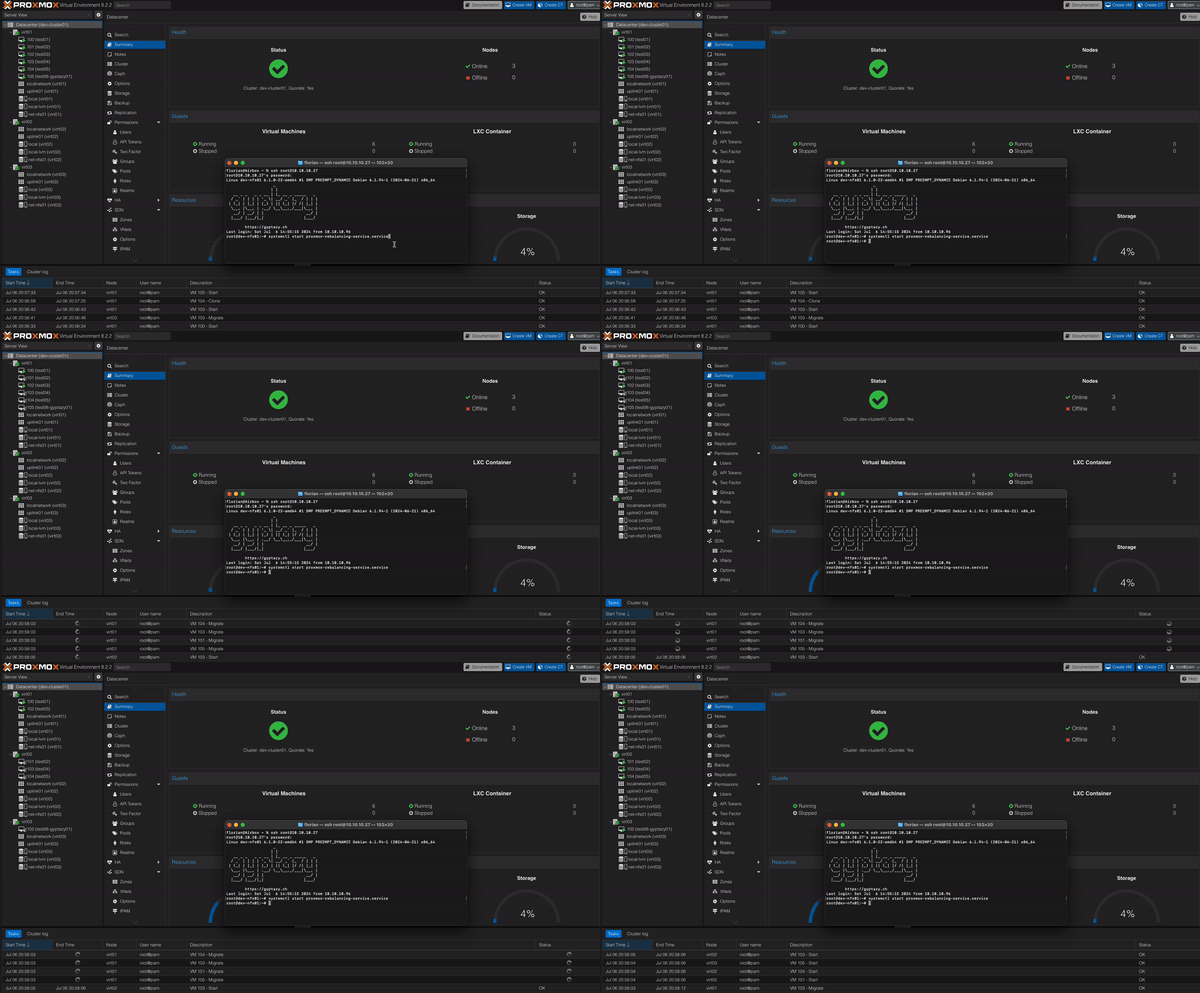
Video of Migration
Features
ProxLB's key features are by enabling automatic rebalancing of VMs and CTs across a Proxmox cluster based on memory, CPU, and local disk usage while identifying optimal nodes for automation. It supports maintenance mode, affinity rules, and seamless Proxmox API integration with ACL support, offering flexible usage as a one-time operation, a daemon, or through the Proxmox Web GUI.
Features
- Rebalance VMs/CTs in the cluster by:
- Memory
- Disk (only local storage)
- CPU
- Get best nodes for further automation
- Supported Guest Types
- VMs
- CTs
- Maintenance Mode
- Set node(s) into maintenance
- Move all workloads to different nodes
- Affinity / Anti-Affinity Rules
- Fully based on Proxmox API
- Fully integrated into the Proxmox ACL
- No SSH required
- Usage
- One-Time
- Daemon
- Proxmox Web GUI Integration
How does it work?
ProxLB is a load-balancing system designed to optimize the distribution of virtual machines (VMs) and containers (CTs) across a cluster. It works by first gathering resource usage metrics from all nodes in the cluster through the Proxmox API. This includes detailed resource metrics for each VM and CT on every node. ProxLB then evaluates the difference between the maximum and minimum resource usage of the nodes, referred to as "Balanciness." If this difference exceeds a predefined threshold (which is configurable), the system initiates the rebalancing process.
Before starting any migrations, ProxLB validates that rebalancing actions are necessary and beneficial. Depending on the selected balancing mode — such as CPU, memory, or disk — it creates a balancing matrix. This matrix sorts the VMs by their maximum used or assigned resources, identifying the VM with the highest usage. ProxLB then places this VM on the node with the most free resources in the selected balancing type. This process runs recursively until the operator-defined Balanciness is achieved. Balancing can be defined for the used or max. assigned resources of VMs/CTs.
Installation
Debian Package
Container / Docker
Source
Upgrading
Upgrading from < 1.1.0
Upgrading ProxLB is not supported due to a fundamental redesign introduced in version 1.1.x. With this update, ProxLB transitioned from a monolithic application to a pure Python-style project, embracing a more modular and flexible architecture. This shift aimed to improve maintainability and extensibility while keeping up with modern development practices. Additionally, ProxLB moved away from traditional ini-style configuration files and adopted YAML for configuration management. This change simplifies configuration handling, reduces the need for extensive validation, and ensures better type casting, ultimately providing a more streamlined and user-friendly experience.
Upgrading from >= 1.1.0
Uprading within the current stable versions, starting from 1.1.0, will be possible in all supported ways.
Usage / Configuration
Running ProxLB is straightforward and versatile, as it only requires Python3 and the proxmoxer library. This means ProxLB can be executed directly on a Proxmox node or on dedicated systems such as Debian, RedHat, or even FreeBSD, provided that the Proxmox API is accessible from the client running ProxLB. ProxLB can also run inside a Container - Docker or LXC - and is simply up to you.
Dependencies
- Python3.x
- proxmoxer
- requests
- urllib3
- pyyaml
The dependencies can simply be installed with pip by running the following command:
pip install -r requirements.txt
Distribution packages, such like the provided .deb package will automatically resolve and install all required dependencies by using already packaged version from the distribution's repository.
GUI Integration
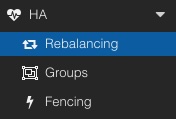 ProxLB can also be accessed through the Proxmox Web UI by installing the optional
 pve-proxmoxlb-service-ui package, which depends on the proxlb package. For full Web UI integration, this package must be installed on all nodes within the cluster. Once installed, a new menu item - Rebalancing, appears in the cluster level under the HA section. Once installed, it offers two key functionalities:
- Rebalancing VM workloads
- Migrate VM workloads away from a defined node (e.g. maintenance preparation)
Note: This package is currently discontinued and will be readded at a later time.
Options
The following options can be set in the configuration file proxlb.yaml:
| Section | Option | Example | Type | Description |
|---|---|---|---|---|
proxmox_api |
||||
| hosts | ['virt01.example.com', '10.10.10.10', 'fe01::bad:code::cafe'] | List |
List of Proxmox nodes. Can be IPv4, IPv6 or mixed. | |
| user | root@pam | Str |
Username for the API. | |
| pass | FooBar | Str |
Password for the API. | |
| ssl_verification | True | Bool |
Validate SSL certificates (1) or ignore (0). (default: 1, type: bool) | |
| timeout | 10 | Int |
Timeout for the Proxmox API in sec. (default: 10) | |
proxmox_cluster |
||||
| maintenance_nodes | ['virt66.example.com'] | List |
A list of Proxmox nodes that are defined to be in a maintenance. | |
| ignore_nodes | [] | List |
A list of Proxmox nodes that are defined to be ignored. | |
| overprovisioning | False | Bool |
A list of Proxmox nodes that are defined to be ignored. | |
balancing |
||||
| enable | True | Bool |
||
| force | True | Bool |
||
| parallel | True | Bool |
||
| live | True | Bool |
||
| with_local_disks | True | Bool |
||
| balance_types | ['vm', 'ct'] | List |
||
| max_job_validation | 1800 | Int |
Timeout for the Proxmox API in sec. (default: 10) | |
| balanciness | 1800 | Int |
Timeout for the Proxmox API in sec. (default: 10) | |
| method | memory | Str |
||
| mode | rused | Str |
||
service |
||||
| daemon | True | Bool |
||
| log_level | INFO | Str |
An example of the configuration file looks like:
proxmox_api:
  hosts: ['virt01.example.com', '10.10.10.10', 'fe01::bad:code::cafe']
  user: root@pam
  pass: crazyPassw0rd!
  ssl_verification: False
  timeout: 10

proxmox_cluster:
  maintenance_nodes: ['virt66.example.com']
  ignore_nodes: []
  overprovisioning: True

balancing:
  enable: True
  force: False
  parallel: False
  live: True
  with_local_disks: True
  balance_types: ['vm', 'ct']
  max_job_validation: 1800
  balanciness: 5
  method: memory
  mode: assigned

service:
  daemon: False
  log_level: DEBUG
Parameters
The following options and parameters are currently supported:
| Option | Long Option | Description | Default |
|---|---|---|---|
| -c | --config | Path to a config file. | /etc/proxlb/proxlb.conf (default) |
| -d | --dry-run | Performs a dry-run without doing any actions. | False |
| -j | --json | Returns a JSON of the VM movement. | False |
| -b | --best-node | Returns the best next node for a VM/CT placement (useful for further usage with Terraform/Ansible). | False |
| -v | --version | Returns the ProxLB version on stdout. | False |
Affinity & Anti-Affinity Rules
ProxLB provides an advanced mechanism to define affinity and anti-affinity rules, enabling precise control over virtual machine (VM) placement. These rules help manage resource distribution, improve high availability configurations, and optimize performance within a Proxmox Virtual Environment (PVE) cluster. By leveraging Proxmox’s integrated access management, ProxLB ensures that users can only define and manage rules for guests they have permission to access.
ProxLB implements affinity and anti-affinity rules through a tag-based system within the Proxmox web interface. Each guest (virtual machine or container) can be assigned specific tags, which then dictate its placement behavior. This method maintains a streamlined and secure approach to managing VM relationships while preserving Proxmox’s inherent permission model.
Affinity Rules
 Affinity rules are used to group certain VMs together, ensuring that they run on the same host whenever possible. This can be beneficial for workloads requiring low-latency communication, such as clustered databases or application servers that frequently exchange data.
To define an affinity rule which keeps all guests assigned to this tag together on a node, users assign a tag with the prefix plb_affinity_$TAG:
Example for Screenshot
plb_affinity_talos
As a result, ProxLB will attempt to place all VMs with the plb_affinity_web tag on the same host (see also the attached screenshot with the same node).
Anti-Affinity Rules
 Conversely, anti-affinity rules ensure that designated VMs do not run on the same physical host. This is particularly useful for high-availability setups, where redundancy is crucial. Ensuring that critical services are distributed across multiple hosts reduces the risk of a single point of failure.
To define an anti-affinity rule that ensures to not move systems within this group to the same node, users assign a tag with the prefix:
Example for Screenshot
plb_anti_affinity_ntp
As a result, ProxLB will try to place the VMs with the plb_anti_affinity_ntp tag on different hosts (see also the attached screenshot with the different nodes).
Note: While this ensures that ProxLB tries distribute these VMs across different physical hosts within the Proxmox cluster this may not always work. If you have more guests attached to the group than nodes in the cluster, we still need to run them anywhere. If this case occurs, the next one with the most free resources will be selected.
Maintenance
The maintenance_nodes option allows operators to designate one or more Proxmox nodes for maintenance mode. When a node is set to maintenance, no new guest workloads will be assigned to it, and all existing workloads will be migrated to other available nodes within the cluster. This process ensures that (anti)-affinity rules and resource availability are respected, preventing disruptions while maintaining optimal performance across the infrastructure.
Misc
Bugs
Bugs can be reported via the GitHub issue tracker here. You may also report bugs via email or deliver PRs to fix them on your own. Therefore, you might also see the contributing chapter.
Contributing
Feel free to add further documentation, to adjust already existing one or to contribute with code. Please take care about the style guide and naming conventions. You can find more in our CONTRIBUTING.md file.
Documentation
You can also find additional and more detailed documentation within the docs/ directory.
Support
If you need assistance or have any questions, we offer support through our dedicated chat room in Matrix or Discord. Join our community for real-time help, advice, and discussions. The Matrix and Discord room are bridged to ensure that the communication is not splitted - so simply feel free to join which fits most to you!
Connect with us in our dedicated chat room for immediate support and live interaction with other users and developers. You can also visit our GitHub Community to post your queries, share your experiences, and get support from fellow community members and moderators. You may also just open directly an issue here on GitHub.
| Support Channel | Link |
|---|---|
| Matrix | #proxlb:gyptazy.com |
| Discord | Discord |
| GitHub Community | GitHub Community |
| GitHub | ProxLB GitHub |
Note: Please always keep in mind that this is a one-man show project without any further help. This includes coding, testing, packaging and all the infrastructure around it to keep this project up and running.
Author(s)
- Florian Paul Azim Hoberg @gyptazy (https://gyptazy.com)