
ProxLB - (Re)Balance VM Workloads in Proxmox Clusters






Table of Contents
Introduction
ProxLB (PLB) is an advanced tool designed to enhance the efficiency and performance of Proxmox clusters by optimizing the distribution of virtual machines (VMs) across the cluster nodes by using the Proxmox API. ProxLB meticulously gathers and analyzes a comprehensive set of resource metrics from both the cluster nodes and the running VMs. These metrics include CPU usage, memory consumption, and disk utilization, specifically focusing on local disk resources.
PLB collects resource usage data from each node in the Proxmox cluster, including CPU, (local) disk and memory utilization. Additionally, it gathers resource usage statistics from all running VMs, ensuring a granular understanding of the cluster's workload distribution.
Intelligent rebalancing is a key feature of ProxLB where it re-balances VMs based on their memory, disk or CPU usage, ensuring that no node is overburdened while others remain underutilized. The rebalancing capabilities of PLB significantly enhance cluster performance and reliability. By ensuring that resources are evenly distributed, PLB helps prevent any single node from becoming a performance bottleneck, improving the reliability and stability of the cluster. Efficient rebalancing leads to better utilization of available resources, potentially reducing the need for additional hardware investments and lowering operational costs.
Automated rebalancing reduces the need for manual actions, allowing operators to focus on other critical tasks, thereby increasing operational efficiency.
Video of Migration
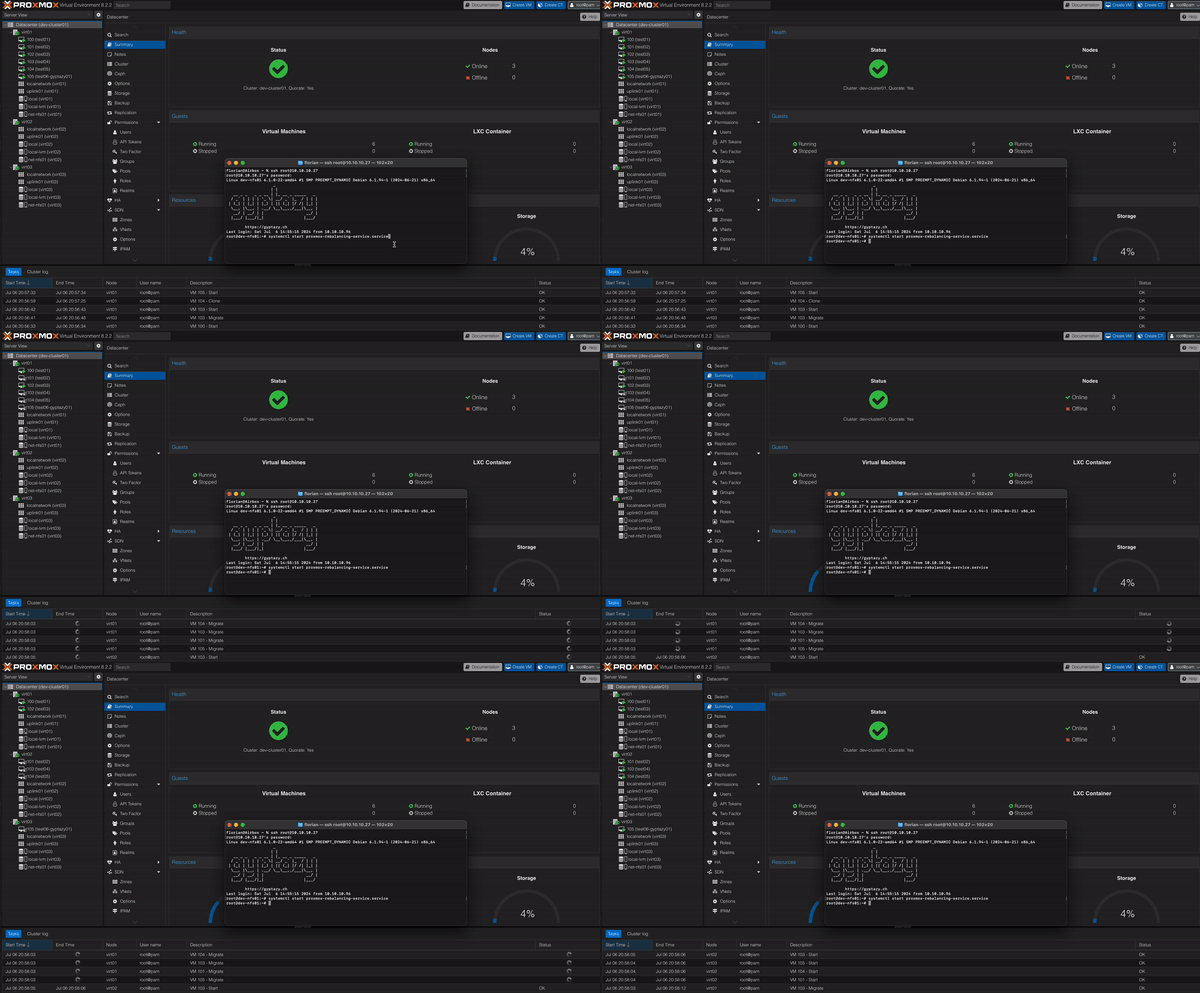
Features
- Rebalance the cluster by:
- Memory
- Disk (only local storage)
- CPU
- Performing
- Periodically
- One-shot solution
- Filter
- Exclude nodes
- Exclude virtual machines
- Grouping
- Include groups (VMs that are rebalanced to nodes together)
- Exclude groups (VMs that must run on different nodes)
- Ignore groups (VMs that should be untouched)
- Dry-run support
- Human readable output in CLI
- JSON output for further parsing
- Migrate VM workloads away (e.g. maintenance preparation)
- Fully based on Proxmox API
- Usage
- One-Shot (one-shot)
- Periodically (daemon)
- Proxmox Web GUI Integration (optional)
Usage
Running PLB is easy and it runs almost everywhere since it just depends on Python3 and the proxmoxer library. Therefore, it can directly run on a Proxmox node, dedicated systems like Debian, RedHat, or even FreeBSD, as long as the API is reachable by the client running PLB.
Dependencies
- Python3
- proxmoxer (Python module)
Options
The following options can be set in the proxlb.conf file:
| Option | Example | Description |
|---|---|---|
| api_host | hypervisor01.gyptazy.ch | Host or IP address of the remote Proxmox API. |
| api_user | root@pam | Username for the API. |
| api_pass | FooBar | Password for the API. |
| verify_ssl | 1 | Validate SSL certificates (1) or ignore (0). (default: 1) |
| method | memory | Defines the balancing method (default: memory) where you can use memory, disk or cpu. |
| balanciness | 10 | Value of the percentage of lowest and highest resource consumption on nodes may differ before rebalancing. (default: 10) |
| ignore_nodes | dummynode01,dummynode02,test* | Defines a comma separated list of nodes to exclude. |
| ignore_vms | testvm01,testvm02 | Defines a comma separated list of VMs to exclude. (* as suffix wildcard or tags are also supported) |
| daemon | 1 | Run as a daemon (1) or one-shot (0). (default: 1) |
| schedule | 24 | Hours to rebalance in hours. (default: 24) |
| log_verbosity | INFO | Defines the log level (default: CRITICAL) where you can use INFO, WARN or CRITICAL |
An example of the configuration file looks like:
[proxmox]
api_host: hypervisor01.gyptazy.ch
api_user: root@pam
api_pass: FooBar
verify_ssl: 1
[balancing]
method: memory
# Balanciness defines how much difference may be
# between the lowest & highest resource consumption
# of nodes before rebalancing will be done.
# Examples:
# Rebalancing:     node01: 41% memory consumption :: node02: 52% consumption
# No rebalancing:  node01: 43% memory consumption :: node02: 50% consumption
balanciness: 10
ignore_nodes: dummynode01,dummynode02
ignore_vms: testvm01,testvm02
[service]
daemon: 1
Parameters
The following options and parameters are currently supported:
| Option | Long Option | Description | Default |
|---|---|---|---|
| -c | --config | Path to a config file. | /etc/proxlb/proxlb.conf (default) |
| -d | --dry-run | Perform a dry-run without doing any actions. | Unset |
| -j | --json | Return a JSON of the VM movement. | Unset |
Grouping
Include (Stay Together)
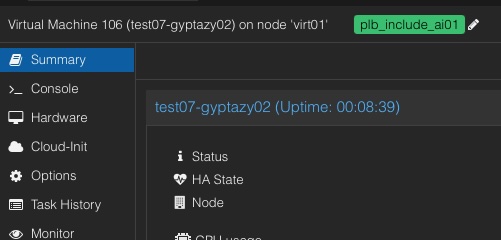 Access the Proxmox Web UI by opening your web browser and navigating to your Proxmox VE web interface, then log in with your credentials. Navigate to the VM you want to tag by selecting it from the left-hand navigation panel. Click on the "Options" tab to view the VM's options, then select "Edit" or "Add" (depending on whether you are editing an existing tag or adding a new one). In the tag field, enter plb_include_ followed by your unique identifier, for example, plb_include_group1. Save the changes to apply the tag to the VM. Repeat these steps for each VM that should be included in the group.
Exclude (Stay Separate)
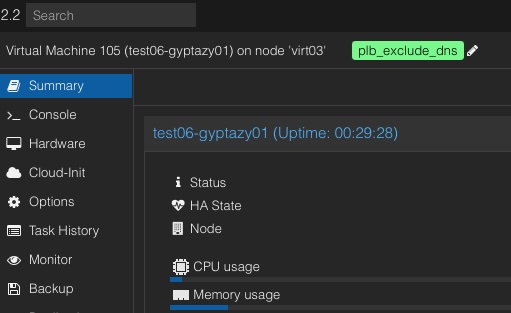 Access the Proxmox Web UI by opening your web browser and navigating to your Proxmox VE web interface, then log in with your credentials. Navigate to the VM you want to tag by selecting it from the left-hand navigation panel. Click on the "Options" tab to view the VM's options, then select "Edit" or "Add" (depending on whether you are editing an existing tag or adding a new one). In the tag field, enter plb_exclude_ followed by your unique identifier, for example, plb_exclude_critical. Save the changes to apply the tag to the VM. Repeat these steps for each VM that should be excluded from being on the same node.
Ignore VMs (Tag Style)
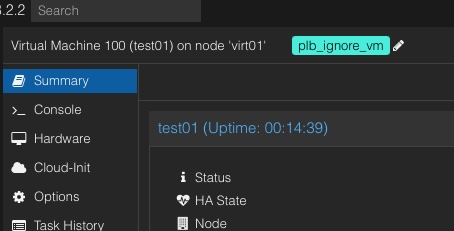 In Proxmox, you can ensure that certain VMs are ignored during the rebalancing process by setting a specific tag within the Proxmox Web UI, rather than solely relying on configurations in the ProxLB config file. This can be achieved by adding the tag 'plb_ignore_vm' to the VM. Once this tag is applied, the VM will be excluded from any further rebalancing operations, simplifying the management process.
Systemd
When installing a Linux distribution (such as .deb or .rpm) file, this will be shipped with a systemd unit file. The default configuration file will be sourced from /etc/proxlb/proxlb.conf.
| Unit Name | Options |
|---|---|
| proxlb | start, stop, status, restart |
Manual
A manual installation is possible and also supports BSD based systems. Proxmox Rebalancing Service relies on mainly two important files:
- proxlb (Python Executable)
- proxlb.conf (Config file)
The executable must be able to read the config file, if no dedicated config file is given by the -c argument, PLB tries to read it from /etc/proxlb/proxlb.conf.
Proxmox GUI Integration
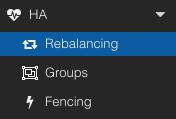 PLB can also be directly be used from the Proxmox Web UI by installing the optional package
 pve-proxmoxlb-service-ui package which has a dependency on the proxlb package. For the Web UI integration, it requires to be installed (in addition) on the nodes on the cluster. Afterwards, a new menu item is present in the HA chapter called Rebalancing. This chapter provides two possibilities:
- Rebalancing VM workloads
- Migrate VM workloads away from a defined node (e.g. maintenance preparation)
Quick Start
The easiest way to get started is by using the ready-to-use packages that I provide on my CDN and to run it on a Linux Debian based system. This can also be one of the Proxmox nodes itself.
wget https://cdn.gyptazy.ch/files/amd64/debian/proxlb/proxlb_0.9.9_amd64.deb
dpkg -i proxlb_0.9.9_amd64.deb
# Adjust your config
vi /etc/proxlb/proxlb.conf
systemctl restart proxlb
systemctl status proxlb
Container Quick Start (Docker/Podman)
Creating a container image of ProxLB is straightforward using the provided Dockerfile. The Dockerfile simplifies the process by automating the setup and configuration required to get ProxLB running in a container. Simply follow the steps in the Dockerfile to build the image, ensuring all dependencies and configurations are correctly applied. For those looking for an even quicker setup, a ready-to-use ProxLB container image is also available, eliminating the need for manual building and allowing for immediate deployment.
git clone https://github.com/gyptazy/ProxLB.git
cd ProxLB
build -t proxlb .
Afterwards simply adjust the config file to your needs:
vi /etc/proxlb/proxlb.conf
Finally, start the created container.
docker run -it --rm -v $(pwd)/proxlb.conf:/etc/proxlb/proxlb.conf proxlb
Logging
ProxLB uses the SystemdHandler for logging. You can find all your logs in your systemd unit log or in the journalctl.
Motivation
As a developer managing a cluster of virtual machines for my projects, I often encountered the challenge of resource imbalance. Nodes within the cluster would become unevenly loaded, with some nodes being overburdened while others remained underutilized. This imbalance led to inefficiencies, performance bottlenecks, and increased operational costs. Frustrated by the lack of an adequate solution to address this issue, I decided to develop the ProxLB (PLB) to ensure better resource distribution across my clusters.
My primary motivation for creating PLB stemmed from my work on my BoxyBSD project, where I consistently faced the difficulty of maintaining balanced nodes while running various VM workloads but also on my personal clusters. The absence of an efficient rebalancing mechanism made it challenging to achieve optimal performance and stability. Recognizing the necessity for a tool that could gather and analyze resource metrics from both the cluster nodes and the running VMs, I embarked on developing ProxLB.
PLB meticulously collects detailed resource usage data from each node in a Proxmox cluster, including CPU load, memory usage, and local disk space utilization. It also gathers comprehensive statistics from all running VMs, providing a granular understanding of the workload distribution. With this data, PLB intelligently redistributes VMs based on memory usage, local disk usage, and CPU usage. This ensures that no single node is overburdened, storage resources are evenly distributed, and the computational load is balanced, enhancing overall cluster performance.
As an advocate of the open-source philosophy, I believe in the power of community and collaboration. By sharing solutions like PLB, I aim to contribute to the collective knowledge and tools available to developers facing similar challenges. Open source fosters innovation, transparency, and mutual support, enabling developers to build on each other's work and create better solutions together.
Developing PLB was driven by a desire to solve a real problem I faced in my projects. However, the spirit behind this effort was to provide a valuable resource to the community. By open-sourcing PLB, I hope to help other developers manage their clusters more efficiently, optimize their resource usage, and reduce operational costs. Sharing this solution aligns with the core principles of open source, where the goal is not only to solve individual problems but also to contribute to the broader ecosystem.
References
Here you can find some overviews of references for and about the ProxLB (PLB):
| Description | Link |
|---|---|
| General introduction into ProxLB | https://gyptazy.ch/blog/proxlb-rebalancing-vm-workloads-across-nodes-in-proxmox-clusters/ |
| Howto install and use ProxLB on Debian to rebalance vm workloads in a Proxmox cluster | https://gyptazy.ch/howtos/howto-install-and-use-proxlb-to-rebalance-vm-workloads-across-nodes-in-proxmox-clusters/ |
Packages / Container Images
Ready to use packages can be found at:
- https://cdn.gyptazy.ch/files/amd64/debian/proxlb/
- https://cdn.gyptazy.ch/files/amd64/ubuntu/proxlb/
- https://cdn.gyptazy.ch/files/amd64/redhat/proxlb/
- https://cdn.gyptazy.ch/files/amd64/freebsd/proxlb/
Container Images for Podman, Docker etc., can be found at:
| Version | Image |
|---|---|
| latest | cr.gyptazy.ch/proxlb/proxlb:latest |
| v0.0.9 | cr.gyptazy.ch/proxlb/proxlb:v0.0.9 |
Misc
Bugs
Bugs can be reported via the GitHub issue tracker here. You may also report bugs via email or deliver PRs to fix them on your own. Therefore, you might also see the contributing chapter.
Contributing
Feel free to add further documentation, to adjust already existing one or to contribute with code. Please take care about the style guide and naming conventions.
Author(s)
- Florian Paul Azim Hoberg @gyptazy (https://gyptazy.ch)