mirror of
https://github.com/MrUnknownDE/examples-image-loading.git
synced 2026-04-09 09:53:52 +02:00

56 lines
3.3 KiB
Markdown
56 lines
3.3 KiB
Markdown
# VRChat Image Downloading Examples
|
|
|
|
This is a Unity Example Project that demonstrates some ways that remote images can be downloaded using Udon in VRChat Worlds.
|
|
|
|
## Getting Started
|
|
|
|
Clone or Download this project and open it up in Unity 2019.4.31f1.
|
|
|
|
## Gallery Example
|
|
|
|

|
|
|
|
Scene File: `Assets/_Project/Gallery`
|
|
|
|
This scene demonstrates a RemoteImageFrame which loads images from a web server at runtime.
|
|
|
|
### TheFrame
|
|
|
|
|
|
|
|
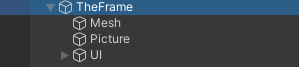
TheFrame is a GameObject with a couple of important pieces:
|
|
* SlideshowFrame UdonBehaviour to load the images and captions from a web server.
|
|
* Mesh object to render the frame.
|
|
* Picture mesh to render the downloaded textures.
|
|
* UI world-space canvas to render the caption.
|
|
|
|
#### SlideshowFrame
|
|
|
|
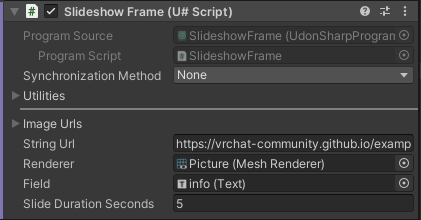
This UdonBehaviour has all of the logic to download the images and captions from a web server.
|
|
|
|
|
|
|
|
It has these public variables:
|
|
* Rgb Url - an array of all the `VRCUrls` for the images to download.
|
|
* String Url - a single `VRCUrl` where the caption text can be downloaded.
|
|
* Renderer - this renderer's sharedMaterial will have its texture set from the downloaded textures.
|
|
* Field - this UI element's `text` property will be set from the downloaded caption for the matching texture.
|
|
* Slide Duration Seconds - how long to show each image.
|
|
|
|
The basic logic flow of the script is this:
|
|
|
|
* On Start, construct a VRCImageDownloader to reuse for downloading all the images. It's important to keep this around so the textures will persist. Download the string from the `String Url`.
|
|
* If the String downloads successfully, split it up line-by-line into separate strings, and save those to a `_captions` array. If it doesn't download, log the error message.
|
|
* Next, try to Load the next Image. Increment the `_loadedIndex` to keep track of our place, then call `DownloadImage()` on the downloader we saved earlier.
|
|
* If the Image downloads successfully, save a reference to it and then load it up on the `Renderer`. If it fails, log the error message.
|
|
* Call the function to Load the next Image again, delayed by `SlideDurationSeconds`. The `_loadedIndex` is incremented during each Load call, and starts over after reaching the last url in the array.
|
|
* When each image is visited for the second+ time, it will be displayed from its saved Texture2D reference instead of loaded fresh, unless it failed to download the first time.
|
|
|
|
## Known Issues
|
|
|
|
* The first image doesn't have its caption loaded quickly enough, so it doesn't show until the first loop around.
|
|
|
|
## Using GitHub to Host the Images and Captions
|
|
|
|
This repo publishes to [GitHub Pages](https://pages.github.com/) for free hosting of the images and captions. When the files in the "Web" directory are edited, the website is re-published. As long as the filenames stay the same (images are 1.jpg, 2.jpg, etc.) - the URLs in the world will point to the newly published files. Republishing happens automatically through [an included GitHub Action](https://github.com/vrchat-community/examples-image-loading/actions/workflows/static.yml).
|