mirror of
https://github.com/cloudpanel-io/cloudpanel-ce.git
synced 2026-04-05 20:31:58 +02:00
Panel security #518
Assignees
 MrUnknownDE
Clear assignees
MrUnknownDE
No Assignees
Notifications
Due Date
No due date set.
Dependencies
No dependencies set.
Reference: github/cloudpanel-ce#518
Reference in New Issue
Block a user
Delete Branch "%!s()"
Deleting a branch is permanent. Although the deleted branch may continue to exist for a short time before it actually gets removed, it CANNOT be undone in most cases. Continue?
Originally created by @ntkonsultant on 7/30/2022
CloudPanel version(s) affected
2.0.2
Description
Hello,
After that :
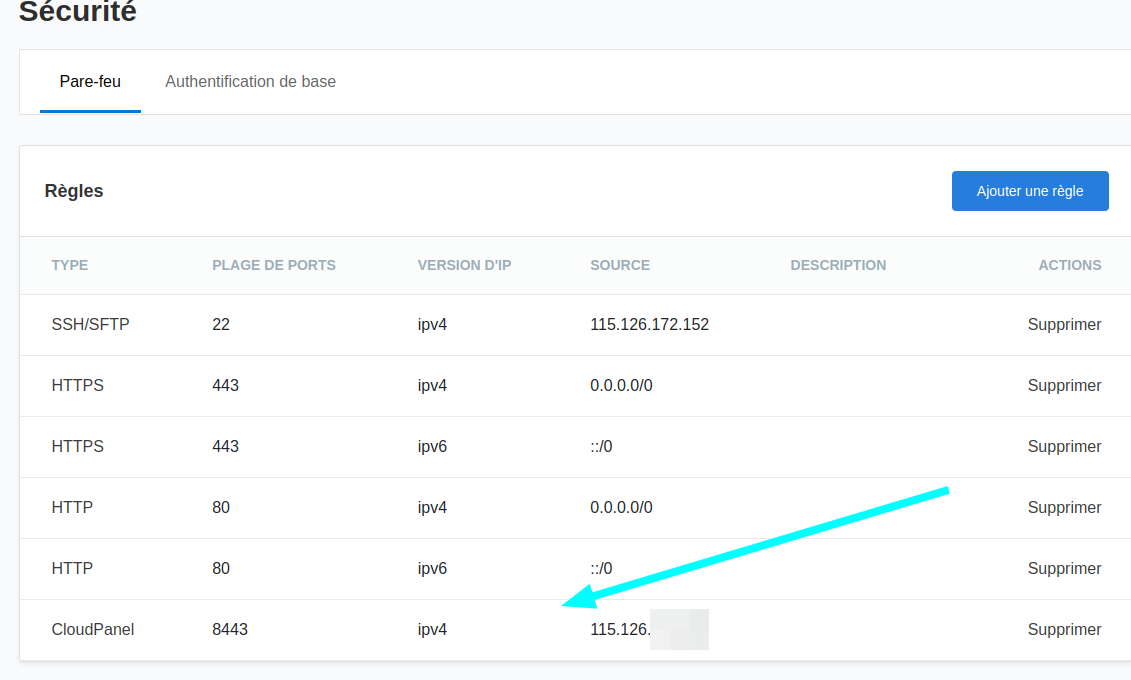
I'm always able to see my panel even if it's not the autorized IP. With cloudpanel V1 it's working because I have access to the vhost and I add the rules in V2 I don't found a way to modify the panel vhost to add the rules.
Sorry for my bad english
How to reproduce
normally just add the rules and try to access the panel behind a vpn
Possible Solution
Give access to the panel vhost and let us put the rules inside like V1
Additional Context
No response