
25 KiB
Table of Contents
- Authentication / User Accounts / Permissions
- Configuration
Authentication / User Accounts / Permissions
Authentication
ProxLB supports the traditional username and password authentication method, which is familiar to many users. This method requires users to provide their credentials (username and password) to gain access to the Proxmox system. While this method is straightforward and easy to implement, it has several security limitations. Username and password combinations can be vulnerable to brute force attacks, where an attacker systematically attempts various combinations until the correct one is found. If a user's credentials are compromised through phishing, malware, or other means, the attacker can gain unauthorized access to the system. Additionally, traditional authentication does not provide granular control over permissions and access levels, potentially exposing sensitive operations to unauthorized users.
To enhance security, ProxLB supports API token authentication. API tokens are unique identifiers that are used to authenticate API requests. They offer several advantages over traditional username and password authentication. API tokens are more secure as they are typically long, random strings that are difficult to guess. They can be revoked and regenerated as needed, reducing the risk of unauthorized access. API tokens can be associated with specific user accounts that have only the required permissions, ensuring that users only have access to the resources and operations they need. Furthermore, API tokens can be used for automated scripts and applications, facilitating seamless integration with other systems and services.
When Multi-Factor Authentication (MFA) or Two-Factor Authentication (2FA) is enabled in the Proxmox cluster, the system enforces the use of API tokens for authentication. This is because traditional username and password authentication is not considered secure enough in conjunction with MFA/2FA. To ensure the highest level of security when using API tokens, follow these best practices: Use dedicated user accounts for API tokens, each with only the necessary permissions. This limits the potential impact of a compromised token. Ensure that API tokens are long, random, and unique. Avoid using easily guessable patterns or sequences. Periodically regenerate and replace API tokens to minimize the risk of long-term exposure. Store API tokens securely, using environment variables or secure vaults. Avoid hardcoding tokens in source code or configuration files. Regularly monitor and audit the usage of API tokens to detect any suspicious activity or unauthorized access.
Creating a Dedicated User
It is advisable to avoid using the default root@pam user for balancing tasks in ProxLB. Instead, creating a dedicated user account is recommended and can be done easily. You can create a new user through the GUI, API, or CLI. While the detailed roles required for balancing are outlined in the next chapter, you can also use the following CLI commands to create a user with the necessary roles to manage Virtual Machines (VMs) and Containers (CTs):
pveum role add proxlb --privs Datastore.Audit,Sys.Audit,VM.Audit,VM.Migrate
pveum user add proxlb@pve --password <password>
pveum acl modify / --roles proxlb --users proxlb@pve
Note: The user management can also be done on the WebUI without invoking the CLI.
Creating an API Token for a User
Create an API token for user proxlb@pve with token ID proxlb and deactivated privilege separation:
pveum user token add proxlb@pve proxlb --privsep 0
Afterwards, you get the token secret returned. You can now add those entries to your ProxLB config. Make sure, that you also keep the user parameter, next to the new token parameters.
Important
The parameter
passthen needs to be absent! You should also take care about the privilege and authentication mechanism behind Proxmox. You might want or even might not want to use privilege separation and this is up to your personal needs and use case.
| Proxmox API | ProxLB Config | Example |
|---|---|---|
| User | user | proxlb@pve |
| Token ID | token_id | proxlb |
| Token Secret | token_secret | 430e308f-1337-1337-beef-1337beefcafe |
Note: The API token configuration can also be done on the WebUI without invoking the CLI.
Required Permissions for a User
To ensure that ProxLB operates effectively and securely, it is essential to assign the appropriate permissions to the user accounts responsible for managing the load balancing tasks. The following permissions are the minimum required for a user to perform essential ProxLB operations:
Datastore.Audit: Grants the ability to audit and view datastore information.Sys.Audit: Allows the user to audit and view system information.VM.Audit: Enables the user to audit and view virtual machine details.VM.Migrate: Provides the permission to migrate virtual machines.
Assigning these permissions ensures that the user can access necessary information and perform critical operations related to load balancing without granting excessive privileges. This practice helps maintain a secure and efficient ProxLB environment.
Configuration
Affinity & Anti-Affinity Rules
ProxLB provides an advanced mechanism to define affinity and anti-affinity rules, enabling precise control over virtual machine (VM) placement. These rules help manage resource distribution, improve high availability configurations, and optimize performance within a Proxmox Virtual Environment (PVE) cluster. By leveraging Proxmox’s integrated access management, ProxLB ensures that users can only define and manage rules for guests they have permission to access.
ProxLB implements affinity and anti-affinity rules through a tag-based system within the Proxmox web interface. Each guest (virtual machine or container) can be assigned specific tags, which then dictate its placement behavior. This method maintains a streamlined and secure approach to managing VM relationships while preserving Proxmox’s inherent permission model.
Affinity Rules by Tags
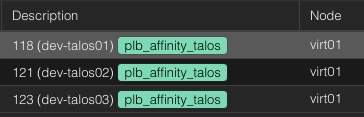 Affinity rules are used to group certain VMs together, ensuring that they run on the same host whenever possible. This can be beneficial for workloads requiring low-latency communication, such as clustered databases or application servers that frequently exchange data.
To define an affinity rule which keeps all guests assigned to this tag together on a node, users assign a tag with the prefix plb_affinity_$TAG:
Example for Screenshot
plb_affinity_talos
As a result, ProxLB will attempt to place all VMs with the plb_affinity_web tag on the same host (see also the attached screenshot with the same node).
Affinity Rules by Pools
Antoher approach is by using pools in Proxmox. This way, it can easily also combined with other resources like backup jobs. However, in this approach you need to modify the ProxLB config file to your needs. Within the balancing section you can create a dict of pools, including the pool name and the affinity type. Please see the example for further details:
Example Config
balancing:
  [...]
  pools:                              # Optional: Define affinity/anti-affinity rules per pool
    dev:                              # Pool name: dev
      type: affinity                  # Type: affinity (keeping VMs together)
Anti-Affinity Rules by Tags
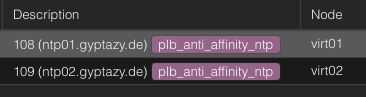 Conversely, anti-affinity rules ensure that designated VMs do not run on the same physical host. This is particularly useful for high-availability setups, where redundancy is crucial. Ensuring that critical services are distributed across multiple hosts reduces the risk of a single point of failure.
To define an anti-affinity rule that ensures to not move systems within this group to the same node, users assign a tag with the prefix:
Example for Screenshot
plb_anti_affinity_ntp
As a result, ProxLB will try to place the VMs with the plb_anti_affinity_ntp tag on different hosts (see also the attached screenshot with the different nodes).
Note: While this ensures that ProxLB tries distribute these VMs across different physical hosts within the Proxmox cluster this may not always work. If you have more guests attached to the group than nodes in the cluster, we still need to run them anywhere. If this case occurs, the next one with the most free resources will be selected.
Anti-Affinity Rules by Pools
Antoher approach is by using pools in Proxmox. This way, it can easily also combined with other resources like backup jobs. However, in this approach you need to modify the ProxLB config file to your needs. Within the balancing section you can create a dict of pools, including the pool name and the affinity type. Please see the example for further details:
Example Config
balancing:
  [...]
  pools:                              # Optional: Define affinity/anti-affinity rules per pool
    de-nbg01-db:                      # Pool name: de-nbg01-db
      type: anti-affinity                  # Type: anti-affinity (spreading VMs apart)
Affinity / Anti-Affinity Enforcing
When a cluster is already balanced and does not require further adjustments, enabling the enforce_affinity parameter ensures that affinity and anti-affinity rules are still respected. This parameter prioritizes the placement of guest objects according to these rules, even if it leads to slight resource imbalances or increased migration overhead. Regularly reviewing and updating these rules, along with monitoring cluster performance, helps maintain optimal performance and reliability. By carefully managing these aspects, you can create a cluster environment that meets your specific needs and maintains a good balance of resources.
balancing:
  enforce_affinity: True
Note: This may have impacts to the cluster. Depending on the created group matrix, the result may also be an unbalanced cluster.
Ignore VMs / CTs
 Guests, such as VMs or CTs, can also be completely ignored. This means, they won't be affected by any migration (even when (anti-)affinity rules are enforced). To ensure a proper resource evaluation, these guests are still collected and evaluated but simply skipped for balancing actions. Another thing is the implementation. While ProxLB might have a very restricted configuration file including the file permissions, this file is only read- and writeable by the Proxmox administrators. However, we might have user and groups who want to define on their own that their systems shouldn't be moved. Therefore, these users can simpy set a specific tag to the guest object - just like the (anti)affinity rules.
To define a guest to be ignored from the balancing, users assign a tag with the prefix plb_ignore_$TAG:
Example for Screenshot
plb_ignore_dev
As a result, ProxLB will not migrate this guest with the plb_ignore_dev tag to any other node.
Note: Ignored guests are really ignored. Even by enforcing affinity rules this guest will be ignored.
Pin VMs to Specific Hypervisor Nodes
 Guests, such as VMs or CTs, can also be pinned to specific nodes in the cluster. This might be usefull when running applications with some special licensing requirements that are only fulfilled on certain nodes. It might also be interesting, when some physical hardware is attached to a node, that is not available in general within the cluster.
To pin a guest to a specific cluster node, users assign a tag with the prefix plb_pin_$nodename to the desired guest:
Example for Screenshot
plb_pin_node03
As a result, ProxLB will pin the guest dev-vm01 to the node virt03.
You can also repeat this step multiple times for different node names to create a potential group of allowed hosts where a the guest may be served on. In this case, ProxLB takes the node with the lowest used resources according to the defined balancing values from this group.
Note: The given node names from the tag are validated. This means, ProxLB validated if the given node name is really part of the cluster. In case of a wrongly defined or unavailable node name it continous to use the regular processes to make sure the guest keeps running.
API Loadbalancing
ProxLB supports API loadbalancing, where one or more host objects can be defined as a list. This ensures, that you can even operator ProxLB without further changes when one or more nodes are offline or in a maintenance. When defining multiple hosts, the first reachable one will be picked. You can speficy custom ports in the list. There are 4 ways of defining hosts with ports:
- Hostname of IPv4 without port (in this case the default 8006 will be used)
- Hostname or IPv4 with port
- IPv6 in brackets with optional port
- IPv6 without brackets, in this case the port is assumed after last colon
proxmox_api:
  hosts: ['virt01.example.com', '10.10.10.10', 'fe01::bad:code::cafe', 'virt01.example.com:443', '[fc00::1]', '[fc00::1]:443', 'fc00::1:8006']
Ignore Host-Nodes or Guests
In managing a Proxmox environment, it's often necessary to exclude certain host nodes and guests from various operations. For host nodes, this exclusion can be achieved by specifying them in the ignore_nodes parameter within the proxmox_api chapter, effectively preventing any automated processes from interacting with these nodes. Guests, on the other hand, can be ignored by assigning them a specific tag that starts with or is equal to plb_ignore, ensuring they are omitted from any automated tasks or monitoring. By implementing these configurations, administrators can fine-tune their Proxmox management to focus only on relevant nodes and guests, optimizing operational efficiency and resource allocation.
proxmox_cluster:
  ignore_nodes: ['node01', 'node02']
IPv6 Support
Yes, ProxLB fully supports IPv6.
Logging / Log-Level
ProxLB supports systemd for seamless service management on Linux distributions. To enable this, create a proxLB.service file in /etc/systemd/system/ from service/proxlb.service within this repository.
On systems without systemd, such as FreeBSD and macOS, ProxLB runs with similar configurations but logs to stdout and stderr. The logging level and verbosity can be set in the service section of the configuration file:
service:
  log_level: DEBUG
ProxLB only support the following log levels:
- INFO
- WARNING
- CRITICAL
- DEBUG
Parallel Migrations
By default, parallel migrations are deactivated. This means, that a guest object gets migrated and the migration job is being watched until the VM or CT got moved to a new node. However, this may take a lot of time and many environments are fast enough to handle the IO load for multiple guest objects. However, there are always corner cases and this depends on your setup. Parallel migrations can be enabled by setting parallel to True within the balancing chapter:
balancing:
  parallel: False
Run as a Systemd-Service
The proxlb systemd unit orchestrates the ProxLB application. ProxLB can be used either as a one-shot solution or run periodically, depending on the configuration specified in the daemon chapter of its configuration file.
service:
  daemon: False
    schedule:
      interval: 12
      format: hours
In this configuration:
daemon: False indicates that the ProxLB application is not running as a daemon and will execute as a one-shot solution.schedule: 12 defines the interval for the schedule, specifying how often rebalancing should be done if running as a daemon.format: Defines the given format of schedule where you can choose betweenhoursorminutes.
SSL Self-Signed Certificates
If you are using SSL self-signed certificates or non-valid certificated in general and do not want to deal with additional trust levels, you may also disable the SSL validation. This may mostly be helpful for dev- & test labs.
SSL certificate validation can be disabled in the proxmox_api section in the config file by setting:
proxmox_api:
    ssl_verification: False
Note: Disabling SSL certificate validation is not recommended.
Node Maintenances
To exclude specific nodes from receiving any new workloads during the balancing process, the maintenance_nodes configuration option can be used. This option allows administrators to define a list of nodes that are currently undergoing maintenance or should otherwise not be used for running virtual machines or containers.
maintenance_nodes:
  - virt66.example.com
which can also be written as:
maintenance_nodes: ['virt66.example.com']
The maintenance_nodes key must be defined as a list, even if it only includes a single node. Each entry in the list must exactly match the node name as it is known within the Proxmox VE cluster. Do not use IP addresses, alternative DNS names, or aliases—only the actual cluster node names are valid. Once a node is marked as being in maintenance mode:
- No new workloads will be balanced or migrated onto it.
- Any existing workloads currently running on the node will be migrated away in accordance with the configured balancing strategies, assuming resources on other nodes allow.
This feature is particularly useful during planned maintenance, upgrades, or troubleshooting, ensuring that services continue to run with minimal disruption while the specified node is being worked on.
10. Balancing Methods
ProxLB provides multiple balancing modes that define how resources are evaluated and compared during cluster balancing. Each mode reflects a different strategy for determining load and distributing guests (VMs or containers) between nodes.
Depending on your environment, provisioning strategy, and performance goals, you can choose between:
| Mode | Description | Typical Use Case |
|---|---|---|
used |
Uses the actual runtime resource usage (e.g. CPU, memory, disk). | Dynamic or lab environments with frequent workload changes and tolerance for overprovisioning. |
assigned |
Uses the statically defined resource allocations from guest configurations. | Production or SLA-driven clusters that require guaranteed resources and predictable performance. |
psi |
Uses Linux Pressure Stall Information (PSI) metrics to evaluate real system contention and pressure. | Advanced clusters that require pressure-aware decisions for proactive rebalancing. |
10.1 Used Resources
When mode: used is configured, ProxLB evaluates the real usage metrics of guest objects (VMs and CTs).
It collects the current CPU, memory, and disk usage directly from the Proxmox API to determine the actual consumption of each guest and node.
This mode is ideal for dynamic environments where workloads frequently change and overprovisioning is acceptable. It provides the most reactive balancing behavior, since decisions are based on live usage instead of static assignment.
Typical scenarios include:
- Production environments to distribute workloads across the nodes.
- Test or development clusters with frequent VM changes.
- Clusters where resource spikes are short-lived.
- Environments where slight resource contention is tolerable.
Example Configuration
balancing:
  mode: used
10.2 Assigned Resources
When mode: assigned is configured, ProxLB evaluates the provisioned or allocated resources of each guest (VM or CT) instead of their runtime usage.
It uses data such as CPU cores, memory limits, and disk allocations defined in Proxmox to calculate how much of each node’s capacity is reserved.
This mode is ideal for production clusters where:
- Overcommitment is not allowed or only minimally tolerated.
- Each node’s workload is planned based on the assigned capacities.
- Administrators want predictable resource distribution aligned with provisioning policies.
Unlike the used mode, assigned focuses purely on the declared configuration of guests and remains stable even if actual usage varies temporarily.
Typical scenarios include:
- Enterprise environments with SLA or QoS requirements.
- Clusters where workloads are sized deterministically.
- Situations where consistent node utilization and capacity awareness are crucial.
Example Configuration
balancing:
  mode: assigned
10.3 Pressure (PSI) based Resources
Important
PSI based balancing is still in beta! If you find any bugs, please raise an issue including metrics of all nodes and affected guests. You can provide metrics directly from PVE or Grafana (via node_exporter or pve_exporter).
When mode: psi is configured, ProxLB uses the Linux Pressure Stall Information (PSI) interface to measure the real-time pressure on system resources such as CPU, memory, and disk I/O.
Unlike the used or assigned modes, which rely on static or average metrics, PSI provides direct insight into how often and how long tasks are stalled because of insufficient resources.
This enables ProxLB to make proactive balancing decisions — moving workloads before performance degradation becomes visible to the user.
IMPORTANT: Predicting distributing workloads is dangerous and might not result into the expected state. Therefore, ProxLB migrates only a single instance each 60 minutes to obtain new real-metrics and to validate if further changes are required. Keep in mind, that migrations are also costly and should be avoided as much as possible.
PSI metrics are available for both nodes and guest objects, allowing fine-grained balancing decisions:
- Node-level PSI: Detects cluster nodes under systemic load or contention.
- Guest-level PSI: Identifies individual guests suffering from memory, CPU, or I/O stalls.
PSI Metrics Explained
Each monitored resource defines three pressure thresholds:
| Key | Description |
|---|---|
pressure_some |
Indicates partial stall conditions where some tasks are waiting for a resource. |
pressure_full |
Represents complete stall conditions where all tasks are blocked waiting for a resource. |
pressure_spikes |
Defines short-term burst conditions that may signal saturation spikes. |
These thresholds are expressed in percentages and represent how much time the kernel reports stalls over specific averaging windows (e.g. 5s, 10s, 60s).
Example Configuration
balancing:
  mode: psi
  psi:
    nodes:
      memory:
        pressure_full: 0.20
        pressure_some: 0.20
        pressure_spikes: 1.00
      cpu:
        pressure_full: 0.20
        pressure_some: 0.20
        pressure_spikes: 1.00
      disk:
        pressure_full: 0.20
        pressure_some: 0.20
        pressure_spikes: 1.00
    guests:
      memory:
        pressure_full: 0.20
        pressure_some: 0.20
        pressure_spikes: 1.00
      cpu:
        pressure_full: 0.20
        pressure_some: 0.20
        pressure_spikes: 1.00
      disk:
        pressure_full: 0.20
        pressure_some: 0.20
        pressure_spikes: 1.00